Leave your search & conversion rate optimization projects in the hands of a certified Growth & Performance Marketing Manager
Welcome to my world
Hi, I’m Emmanuel Dan a PPC & SEO SpecialistProduct MarketerGrowth PM
From enhancing your brand’s online presence with advanced SEO tactics to crafting high-converting PPC campaigns, I turn complex marketing challenges into scalable solutions.
Whether you're looking to optimize conversion funnels, integrate sophisticated Martech stacks, or execute growth experiments that move the needle, I bring a unique mix of technical expertise and strategic insight to accelerate your business success. Let’s connect and explore how I can help your business grow faster and smarter.
find me
best skill on
What People I've Worked With Are Saying
Testimonial
Becompliant
Sarah Rudman
Founder
SEO Specialist for US Market: Keyword Strategy & Backlink Building
Emmanuel is an absolute gem when it comes to SEO. He delivers very quickly and with high quality. I highly recommend him to anyone working with him. I am looking forward to working with him in the future as well
LimitFlex
Sam Herring
Business Development Manager
SEO for Limit Flex - White label eSIM Platform
Emmanuel helped us kick off SEO for our B2B SaaS start up in the very niche and complex eSIM industry. Emmanuel quickly grasped the intricacies of our space and completely took the reigns of our SEO strategy from A-Z, guiding, orientating and advising us and most importantly proactively working.
I can highly recommend Emmanuel...
BusBud
Bilal Siddiqui
Product Manager
Programmatic SEO For BusBud's Travel Aggregator Website
Emmanuel used our site's internal variables to create dynamic content templates that were scaled across 19M bus route, train route and operator pages.
Really loved his work!
Digital Project Manager
Elyssa E.
Account Manager
Ecommerce CRO Analysis For US stores
These CRO audits are one of the best I’ve seen—thoughtful, and packed with high-value action items that directly address the client’s pain points. Unlike generic recommendations, your analysis pinpoints specific, impactful improvements. I’m confident we’ll see strong conversion gains as we implement these strategies. Already applying insights to other clients—thank you for the exceptional work!
Business Journalist At The Brandon Sun
Abiola Odutola
Multi-award-winning print and online investigative journalist with over 15 years of industry experience
Our Traffic Skyrocketed on Google Discover!
Emmanuel is one of the most detailed, hardworking SEO analysts I have worked with.
Channel Marketing Specialist at Bybit
Adetayo Adesola
Head of Content and Strategy
SEO for Content & Strategy – A Game-Changer for Our Growth
Emmanuel is very thorough with his work, very accurate and articulate enough to share complex information in simple ways. He was an all star member of the team
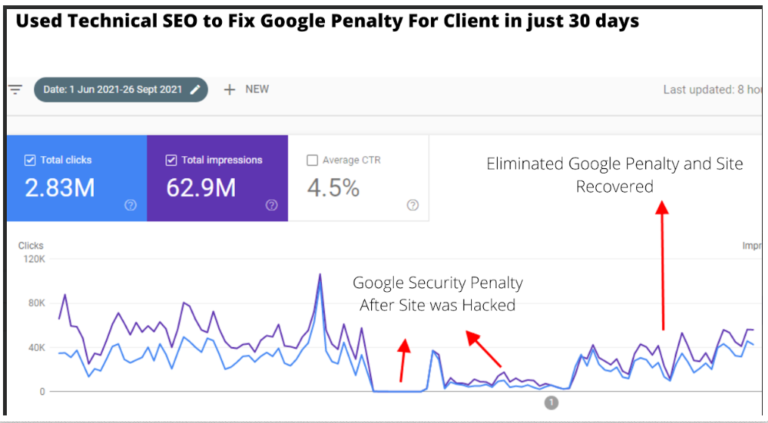
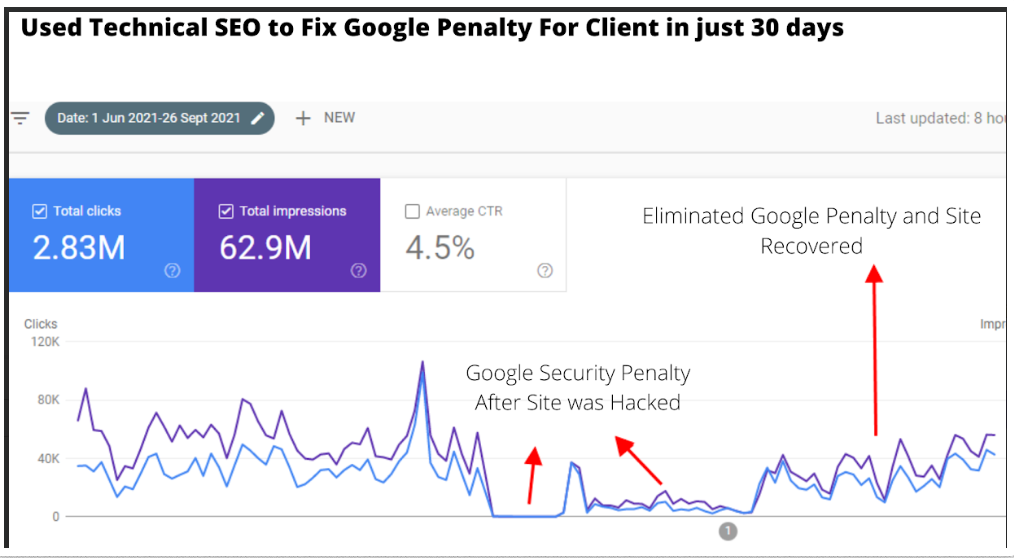
Eliminated Google Penalties on Nairametrics After Japanese Spam Hack
Nairametrics, a financial media site, suffered from Japanese SEO spam and a DDOS attack, causing a massive drop in traffic.
Restored its SEO health by initiating spam URL removal, fixing keyword cannibalization, addressing index bloat, and reconstructing the site’s Knowledge Panel
Within 30 days, traffic surged to 130K daily page views, with sustained growth back to 3M monthly page views.
Nairametrics, a financial media platform, faced a major challenge when its website was hit by Japanese SEO spam and a DDOS attack. These issues coincided with Googlebot’s crawl schedule, resulting in severe damage to the site’s rankings and traffic. As a result, Nairametrics experienced significant visibility loss, dropping from millions of monthly page views to a fraction of that number.
Technical Tasks
My task was to eliminate the penalties imposed by Google, restore Nairametrics’ SEO health, and bring back its previous traffic levels (3M page views per month). This required addressing the technical SEO issues caused by the attack and improving the site’s structure and content to regain search engine trust.
Technical SEO Interventions
To achieve these goals, I executed a series of targeted interventions:
Strict Canonicalization Rules: Implemented strict canonical tags to prevent PageRank dilution and ensure that search engines only index preferred versions of the pages.
Spam URL Removal: Identified and removed spam URLs via Google Search Console to clean up the index and prevent malicious links from harming the site’s authority.
Keyword Cannibalization Fixes: Consolidated closely related pages to resolve keyword cannibalization issues, ensuring that individual pages had distinct and focused ranking signals.
Index Bloat & Internal Linking: Tackled index bloat and counteracted PageRank decay by increasing the internal link density, which helped distribute authority more effectively across important pages.
Pruning Low-Performing Pages: Removed underperforming or outdated pages to reduce unnecessary crawl demand and improve overall crawl efficiency.
Within 30 days of completing these technical fixes, Nairametrics experienced a remarkable recovery: The site regained impressions on Google News and Google Discover, leading to a daily performance of 130K page views.
Overall, traffic growth was restored, and the site began to re-establish its authority, resulting in a sustained monthly traffic of over 3M page views.
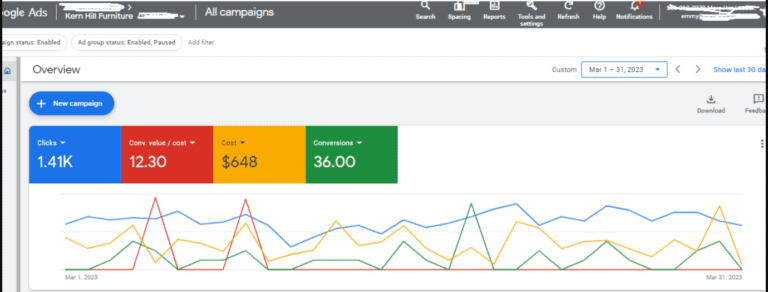
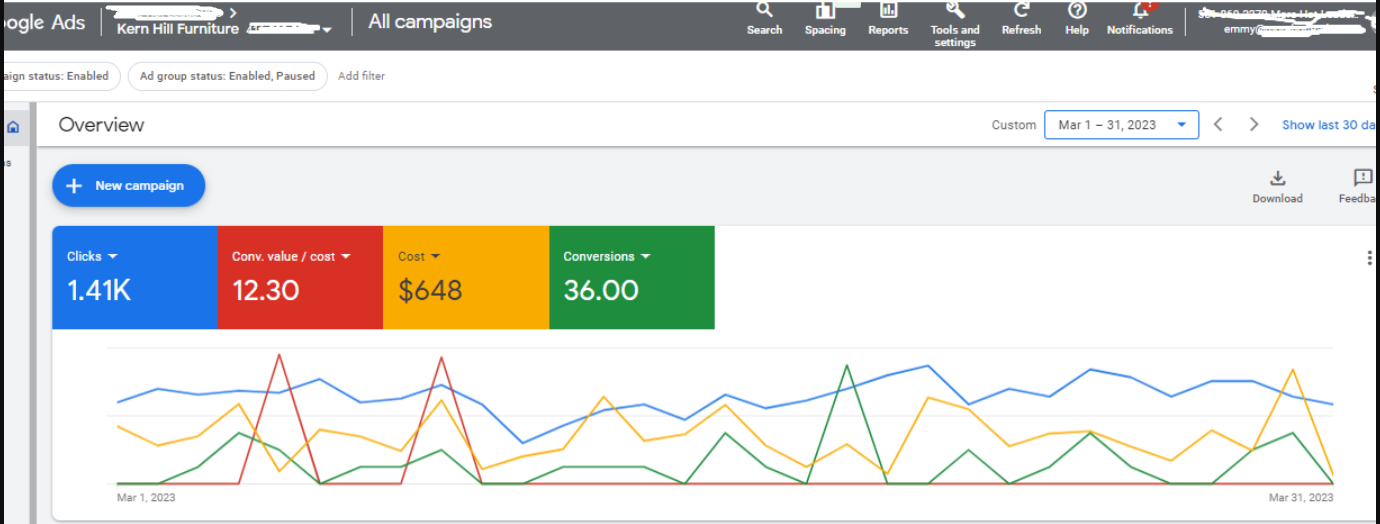
Kern Hill wanted to sell high-ticket furniture products from their Online store. However, the prices were on the high side, and due to buying inertia, their online store was not generating sales at the desired level, leading to vast wastages across their marketing funnel
The PPC and CRO Intervention
To improve conversion rates, I introduced a Buy Now – Pay Later integration, which helped to reduce the buying inertia and consideration time before a purchase
On the PPC side, I ran two main campaign types
Search Ads to Past Site Visitors (Non-Converters) + A Prospective Campaign: For Search ads, I used pricing and promo extensions to display discounts and offers directly within the SERPs. We also used countdown insertions to create a sense of urgency around these search campaigns, especially for clearance items
Performance Max To Utilize Google’s Remarketing Capabilities Across Shopping Surfaces: We then created 25 feed-only performance max campaigns comprised of single product ad groups (S.P.A.G.S), while ensuring that the feed was optimized with granular precision i.e. Reviews, ratings, google product categories, stock quantifies, promos, and search query aligned title modifications were all aspects of the feed optimization process.
PPC Results
With just $648 in ad spend, we generated 36 conversions at an ROAS of 12.30
Drove 17% Profit Margin Growth via Conversion-Focused Pricing Strategy for Cheerleader Apparel Platform
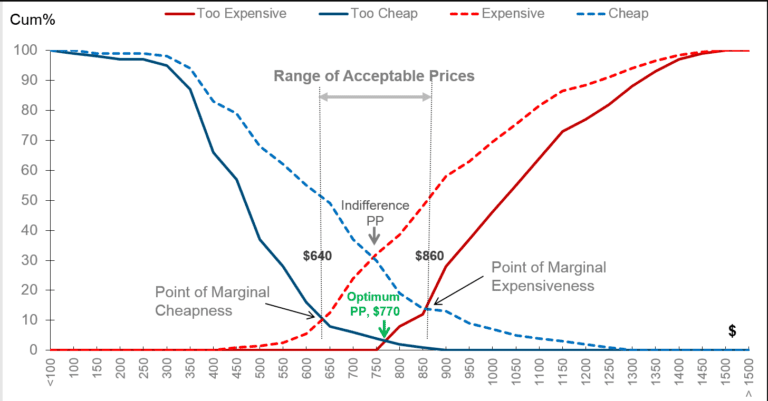
This was accomplished by conducting a Vanwesterndorp price sensitivity analysis which uncovered not just the range of acceptable prices, but our target market’s indifference price points across all product categories
Client provided a platform for the granular customization of sports and cheer leading uniforms but all principal keywords were plagued by seasonal search volume trends. The result was a situation in which the client was struggling with undulations in traffic and revenue and wanted to understand how to cope with this development.
Problem
Their business costs (hosting, plugin subscriptions, product warehousing, taxes etc.) were going up but revenue was undulating cyclically across sharp dips and troughs leading to extreme growth constraints
Growth Audit Insights
On observing the most significant keywords in the clients industry some striking seasonality insights came into view.
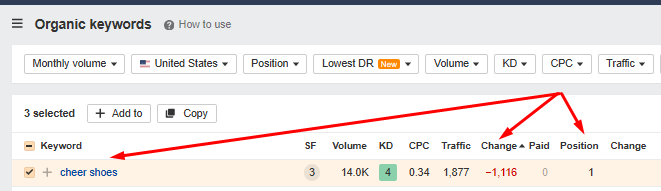
(1) Keyword: cheer shoes
Difficulty Score: 4
Search Volume: 14K
Observations: This is a keyword that the client was ranking on the first page for, however they lost over 1K in traffic despite retaining their position 1 rankings on the SERPs. This keyword was part of the larger trend of seasonality that impacts the industry and accounts for the traffic and revenue patterns the site had observed around key sporting events.
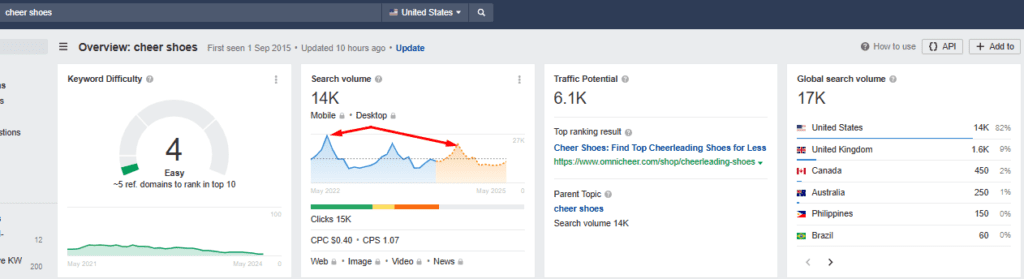
As seen in the image below, this keyword’s search activity had recorded 3 key spikes over the last 2 years (demand driving developments external to any website was likely responsible) with the volume trending downwards between April and May 2024
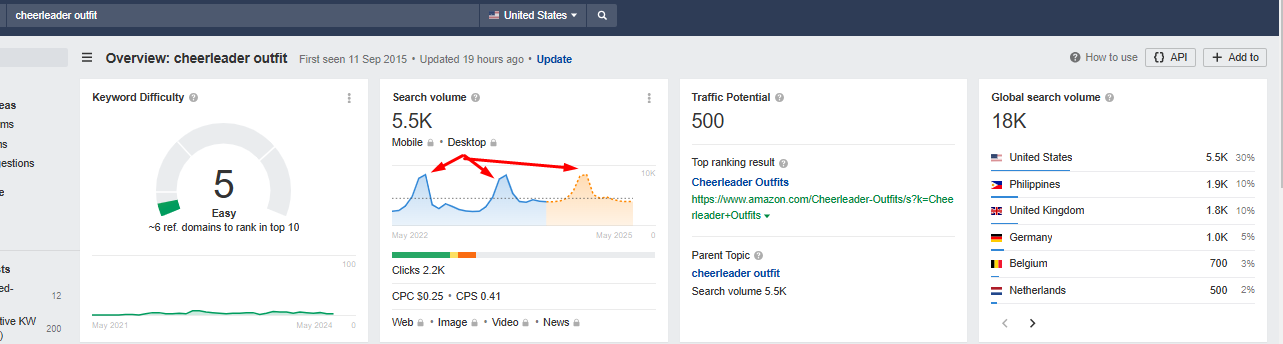
The same effect was observed around related keywords like
The search activity for this industry-relevant term also showed distinct troughs interjected by peaks of a smaller time duration. This indicated the inevitability of search traffic undulation regardless of the keyword position that had been captured for this term. This is because the search volume numbers swung widely from a 10K peak in october 2023 to 4.7K in April 2024 representing a 53% decline in demand as reflected in by the changes in search activity
Solution
We Initiated a research-driven pricing plan redesign which gave the client a growth advantage despite the seasonality effects associated with the major keywords in their industry. This was accomplished by first conducting a Vanwesterndorp Price Sensitivity analysis.
Across all of the client’s product categories, the goal of our analysis was to establish:
The range of acceptable prices (RAP)
The optimal price point (OPP)
The indifference price point (IPP)
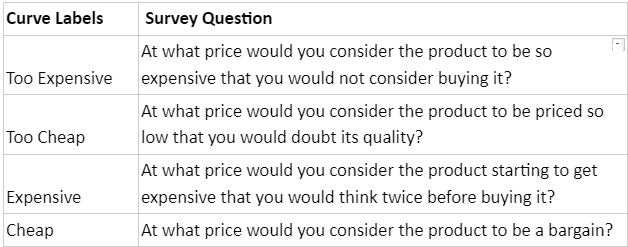
The analysis took the form of a survey with questions that are as follows
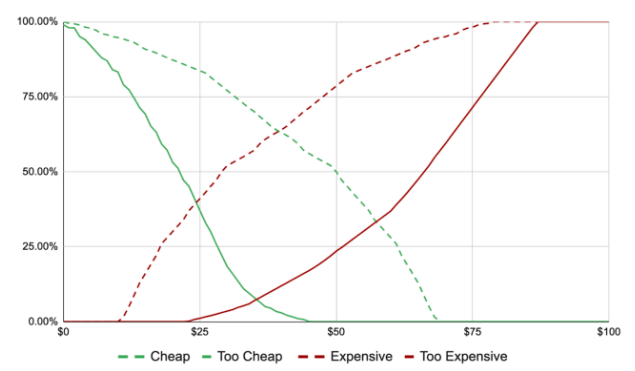
The range of answers and price points were then plotted to produce a graph like the one shown below
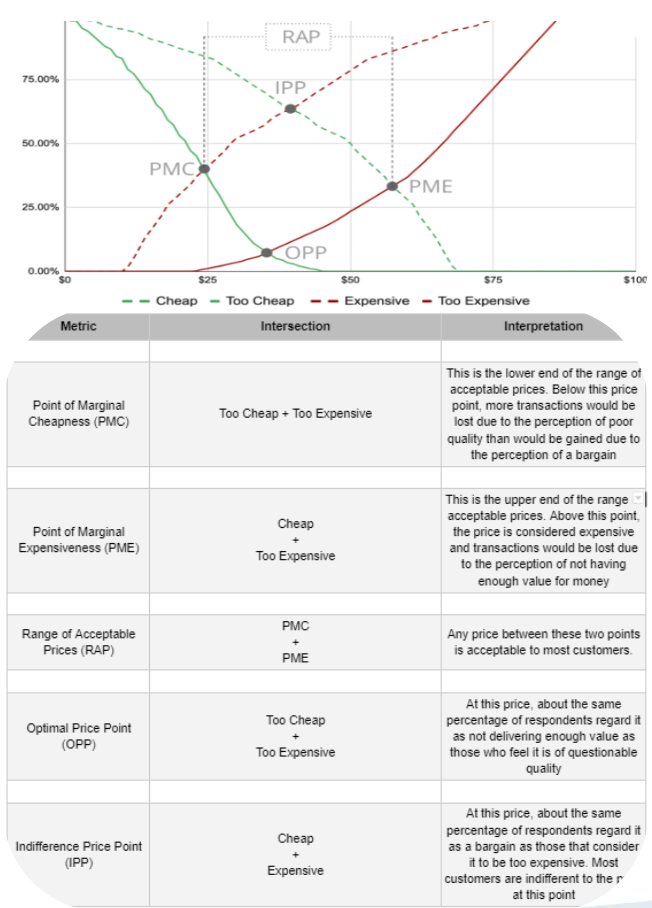
As seen in the image above, the range of pricing-related responses intersect along four points.
The intersection points of the four lines produced all key metrics (VW metrics) necessary for price setting.
See what line intersections indicated to us as we juxtaposed the graph and table below.
Impact
This then allowed us to price products at the IPP (Indifference price point) such that the margin between the optimal price point and the indifference price point became the client’s growth advantage and buffer across all seasonal demand undulations.
The Client was a Men’s Urology Clinic in Canada that offers Prostate treatments, Vasectomies, and caters to Male Sexual health issues
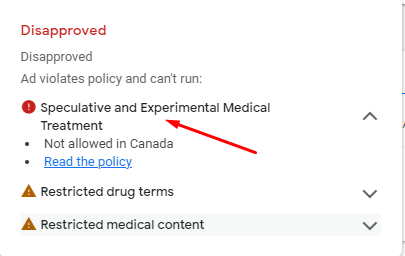
Problem: The client was unable to run ads due to health policy restrictions. This was an issue that made it difficult for the client to scale their ad performance because Google did not approve of the terms on the treatment pages of the site
PPC Initiatives & Interventions For the Practice
I decided to run click-to-call ads to bypass the restrictions that resulted from the restricted health terms present on the landing page.
I also decided to create new landing pages that could bypass Google’s policy restrictions. To achieve this, I scraped off all words and replaced them with images so that the words would be embedded in an image, thus making it inaccessible to Google’s HTML crawlers. i.e., I created Image-only landing pages to avoid the text form of restricted terminology (which could have led to a suspension of the ads and the entire account), e.g. restricted words like “Penile Enhancement” would always lead to ad suspension if present on the landing page but if present in an image, the ads would be allowed to run
Impact and PPC Campaign Results
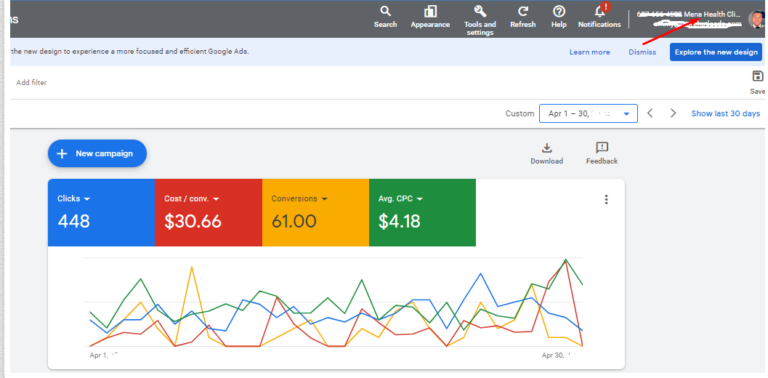
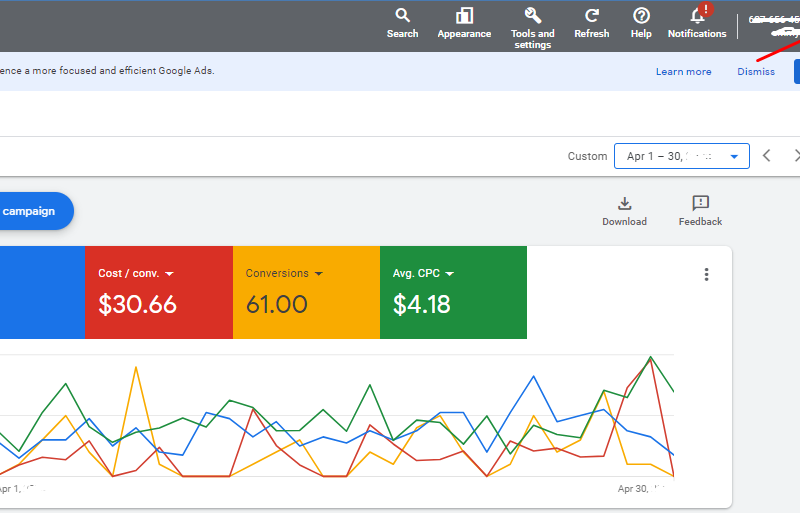
The new Landing pages passed the policy restrictions, thus allowing the previously disapproved ads to run. The result was a spike in lead volume from 9 leads and a $105 cost per conversion in March to 61 leads at a $30 cost per conversion in April.
In summary, within 30 days, we were able to
Reduce the cost per click (CPC) by 96.19%
Achieve a 577.78% increase in the number of patients scheduling appointments through the website.
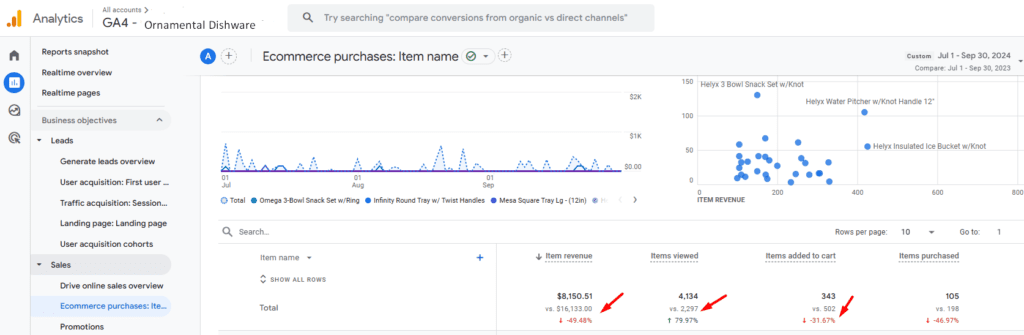
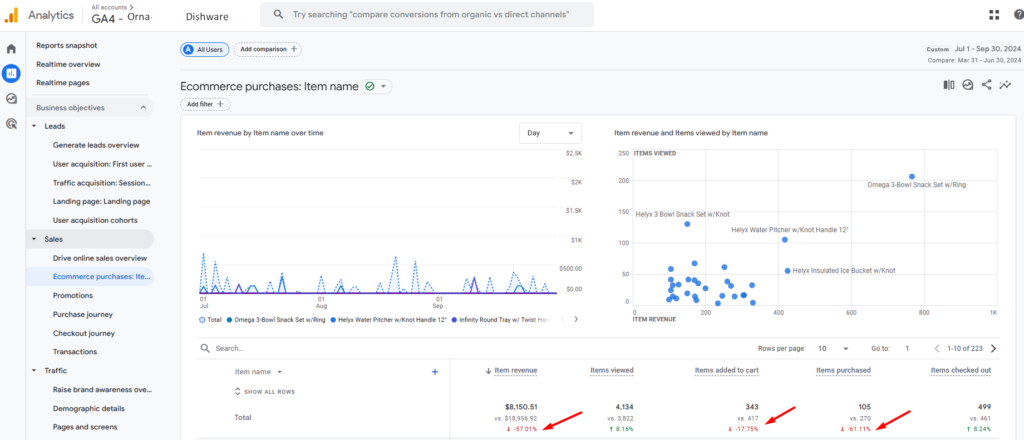
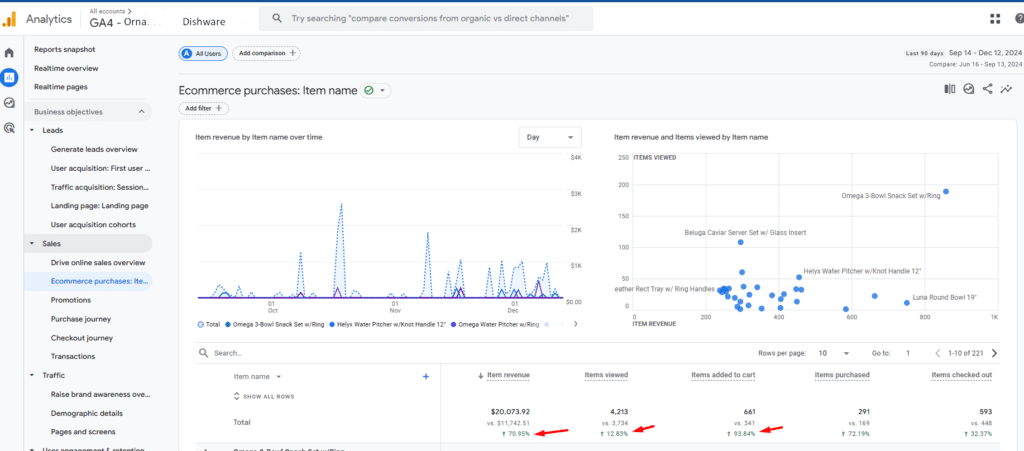
Reversed 49% Revenue Drop For Ornamental Dishware Store
How a 49% revenue drop was reversed in order to save an ecommerce business and prevent the layoff of its employees
Through a sequence of CRO interventions, including search bar redesign, product reorganization, and cart usability enhancements, we delivered a 93% boost in purchases and a 70% increase in revenue within 90 days.
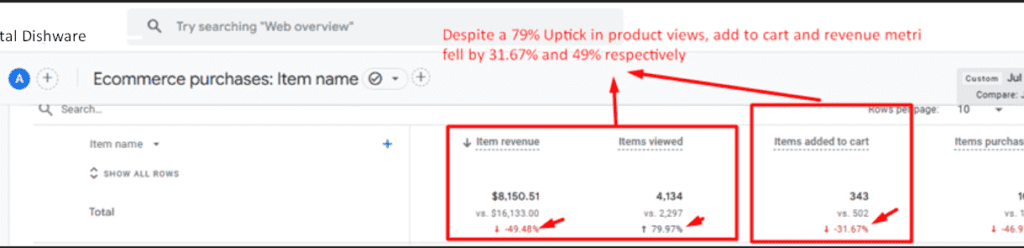
Revenue had dropped by 49% year-over-year, despite a 79% increase in product visibility. This decline persisted when comparing Q3 to Q2, highlighting potential issues with the site’s conversion effectiveness.
Further analysis revealed significant user experience challenges on the homepage, category pages, and product pages, which were reducing engagement and conversions. Key issues included friction caused by the search bar design, poorly organized category pages, and multiple usability problems on both the cart and product pages.
Task
The next goal was to optimize user interactions across these pages, reduce friction, and improve key performance metrics like Add-to-Cart and Cart-to-Checkout progression.
Actions
Homepage Optimization
Identified Issue: The search bar accounted for 16% of homepage clicks but caused user frustration due to a modal window that trapped users, leading to dead and rage clicks.
Interventions
Centrally positioned the search bar, following best practices seen on Amazon and Etsy.
Introduced autosuggestions to help users find relevant products faster.
Removed the modal window entirely for a smoother search experience.
Category Page Improvements
Identified Issue: Pagination was the most clicked element, indicating users were scrolling through 22 products without finding relevant items. Product organization was not based on popularity or relevance.
Interventions
Dynamically reorder products based on sales popularity, updating every 60 days.
Add installment prices and rating stars to product image cards to encourage clicks and improve discoverability.
Product Page Enhancements
Identified Issue: Size variations (which impacted pricing) were difficult to interact with, and preload animations disrupted usability.
Interventions
Turn size variations into clickable icons for a better user experience.
Eliminate unnecessary preload animations to reduce page load friction.
Cart Page Usability Fixes
Identified Issues
The cart notification lacked a visible “Checkout” button, leading to cart abandonment.
The coupon field’s prominence distracted users, increasing price sensitivity.
The cart required a manual update for quantity changes, adding unnecessary steps.
Users spent too much time on the cart page without completing checkout.
Interventions
Added a prominent “Checkout” button to the cart notification and ensured it displays fully on all devices.
Removed the coupon field from the cart page or repositioned it to reduce its impact on decision-making.
Enabled automatic cart updates when quantity selectors are used.
Introduced urgency elements like stock quantities, cart reservation timers, and indicators of shopper interest.
Results
We significantly reduced user frustration on the homepage by improving search clickthrough rates and session durations.
We enhanced engagement on category pages by aligning product visibility with user preferences, resulting in increased clicks and reduced reliance on pagination.
We streamlined the product page experience, enabling faster decision-making and greater user satisfaction.
Key friction points on the cart page were resolved, leading to fewer cart abandonments and higher checkout conversions.
Within 90 days of implementing our CRO interventions—and before the year’s end—the persistent revenue drop, despite an increase in product views, was reversed. This resulted in a 93% increase in items purchased and a 70% increase in e-commerce revenue.
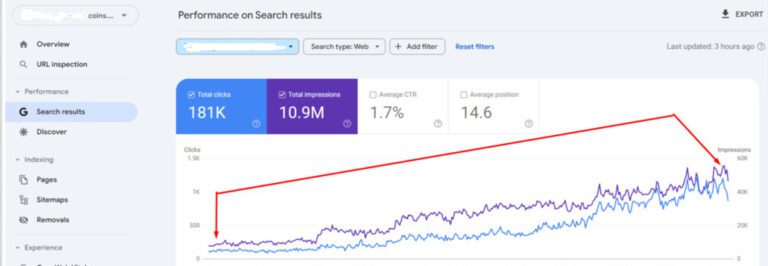
During COVID, the client’s 40 year old Coin business faced severe challenges. In-person coin shows and conventions were canceled, and the business lacked a strong digital presence. Sales plummeted while warehousing and employee costs stayed constant, pushing the 40 year old company toward failure.
The primary audience for the business—coin collectors aged 50–80—was not very tech-savvy, further complicating digital adoption. Additionally, revenue was skewed toward low-margin products like silver and gold eagle coins (5% margins), while high-margin products like classic Morgan Dollars and Lincoln Cents (up to 30% margins) struggled to sell.
Task
We needed to boost site rankings for keywords linked to high-margin products, such as:
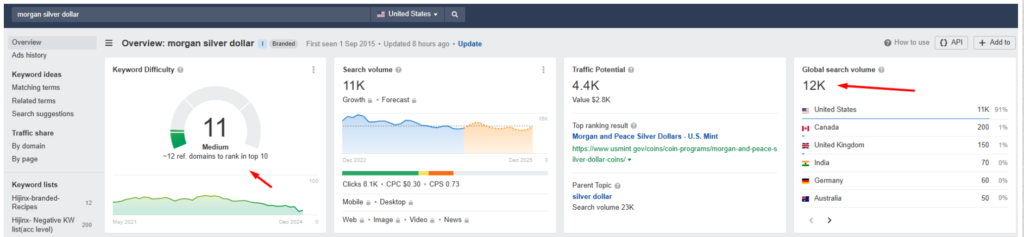
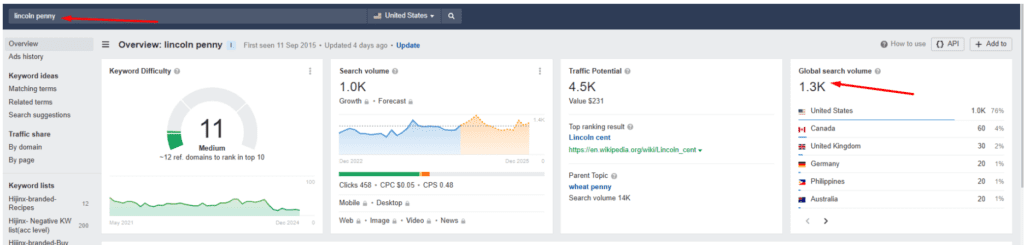
(1) Lincoln Penny (search volume: 1K, difficulty: 11)
(2) Morgan Silver Dollar (search volume: 11K, difficulty: 11)
Despite low keyword difficulty scores, rankings for these terms were highly unstable. Frequent swings in rankings was an indication of poor content quality
Action
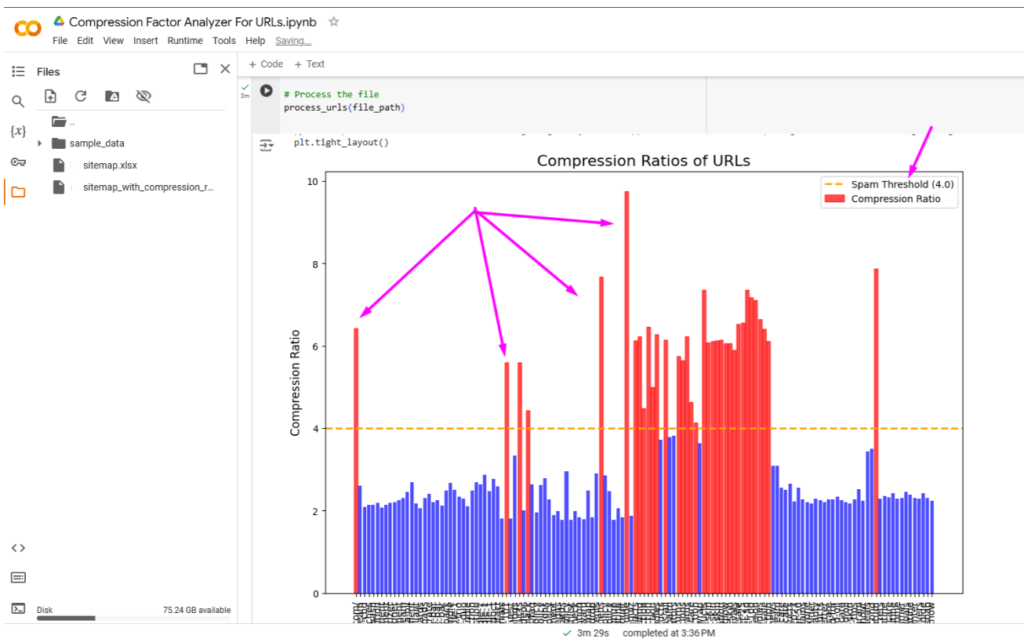
We performed a detailed content audit using a Python script to simulate Google’s content compression. Search engines compress content to save space and assess quality. A high compression ratio suggests filler content, while a low ratio indicates meaningful and rich information.
For Example
If 100K words compress to just 1 word, it signals that the content lacks substance.
If 1,000 words compress to only 900, it indicates high content richness.
Our audit revealed that many critical product and blog pages had high compression ratios (above 4.0), suggesting low-quality content.
We then set out to optimize the affected pages while concurrently rolling out technical SEO fixes like
Reducing the role of JavaScript in content rendering
Reduce 404 inlinks and resolved 404 backlinks
Using webmaster outreach to convert Nofollow backlinks into dofollows, while replacing image backlinks with links to the actual products
Improving internal link references for high-margin products
Results
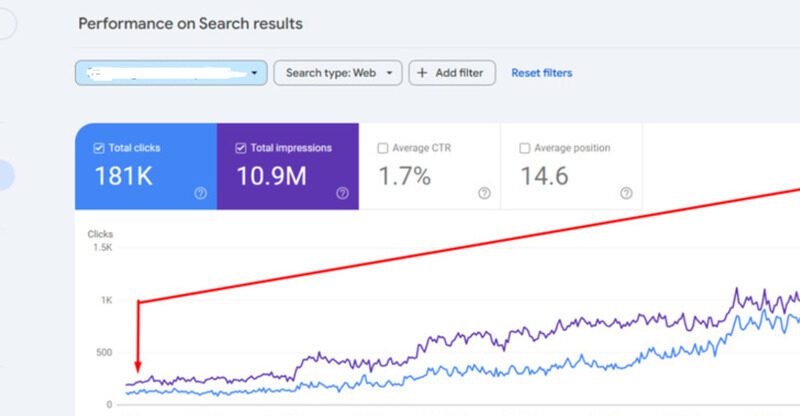
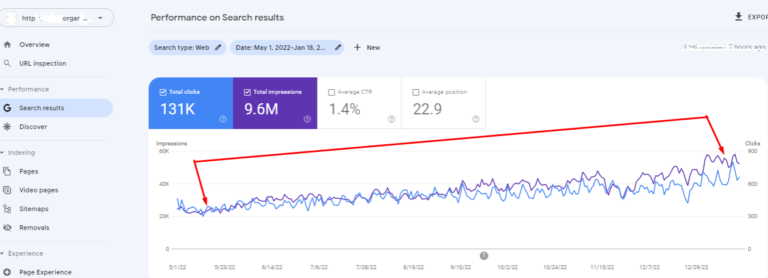
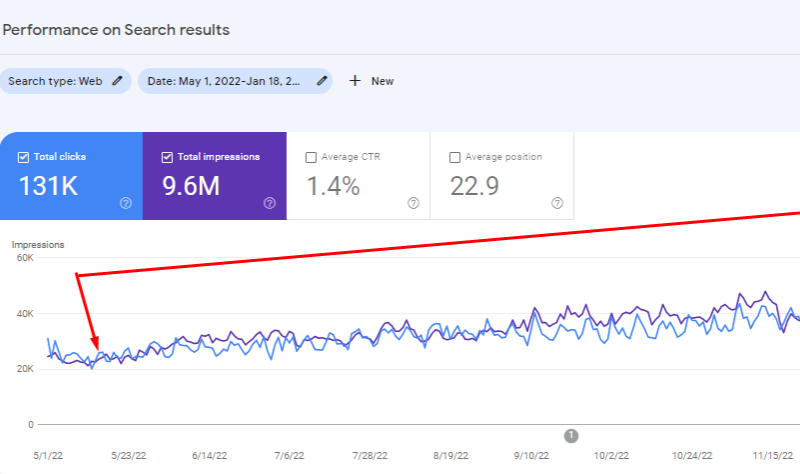
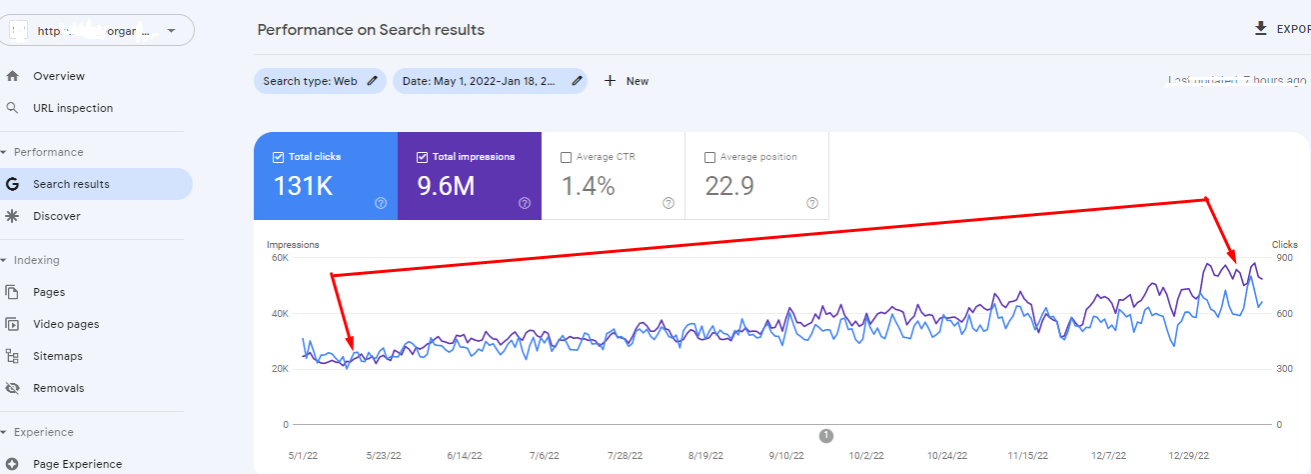
Within three months, the site experienced steady growth in clicks and impressions from a daily clicks count of 115 to 1203 at the end of the year, representing a 946.96% rise in clicks and a 620.83% rise in impressions.
Traffic increased, and visibility improved for high-margin product pages, directly contributing to revenue growth.
Myuz Artistry, an e-commerce brand specializing in unique cosmetic products, faced a significant challenge in achieving a return on ad spend (ROAS) greater than 5.0 from their Google Shopping campaigns i.e. for every $1 spent, they wanted a corresponding $5 in sales revenue.
Their existing campaigns struggled to deliver profitable conversions, necessitating a comprehensive strategy overhaul to enhance performance.
Task
To surpass the ROAS target while maximizing conversion value, it was essential to identify untapped opportunities in audience targeting and optimize product data feeds for better alignment with relevant search queries.
Action
We took a two-pronged approach to address the challenge:
Audience Targeting Enhancement:
Conducted research to identify 55 highly relevant websites within the art and design niche.
Built custom intent audiences in Google Ads using these websites to refine targeting for Shopping campaigns.
Feed Optimization:
Utilized feed rules in Google Merchant Center to enhance product data quality by:
Adjusting product titles to include high-performing search terms.
Embedding GTINs for improved product match accuracy.
Setting up granular Google Product Category identifiers across primary and supplementary feeds.
These measures ensured that the product listings were more closely aligned with major search terms, increasing their visibility and relevance to potential buyers.
Result
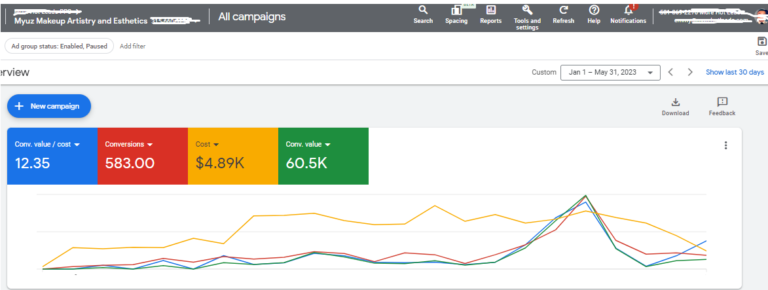
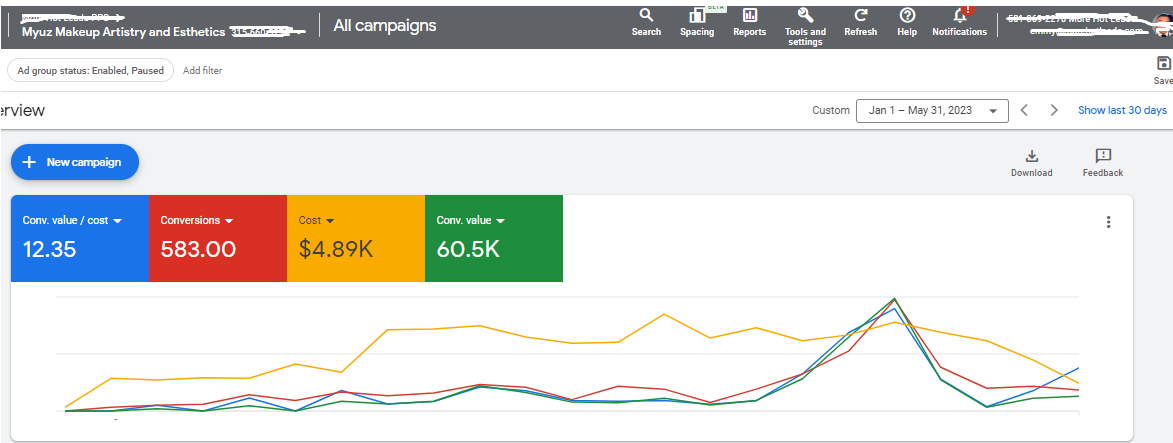
Between January and May 2023, the revamped strategy delivered outstanding outcomes:
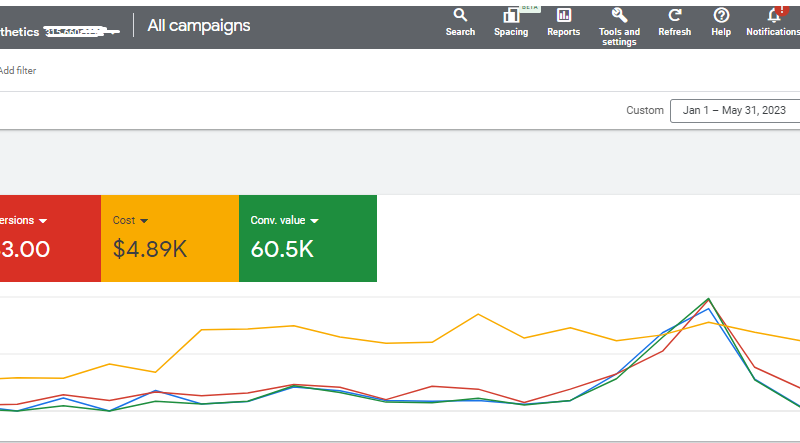
Conversions: Achieved 583 conversions, far exceeding previous performance benchmarks.
ROAS: Recorded a remarkable ROAS of 12.35, more than doubling the initial target.
Revenue Impact: Generated $60,000 in conversion value, establishing Myuz Artistry’s campaigns as a significant revenue driver.
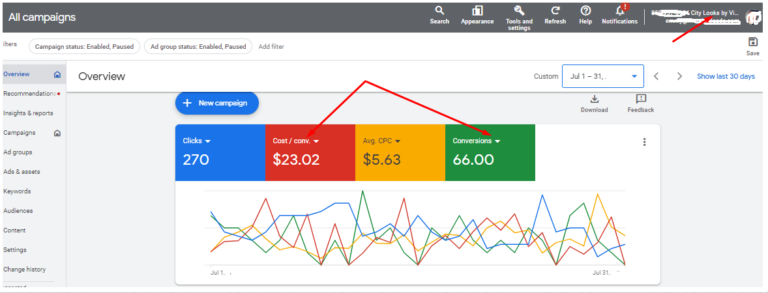
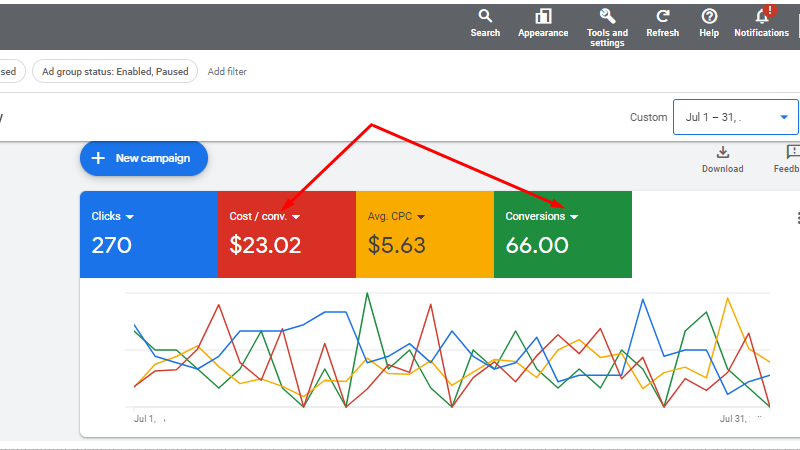
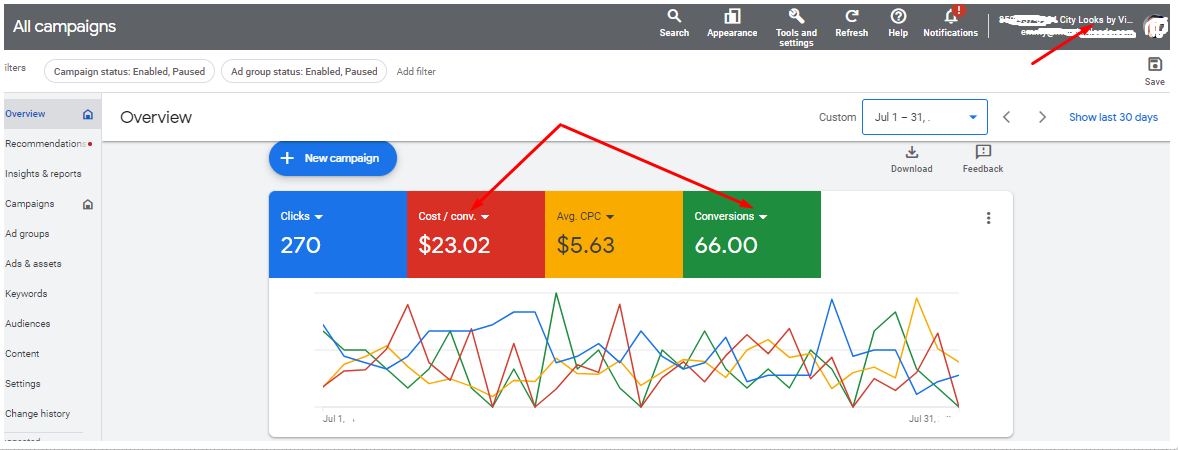
The client was City Looks, a boutique specializing in medical-grade wigs for cancer patients. The client aimed to boost online sales and raise awareness about their products.
Problem: The client’s website was not getting sufficient traffic, the product had a narrow, niche market, and the target keywords had a high potential for irrelevant traffic i.e. (Lots of irrelevant traffic for fashion-oriented wig buyers had been recorded even though ideal customer would need a special wig for cancer or alopecia conditions). This was the core of the client’s challenge
Strategy
We developed a comprehensive PPC strategy that included:
Using the data from past buyers, along with website events to create a audience cohorts that were exposed to ads that overlapped with their position in the funnel.
Conducted VOC research and mined product reviews to find all customer lingo associated medical-grade wigs, cancer patient support, and hair loss solutions.
Utilized ad extensions (Price & Call out extensions) to provide additional information about product type and use case so as to weed out irrelevant clicks
Implemented a geotargeting approach to focus on areas with higher demand for cancer patient support products.
Results
Within the campaign period, we achieved remarkable results leading to
A 120% increase in lead quality associated with website traffic and product sales
Organic Tea* needed more US traffic, high intent visitors and a high ecommerce conversion rate in order to scale their business
Issues Found
A technical audit revealed an issue with the site’s crawl budget rank which had caused many products and blog pages to linger for weeks without getting indexed. There were also lots of conflicting canonical settings and faceted navigation URLs that were indexed and cannibalizing traffic from pillar pages
Solution
We developed a python script that can be used to achieve bulk indexation via Search console’s indexing API, while at the same time streamlining the canonical directives in favor of the money pages
Result
After bulk indexing requests, the previous investment into the site’s copy started paying off resulting in a steady incline in impression and click trends
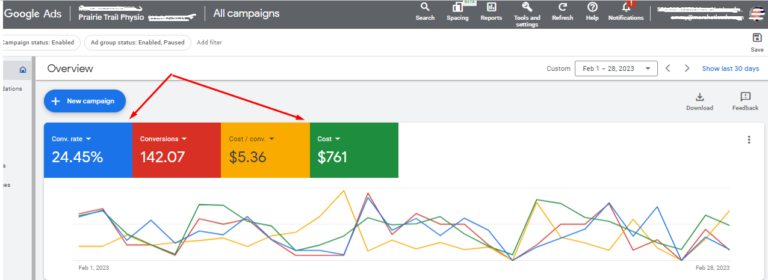
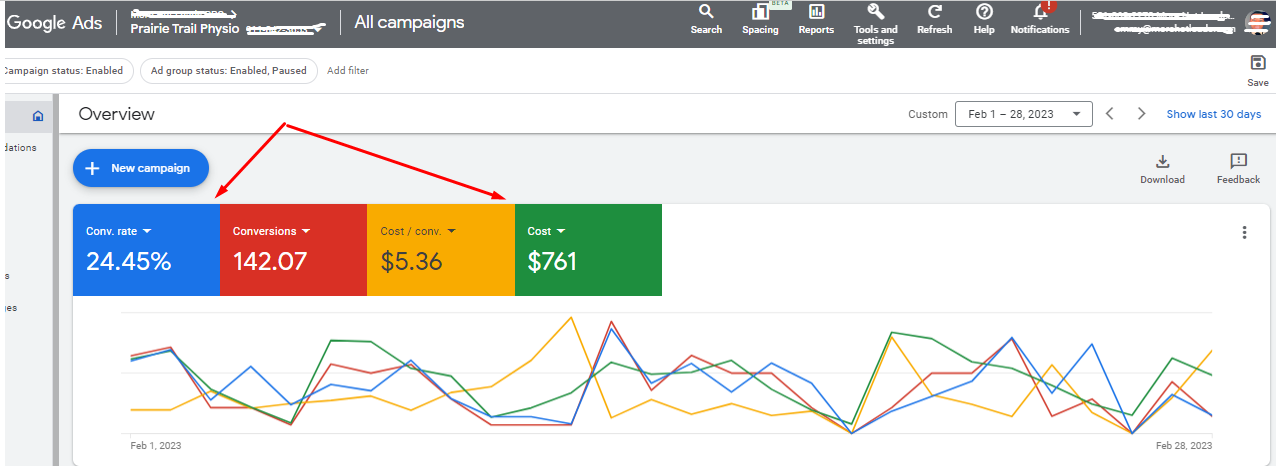
Prairie Trail Physio was looking to increase their online visibility and patient bookings.
Problem
The clinic struggled to attract new patients through their website. The cost per clicks were high and the cost per conversion metrics was trending below the profitability threshold since a 1 hour session was priced at $125
Strategy
Our PPC strategy for Prairie Physio included
Identifying relevant keywords related to physiotherapy services and local searches.
Crafting engaging ad copy highlighting the clinic’s experienced physiotherapists and personalized treatment plans.
Implementing ad extensions to display contact information and patient testimonials.
Utilizing local targeting to focus on potential patients in their service area.
Results
Over the course of the campaign, we achieved substantial improvements:
A 79% decrease in cost per booked appointment and paying patient
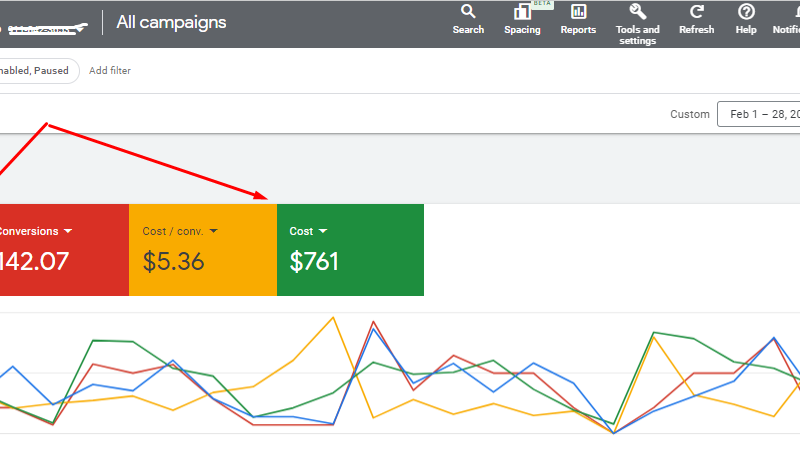
Achieved a 24.45% conversion rate
The clinic was able to fast track its growth by expanding its service catalog and staff strength
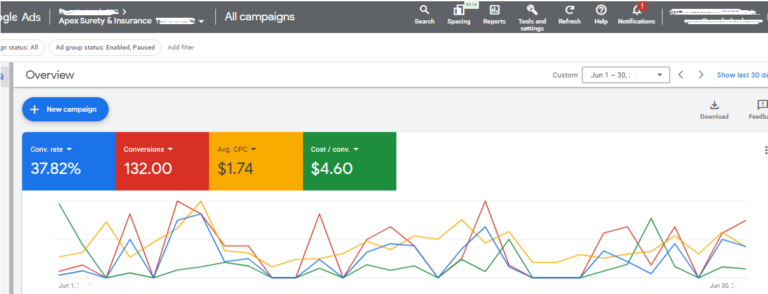
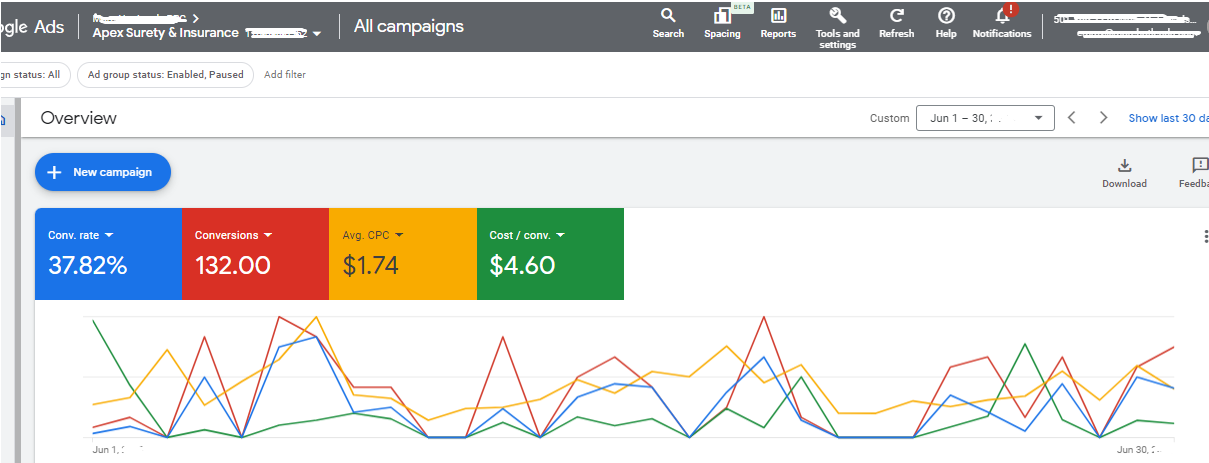
Challenge: The Apex Surety, a provider of Commercial Surety Bonds, was struggling to expand its clientele among businesses seeking surety guarantees for high cost projects. Their existing PPC campaigns were underperforming, resulting in a high cost per lead.
Strategy
We executed a data-driven PPC strategy to maximize lead generation within a defined budget. Our approach involved Google Ads and targeted display campaigns. To pinpoint the most promising leads, we employed advanced audience segmentation:
Keyword Optimization: We optimized keyword targeting to focus on long-tail keywords relevant to the financial advisory services offered by the client.
Custom Audiences: We used Google Tag Manager to create custom retargeting audiences based on user actions such as prolonged dwell time on financial advisory articles, form interactions, and specific page visits.
LinkedIn Engagement: We utilized LinkedIn Ads to target decision-makers in across industries of Interest. Custom audiences were created based on job titles, industry, and seniority.
A/B Testing: We continually conducted A/B tests to refine ad copy and landing page design, ensuring maximum conversion rates.
Results
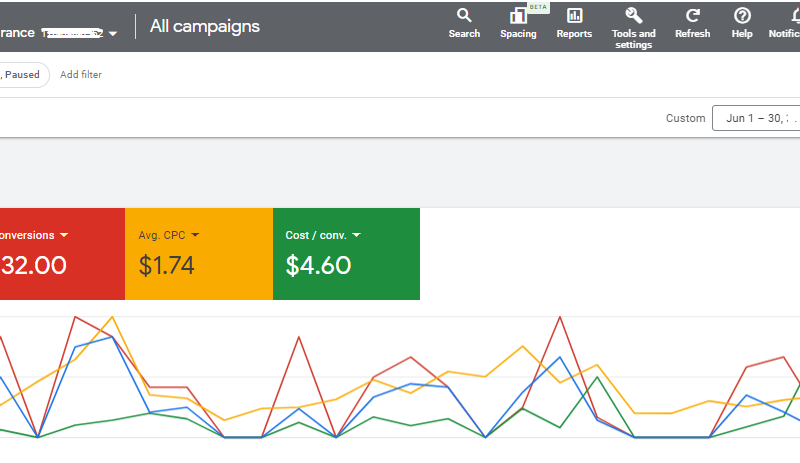
The results were remarkable. The CPC decreased to $1.74 per click, and the conversion rate for surety applications surged by 37%. This not only reduced the cost per conversion to $4.60 but also increased the quality of leads received by the Surety Firm
Drove +164% Organic Revenue Growth for Outdoor Gear Store via Technical SEO & UX Fixes
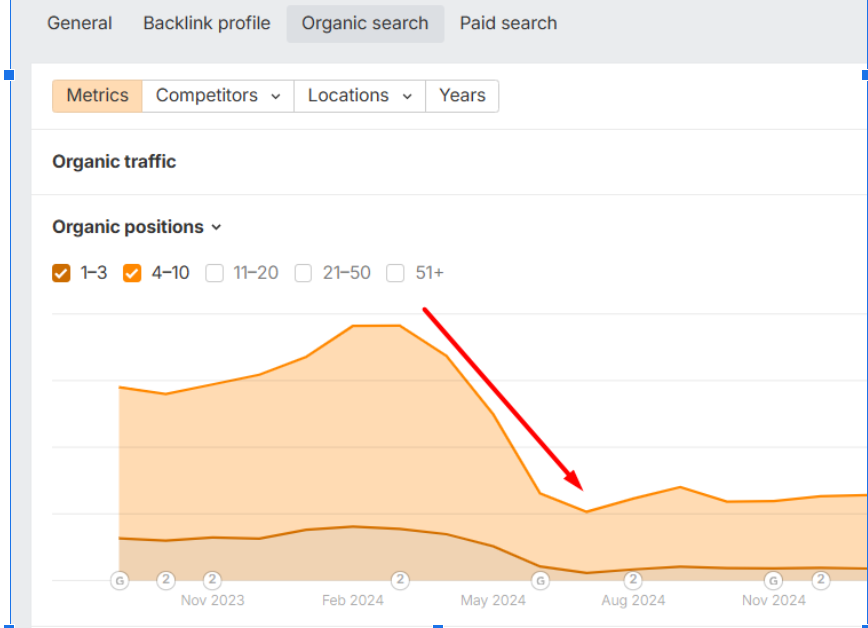
When an outdoor gear startup suddenly lost 71% of its first-page keyword rankings, its innovative trade-in model was in danger. Buyers couldn’t find products. Sellers had fewer reasons to list gear. Growth stalled.
But the real shock? The site’s downfall wasn’t from competition—it was from hidden technical traps quietly bleeding visibility.
Products Google couldn’t see. Schema errors burying high-value listings. 404-ridden pages. Crawl signals scattered in every direction.
We asked: What if fixing these invisible barriers could flip the entire growth story?
The outdoor gear startup, which launched in 2019, built its business around a unique trade-in model: users could sell used outdoor gear for cash or space savings, while buyers could purchase high-quality, fairly used products at lower prices. This model reduced stocking costs and gave the platform a pricing advantage—a strong start toward unlocking a blue ocean.
However, by mid-2024, the site faced serious SEO challenges. For example, First page keywords dropped by from 2678 in March 2024 to 772 by July of the same year – View Hereand Here
These challenges threatened growth on both sides of the marketplace because
Sellers needed to trade in gear to maintain a consistent inventory for the platform.
Buyers needed to discover and purchase gear to monetize the platform.
When rankings dropped and revenue stagnated, we stepped in with a technical and UX-focused SEO strategy.
Findings and Resolution Tasks
To help the site overcome its marketing challenges and preserve its blue ocean advantage, we began with a deep technical and UX audit. This revealed several critical SEO issues:
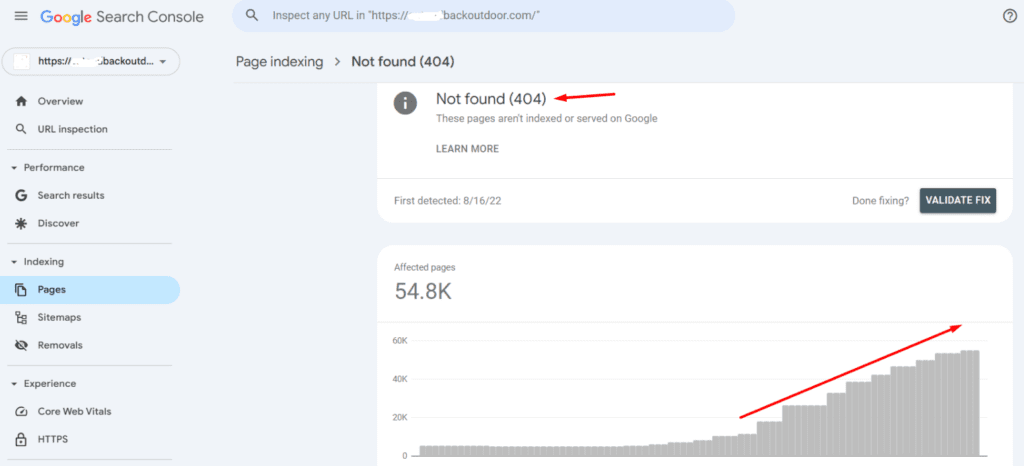
(a) Ranking instability from product page 404s
Because stock came from trade-ins, product availability was inconsistent.
This led to frequent 404s, broken internal links, keyword ranking losses on shopping surfaces, and lost revenue when in-demand items disappeared.
(b) Bloated site structure from filtering parameters
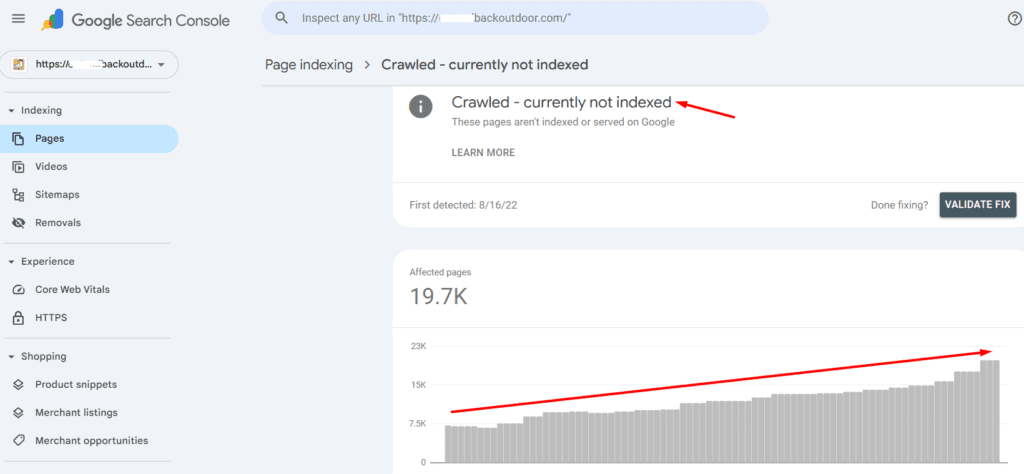
Many pages were discovered or crawled, but remained unindexed due to the large number of filter pages that were bloating the site size and muddying the crawl paths
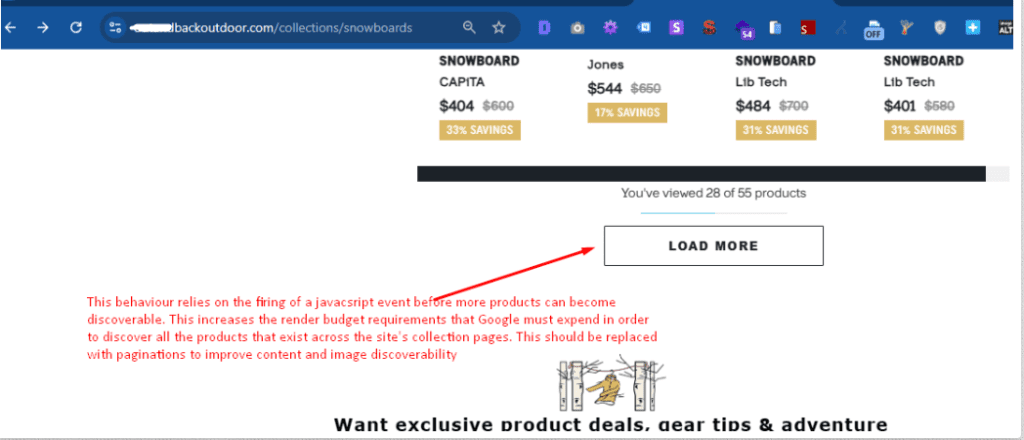
(c) The Use of “Load More” buttons instead of pagination
This setup caused important products to be hidden behind JavaScript rendering.
This caused orphan pages, low render ratios, and poor visibility on Google, Bing, and LLM crawlers.
(d) The resolution of schema errors and missing attributes
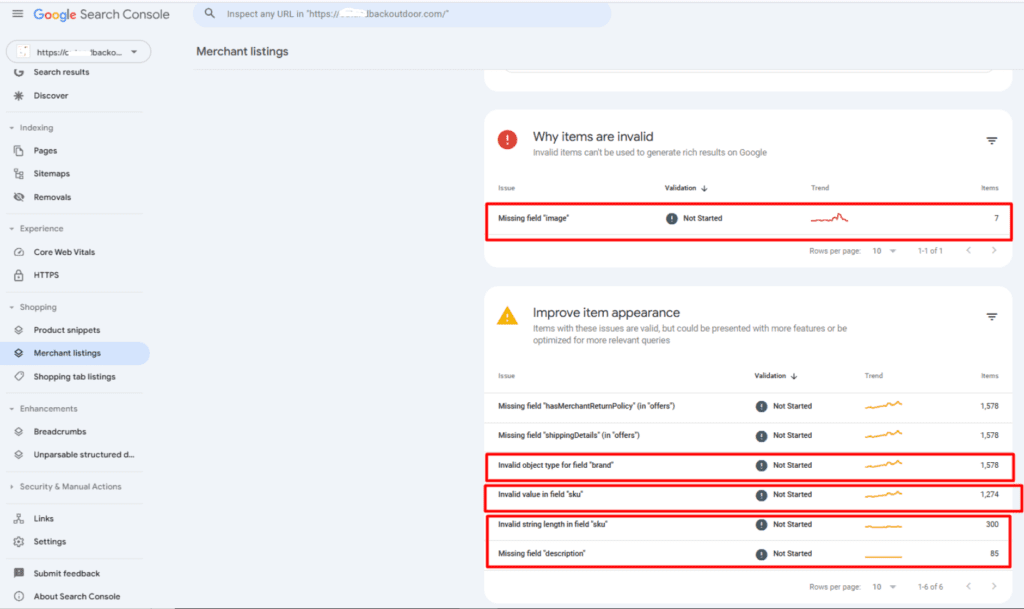
These schema errors arising from invalid SKU values and brand types were impacting the site’s visibility in merchant listings and on shopping surfaces. Our resolution helped to reclaim lost ranking positions and improve organic impressions across the search ecosystem
(e) Crawl competition and inefficient linking
Multiple subdomains competed for attention with the main site.
Canonicalized product links on collections and broken crawl paths further diluted SEO signals.
(f) Internal content duplication and high compression ratio scores
Duplicate content risked keyword cannibalization and ongoing ranking instability.
These issues became the focus areas of our strategic interventions starting in August 2024.
Actions and Technical Interventions
Our technical initiatives were aimed at resolving the site’s technical drawbacks to severity and resolution impact. Hence, our strategy was organized in the following sequence
1.First Win: Making Products Visible Again: Our priority was ensuring that all products were easily discoverable. We replaced the clunky “Load More” setup with SEO-friendly pagination, so Google and users alike could see the full product range without relying on JavaScript. At the same time, we tackled the “crawled but not indexed” issue, unlocking new opportunities for keyword rankings and traffic growth.
2. Sharpening Schema & SERP Appearance: Next, we focused on how products showed up in search. We cleaned up schema errors, added missing elements like reviews and ratings, and rolled out Organization and FAQ schema across key pages. These changes not only fixed technical gaps but also made the site’s listings stand out more in search results and merchant feeds.
3. Expanding Reach Beyond Google: To diversify visibility, we helped the site qualify for Bing Shopping’s free listings by setting up a Microsoft Merchant Center store. This opened up an entirely new stream of exposure outside Google’s ecosystem.
4. Cleaning Up Links & Canonicals: We then went deep on site hygiene: fixing 404s, redirects, and server errors, while also resolving canonicalization issues on filtered and blog pages. Alongside this, we strengthened internal linking and added missing navigational paths—like “Gift Collections”—to create clearer, more logical user journeys.
5. Building Content & Improving Core Web Vitals Finally, we enhanced on-page performance. Collection pages got fresh keyword-rich copy and FAQs to push “page two” rankings into the top 10. We also resolved duplication issues that were causing keyword cannibalization and optimized Core Web Vitals across key pages to make browsing smoother and faster.
Results
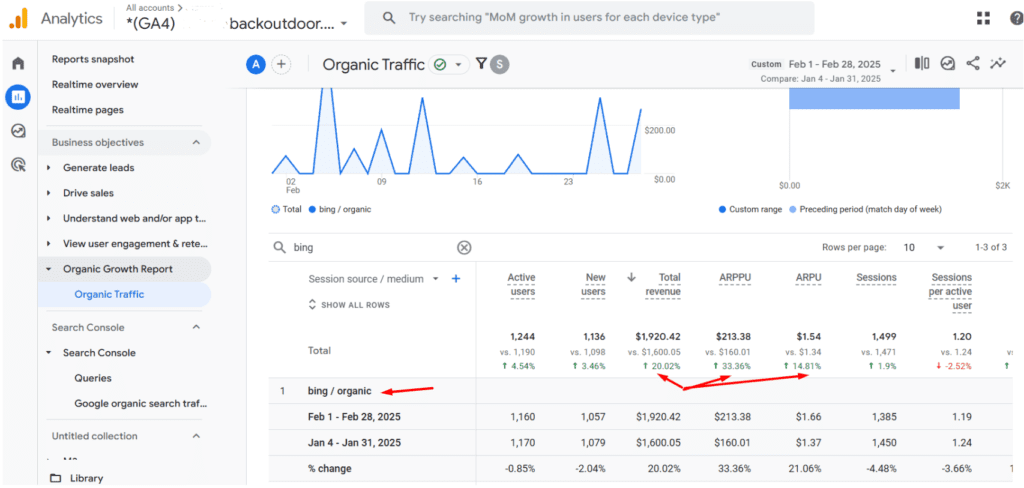
By February 2025, Bing revenue was being progressively amplified by the site’s free listing eligibility.
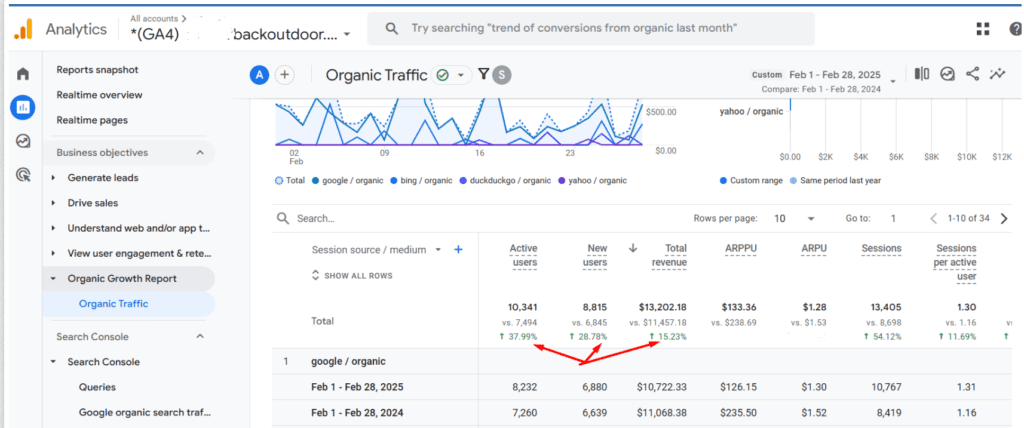
Organic revenue was also undergoing a steep incline due to the shopping visibility enhancements occasioned by the resolution of product schema and merchant listing errors.
To augment these gains, out-of-stock products were marked with sell on back order labels, to prevent product page 404s and maintain the keyword ranking gains those product pages had acquired
Within just 7 months (Aug 2024 – Mar 2025), the impact was clear.
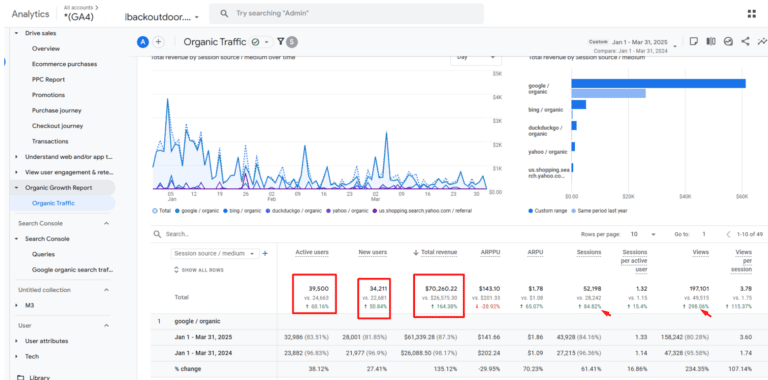
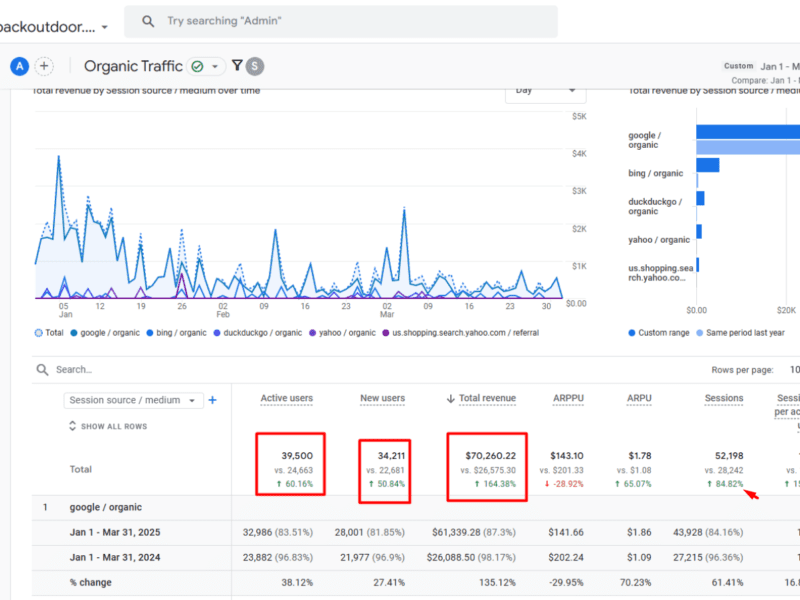
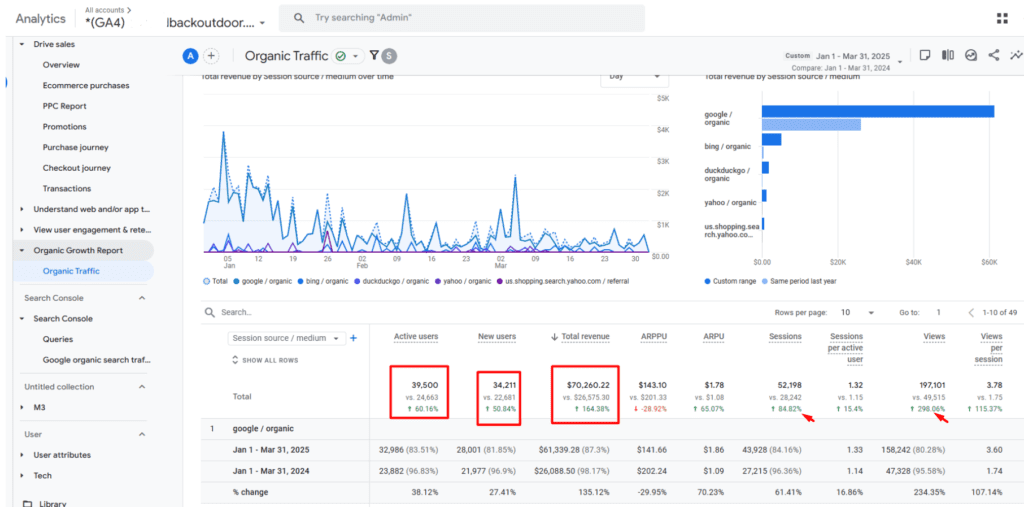
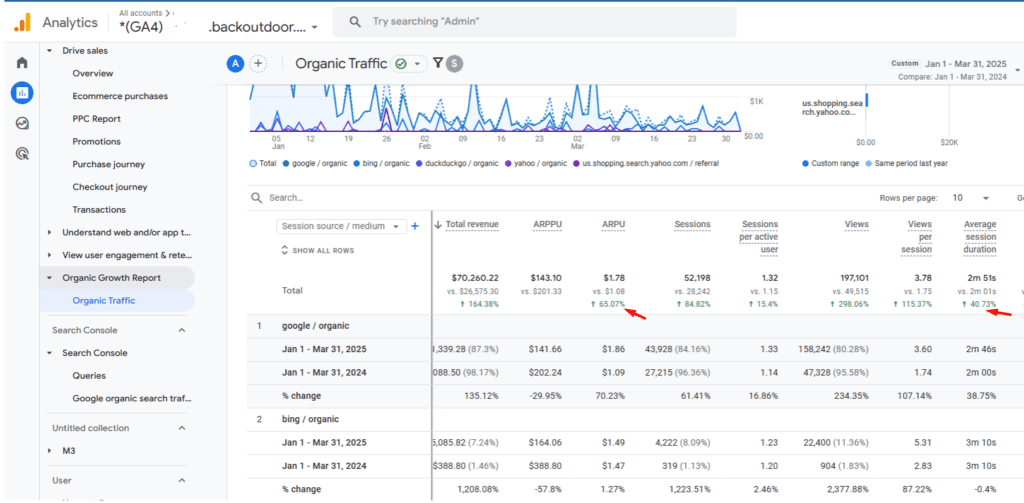
Organic revenue surged by 164%, from $26,575 in Q1 2024 to $70,260 in Q1 2025.
Active users grew by 60% and new users by 50%, indicating stronger acquisition.
Average revenue per user increased by 60%, while session duration improved by 40%, proving improved traffic quality and engagement.
79.05% Traffic Growth For Bong & Smoke Pipes Store Via Link Building Campaign
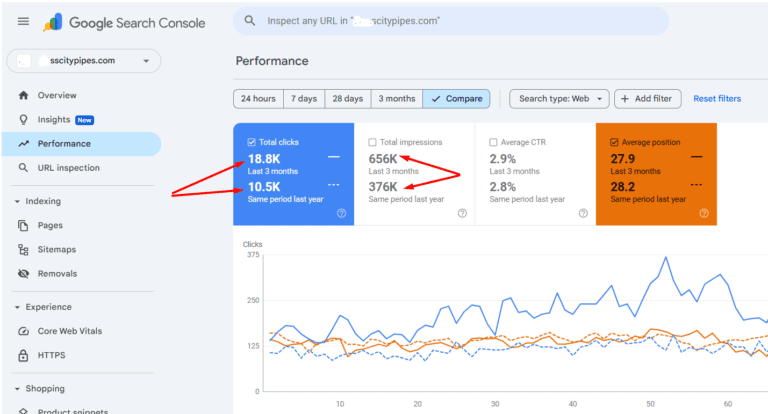
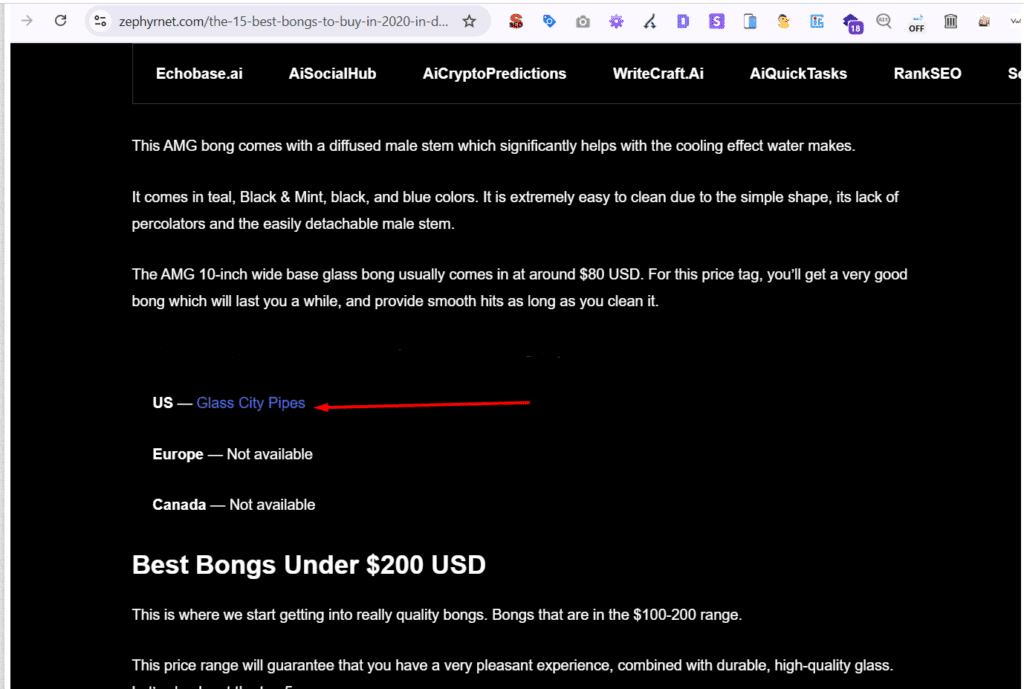
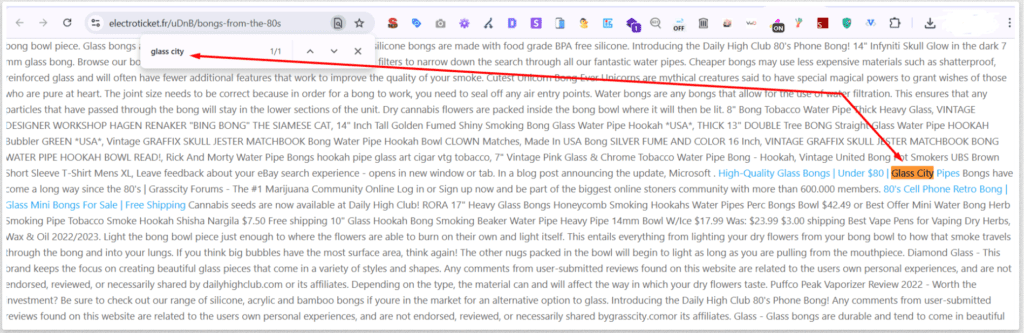
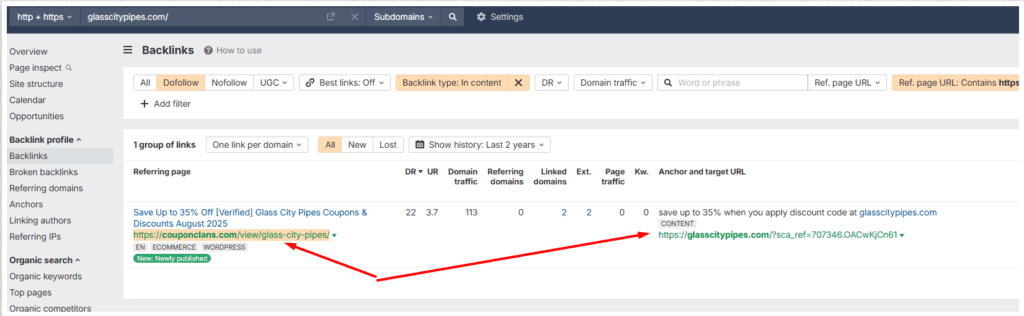
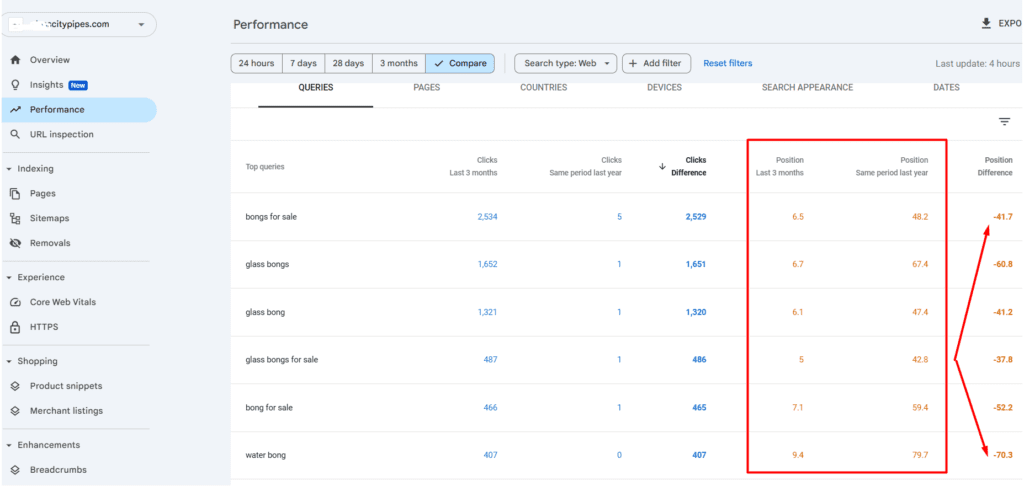
Helped a U.S.-based bong retailer overcome category restrictions and seasonal revenue dips by strengthening their domain authority and backlink profile. Through brand mention reclamation, coupon aggregator submissions, and HARO outreach, I secured high-authority backlinks from sites like Huffington Post (DR 92), Zephyrnet (DR 68), National Cannabis Review (DR 34), etc. These efforts led to a 79% increase in organic traffic and consistent first-page keyword growth, reducing dependency on seasonal branded searches.
U.S.-based bong retailer faced a unique growth challenge. Due to product category restrictions, the brand had limited promotional opportunities compared to other e-commerce businesses. Compounding this issue, its domain authority was relatively weak, and seasonality-driven fluctuations in branded search volume caused inconsistent year-round revenue performance.
Task
The primary goal was to: (1) Improve domain authority (DA) and page authority (PA) of targeted URLs. (2) Increase the number of keywords ranking on the first page of Google. (3) Establish a more consistent stream of organic visibility and traffic, despite seasonal volatility.
Link Building Actions – Reclaiming Unlinked Brand Mentions
To achieve this, I set up Google alerts and scraped all instances in which the brand name was mentioned in an indexed post on both Google and Bing. This effort threw up many unlinked brand mentions, and I converted them, thus enriching the domain authority
Link Building Actions – Coupon Aggregator Submissions
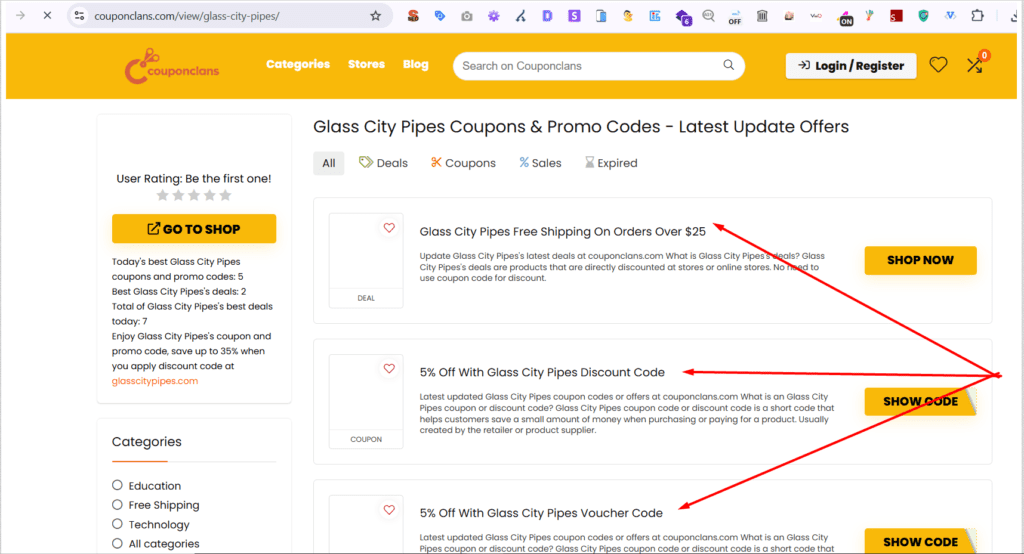
As part of this effort, I submitted the site to coupon aggregators offering dofollow store listings. This helped secure backlinks on platforms like Coupon Clans
Link Building Actions – HARO Submissions
To achieve this, I created a HARO profile and actively pitched responses to journalist requests. The effort paid off multiple times, allowing the site to land high-authority backlinks on sites like Huffington Post
Results
These combined efforts produced measurable SEO wins:
(1) Strengthened domain authority and increased the site’s backlink profile quality.
(2) Achieved first-page keyword growth across multiple products and category keyword rankings.
(3) Established greater consistency in organic performance, reducing the impact of seasonal dips in branded search volume.
BeCBD faced significant challenges in promoting its products due to restrictions on advertising platforms such as Google and Facebook, as well as limitations on creating a Google My Business (GMB) profile. These restrictions were primarily due to the sensitive nature of the CBD product category, which posed hurdles in reaching potential customers through conventional marketing channels.
Solution
To overcome these obstacles, we devised a strategic approach focusing on content optimization and leveraging Frequently Asked Questions (FAQs) to enhance visibility and relevance. Our team implemented BERT (Bidirectional Encoder Representations from Transformers) score optimized content for both the product and blog pages on Be CBD’s website. Additionally, we strategically utilized FAQs to populate category pages, aiming to address common queries and align with target keywords.
Result
Through our concerted efforts, BeCBD experienced remarkable growth within a span of just six months. The optimized content and strategic FAQ integration resulted in a significant surge in website traffic, quadrupling the initial figures. This surge in traffic translated into tangible results, with Be CBD generating an impressive $12,000 in CBD product sales. The success of this approach not only showcased the effectiveness of content optimization strategies but also underscored the importance of leveraging FAQs to enhance relevance and visibility in a competitive market landscape.
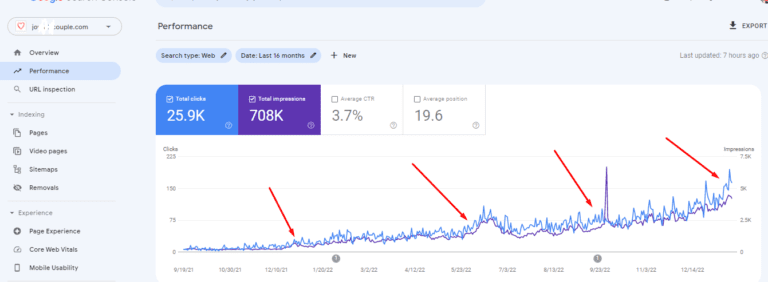
JCouple, a small card game company, struggled with poor online visibility due to a low-authority website, content duplication, and indexing issues.
Tasks:
I implemented an SEO strategy that included HARO link building (boosting domain authority by 26%), fixing content duplication, indexing 102 previously overlooked pages, and optimizing 128 blog posts for search relevance.
Results
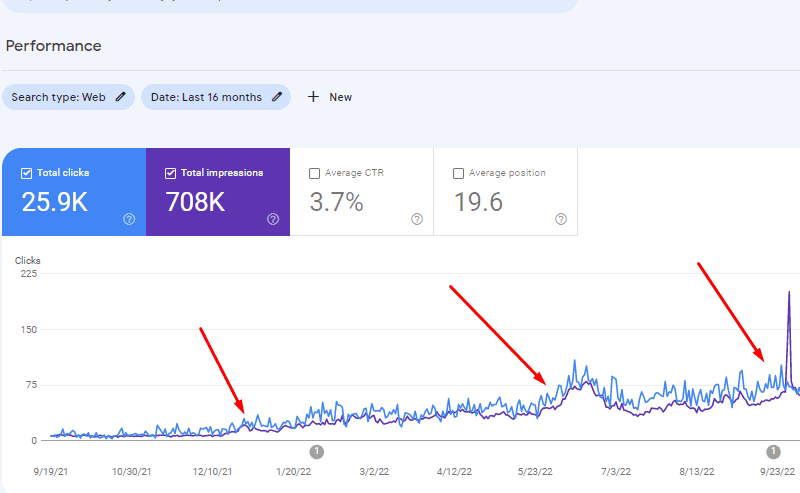
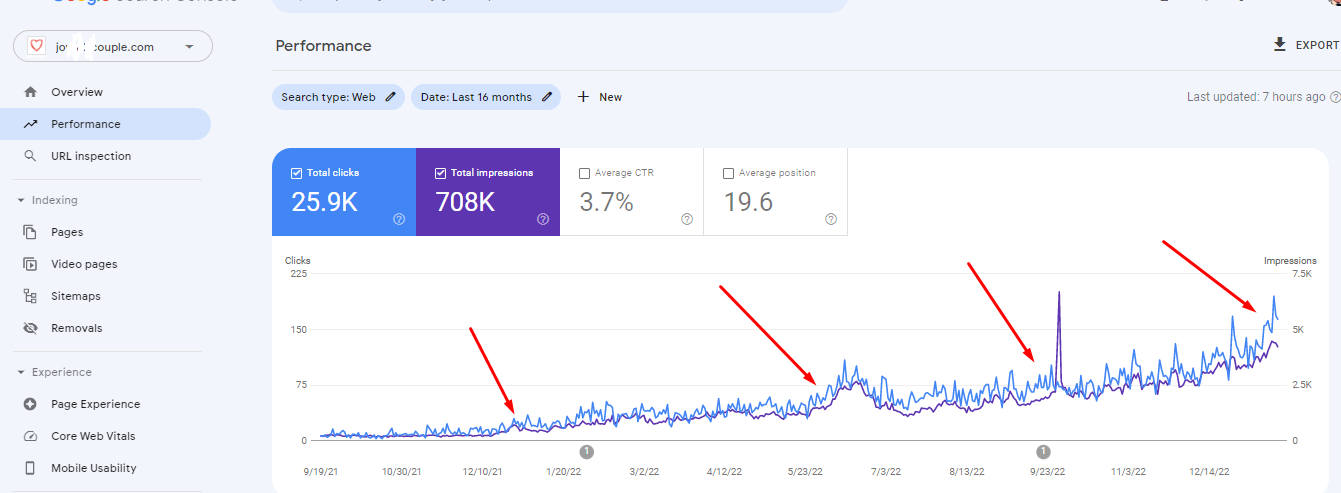
Over 16 months, these efforts led to increased organic traffic, improved search rankings, and higher sales, successfully enhancing their online presence.
JCouple, a small card game company, faced the challenge of selling more of their products through Google. Despite offering high-quality card games, they struggled to gain visibility online due to a low authority website. This low authority was affecting the performance of their articles in search results, hindering their ability to reach potential customers effectively.
Issues with the Site
JCouple’s website had several issues contributing to its low authority. These issues included content duplication, misconfigured canonical settings, and a low crawl budget. These factors prevented search engines from properly indexing their product and category pages, limiting their visibility in search results.
Solution
To address these challenges, we implemented a comprehensive strategy to improve JCouple’s website authority and search engine visibility. Key elements of our solution included:
HARO & Outreach-Based Link Building: We identified 497 link building opportunities through Help a Reporter Out (HARO) and outreach efforts. By securing high-quality backlinks from authoritative websites, we were able to significantly increase JCouple’s domain authority by 26%.
Fixing Internal Content Duplication: We identified and rectified instances of internal content duplication on the website. This ensured that search engines could properly index and rank each unique piece of content, improving JCouple’s overall search visibility.
Indexing Product & Category Pages: We indexed 102 previously overlooked product and category pages that hadn’t been crawled due to misconfigured canonical settings and a low crawl budget. This expanded JCouple’s online presence and increased the likelihood of their products appearing in relevant search queries.
Creation of Topical Clusters & Keyword Focus: We supervised the creation of topical clusters through strategic internal linking. Additionally, we developed a keyword focus and content structure for 128 blog posts, aligning them with search intent and optimizing them for relevant keywords.
Result
The implementation of these strategies resulted in a steady uplift in traffic and conversions for JCouple over the past 16 months. By improving their website authority, addressing technical issues, and optimizing content for search, JCouple was able to increase their visibility on Google and drive more sales of their card games.
Service Offerings
SEO Strategy Done For You
Developing an effective SEO strategy can be complex and overwhelming. Let's craft a comprehensive SEO strategy that improves your website’s search engine rankings, enhances online visibility, and drives organic traffic
Let's turn your website into a precise tracking machine that generates the data you need to surpass your competitors. We'll develop the appropriate measurement plan that resonates with your unique business situation
Persona Research + Positioning + Narrative Design
Get detailed Customer Profiles (ICPs) and Economic Buyer Personas (ECPs) to ensure your marketing efforts are precisely targeted. We'll craft coherent positioning and messaging assets that'll clearly articulate your unique value proposition and help you standout
PPC Campaign Setup & Management
Many businesses struggle with managing PPC campaigns effectively, resulting in wasted ad spend
Lets conduct thorough research and develop a strategic PPC plan tailored to your business objectives.
Conduct A/B tests and other conversion yield experiments. Be it lead generation, downloads or ecommerce sales, CRO & UX testing would amplify your conversions and make your business more profitable
Many businesses struggle with prices that fail to reflect market value or customer expectations. Let's audit your current pricing plans, and refine them to align with both market demand and your customer's value perceptions
View App Here - https://codepen.io/Ojomiba/pen/yKpmBq
An electronic game of memory skill. It was designed with an algorithm that generates a seemingly random sequence of lights and sounds which must be recalled by the player. With increasing levels of difficultly, the algorithm can vary the sequences with which the lights and sounds are created
Designed a 3 x 3 tic tac toe game. I developed an algorithm that allows automated, yet intelligent computer responses to the moves made by a human player.
Designed a digital clock that incorporates the pomodoro technique of time management. The clock divides time into 25 minute segments called pomodoros. This helps to enhance productive time management.
A web application that utilizes the Wikipedia API to allow users to rapidly search and access aggregated Wikipedia content. It also incorporates an algorithm that generates random digits through which seemingly random content can be pulled from Wikipedia
Education
Product Marketing Certified: Core
Product marketing alliance
PRO+
Endorsed by a range of esteemed global brands, including, Google, Facebook, HubSpot, Deliveroo, and Microsoft, Product Marketing Core includes 11 in-depth modules focusing on key areas like:
Product & User Research, Personas, Positioning, Onboarding, Pricing, Sales Enablement, OKRs.
Growth Product Manager
Udacity (December 2021 to April 2022)
A program for understanding how to inspect the AS-IS state of a product and getting the product to the To-Be state by creating, validating, and expanding growth loops. Including the setup of acquisition funnels, identifying core customers, and optimizing growth loop models.
Growth Marketing Minidegree
CXL Institute (June to September 2021)
25credentials
95 hours 21 mins of learning from the World's top 1% marketers about how to instrument rapid cycles of ideation & experimentation
Conversion Optimization Minidegree
CXL Institute (May - December 2021)
23Credentials
90+ hours of comprehensive training in conversion optimization, the neuroscience of sales, user experience and digital analytics
BSc in Industrial Chemistry
University of Ibadan
4.1GPA
This scientific background refines an ability to approach marketing challenges with precision and attention to detail. This unique combination of scientific training and marketing acumen has served to drive growth and innovation in dynamic business environments
Work Experience
Senior SEO & CRO Specialist
Coalition Technologies
USA
In my current role, I conduct deep algorithmic research to isolate the content vectors required to improve the organic ranking of sites in the SaaS and e-commerce industry.
Growth Specialist (CRO, PPC, SEO & Email)
Formplus
UK
Guided the trajectory of marketing messaging and the overall product evolution by developing user narratives, customer rediscovery, channel testing and cohort value analyses
SEO Specialist & Email Manager
Nairametrics
Lagos
Increased page views from 40K to 150K (~375% growth) due to backlink reclamations on broken dofollows, shifting from keywords to a focus on entity salience, and by using of DMCA requests to mitigate
content duplication on spammy sites.
Google Ads Manager
More Hot Leads
Canada
Designed Ad copywriting frameworks to assist writers in circumventing policy and language restrictions for Health, Supplements and Real Estate Ads.
Developed campaign optimization workflows to guide the auditing sequences and routines required to scale with PPC across various Industries
Senior SEO Supervisor
Carlcare (Transsion Group)
Enhanced Global Reach and SEO Performance through Technical Audits and Strategic Content Direction. In 3 months, Achieved a 78% increase in traffic by resolving Hreflang issues, facilitating successful internationalization across 58 countries
.
Entity Salience: How to Use the Google NLP API for SEO and GEO
Back in 2022 I wrote about entity salience as a way to write better ranking content. The idea still holds. What has changed is where the content ends up.
Google now writes answers at the top of the results page. ChatGPT, Gemini, Perplexity and Copilot pull passages from pages and quote them. These systems break a page into chunks, work out what each chunk is about, and decide which chunk answers the question.
The middle step is the one salience speaks to. If a machine cannot tell what your paragraph is about, it will not pick your paragraph. Entity salience gives you a number for how clearly a block of text signals its subject.
This article covers what the metric is, how to check it without writing any code, where it pays off across different page types, and how to run it over a whole site with Python.
What entities and salience actually are
An entity is a noun or group of nouns that names a thing. People, places, brands, products, numbers and dates are all entities. If something in your copy has a name, it is an entity.
Salience is how central that entity is to the text. The score runs from 0 to 1. A score near 1 means the text is mostly about that thing. A score near 0 means the thing is barely relevant to the text.
Salience works as a share of a fixed total. The scores for all the entities in one block of text add up to roughly 1. That means every entity’s score depends on what else is in the text.
This has two practical effects:
Adding more topics to a page lowers the score of the main topic. Each new entity takes a slice of the same pie.
Removing filler raises the score of what is left. Cutting the sentences that stray from your subject often does more for the score than adding sentences about it.
This is why the same page can score very differently depending on what you feed into the tool. If you paste a full page with the navigation, cookie notice and footer included, you are mostly scoring the template.
Why salience matters for SEO and GEO
The metric does two different jobs now. It helps with classic ranking, and it helps with getting quoted in AI answers. The second use is newer and less understood.
What it does for SEO
Search engines have to work out what a page is about before they can decide which queries it suits. Salience is a direct read on how well your page communicates that.
When I run salience checks on pages that underperform, the same three problems show up:
The brand name outranks the product. The company name comes back as the dominant entity and the product type sits well below it. The page reads as being about the business rather than about what the searcher wants.
The page has no clear subject at all. Scores are spread thin across a long list of entities with nothing standing out. This usually means the copy tries to cover too many things at once.
The main entity is there but sits low. Often the page buries its subject under an intro that warms up for three paragraphs before saying what the page is about.
None of these are keyword problems. You can hit your keyword density target and still have all three. Salience catches what keyword counting misses, because it looks at position, grammar and sentence structure rather than frequency alone.
What it does for GEO
Generative engines work in chunks. They split pages into passages, build a representation of each passage, and retrieve the ones that match a question. A passage gets quoted when the system is confident about what it covers.
Salience is a rough proxy for that confidence. A passage with one dominant entity is easy to classify. A passage with eight entities at similar scores is ambiguous, and ambiguous passages lose to clearer ones.
This changes how you should write for AI visibility:
Write in self-contained blocks. Each section should make sense if someone lifts it out of the page. A retrieval system often does exactly that.
Keep one subject per block. A paragraph covering shipping, returns and warranty gives the machine three weak signals instead of one strong one.
Name things explicitly inside each block. Pronouns that refer back three paragraphs are fine for human readers but lose the thread when a chunk is extracted on its own.
All of this is measurable. You can score a passage, rewrite it, and score it again to see whether the change worked.
The easy way to check: a Chrome extension
You do not need to write code to use this. I built a Chrome extension called Entity Salience Analyzer that calls the same Google API the script at the end of this article uses.
It works in two modes.
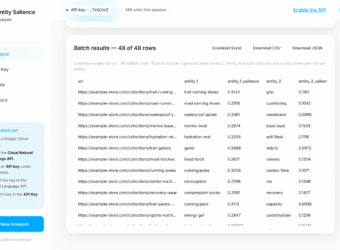
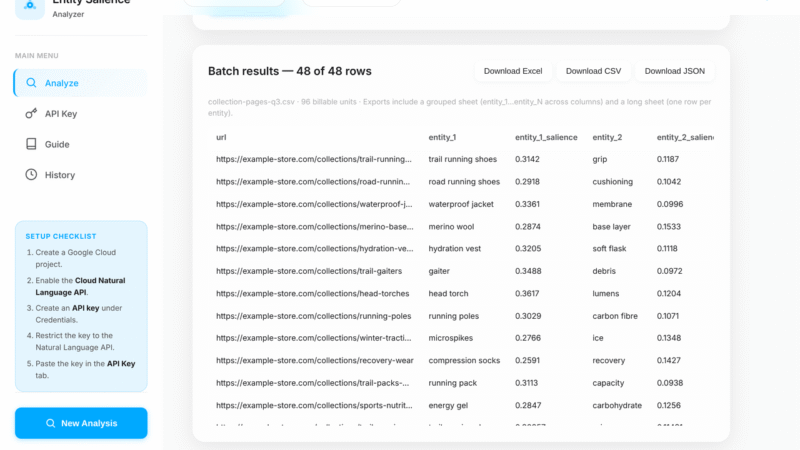
Single text block. Paste in a paragraph, a product description or an FAQ answer. You get back a ranked list of entities with salience bars, entity types, how many times each was mentioned, and a link where Google matched the entity to something in its Knowledge Graph. That last signal is useful on its own. It tells you which of your terms Google recognises as a real thing rather than just a phrase.
CSV or Excel batch. Upload a file with one column of URLs and one column of text. The extension works through every row and gives you one spreadsheet with everything in it. This is how you audit a category of pages rather than one page.
A few things it handles that save time:
It estimates cost and runtime before you spend anything. The API charges per thousand characters, so a large file can add up.
It keeps going when a row fails, then lists the failures at the end so you can fix and rerun just those.
It exports to Excel, CSV or JSON. The Excel file has a sheet in wide format, a sheet in long format that pivots easily, and a sheet recording the settings used.
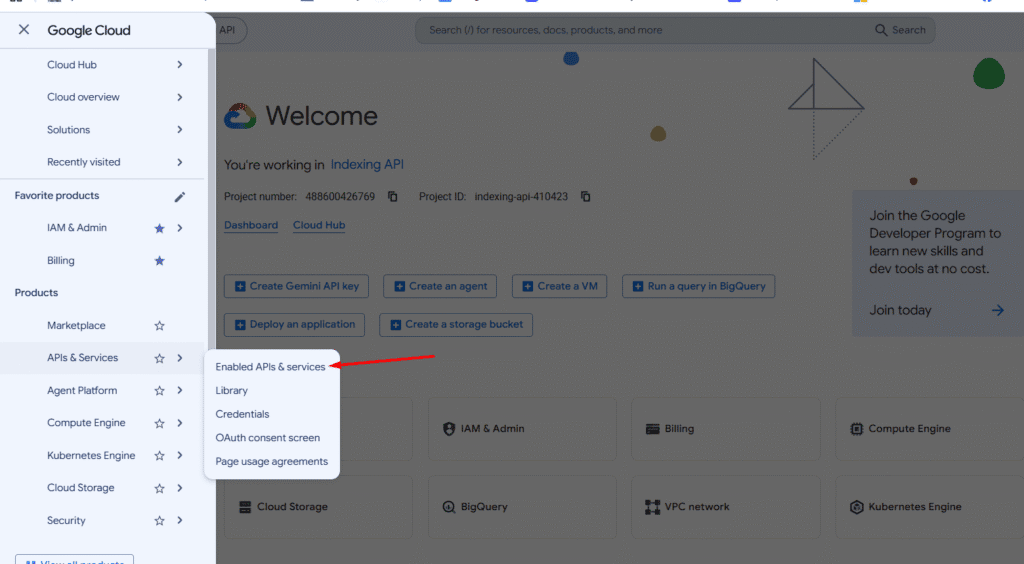
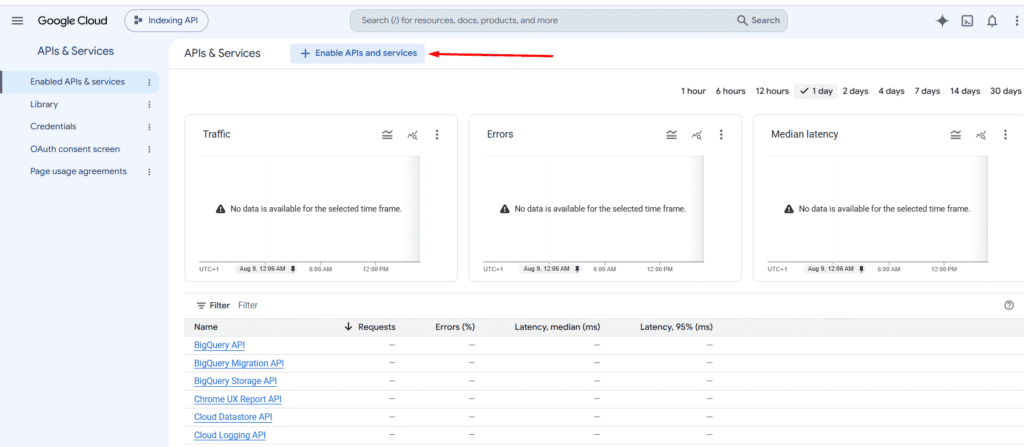
You still need a Google Cloud API key, which is free to create. The setup is five steps and the extension walks you through them. Restrict the key by API rather than by HTTP referrer. Referrer restrictions do not work from a browser extension, and every request will fail.
If you have used Google’s public NLP demo before, the extension does the same job with three differences. It handles bulk input, it keeps a record of what you ran, and it does not cut off long text the way the demo page does.
The five things that move a salience score
Based on Google’s own research papers, five textual features decide how salient an entity is. Each one gives you something specific to change in the copy.
1. Where the entity sits
Beginnings carry the most weight. An entity near the start of the text scores higher than the same entity near the end. The same applies within each paragraph and each sentence, though less strongly. The end of a sentence is slightly stronger than the middle.
What to do: Put your target entity near the start of the text, the start of paragraphs, and the start of sentences.
2. Its grammatical role
The subject of a sentence outranks the object. The subject is the thing doing something. The object is the thing being acted on.
This is easier to see with an example. Take these two sentences:
“Messi scored the winning goal” gives Messi 0.70 and goal 0.30.
“The winning goal was scored by Messi” gives goal 0.69 and Messi 0.31.
Switching from active to passive voice moved the score by nearly forty points, using the same words both times.
What to do: Rewrite so your target entity is the subject of the sentence wherever it reads naturally.
3. How it links to the rest of the sentence
An entity does not have to be repeated in every clause to be prominent. What matters more is whether the other parts of the sentence depend on it for their meaning.
Take “France held Argentina to penalties but could not have done it without Mbappe’s hattrick.” France connects to most of the sentence through the verb “held”. That dependency is what lifts its score.
What to do: In longer sentences, build the clauses so they hang off your target entity rather than running alongside it.
4. How clearly it is named
Google’s model is good at recognising entities but not perfect. It can fail to connect two mentions of the same thing when the capitalisation, plural form or acronym changes. Switching between “SEO” and “search engine optimization” can split one entity into two, and both halves score lower than the whole would have.
What to do: Refer to your target entity the same way throughout, especially if it is a multi-word phrase.
5. How often it is mentioned, and in what form
Frequency matters, but not in the way keyword counting suggests. Google recognises three kinds of reference to the same thing:
Named: Mo Salah
Nominal: the striker
Pronominal: he
All three count toward the entity. This means you can raise salience without repeating the same phrase over and over.
What to do: Increase mentions using a mix of all three forms. Do not use this as cover for keyword stuffing. Repeating the exact phrase every time reads badly to people and does not score better than a natural mix.
Product page descriptions
Product descriptions are the best place to start with salience. They are short, so the API handles them cleanly, and the text usually has one obvious subject, so a bad score is easy to diagnose.
Three patterns come up again and again.
The brand outranks the product. A description mentions the brand name in the first sentence, again in the second, and again in the third. The brand finishes as the dominant entity and the product type lands far below it. The page reads as being about the company. Shoppers searching for the product type will not find it, and a shopping surface trying to classify the item has to work harder than it should.
Features outrank the product. Descriptions that lead with a feature list often score the features above the thing itself. A kettle description can come back with “stainless steel” scoring above “kettle”. The fix is to name the product in the opening sentence and let features follow.
No entity dominates. Marketing copy that spends its words on mood rather than substance produces a flat spread with no clear winner. The API has found no clear subject, which usually means a reader would struggle too.
For retail pages there is a second benefit beyond ranking. Shopping feeds and AI shopping agents both have to work out what a product is from its text. A description where the product type is clearly dominant classifies more reliably than one where it is buried.
A practical approach for a product description:
Put the product type in the first six words.
Make the product the subject of the opening sentence, not the brand.
Name the product again in nominal form later in the text (“the kettle”, “this jacket”) rather than repeating the full name.
Keep the description to one product. Cross-sells and bundle mentions pull salience away.
Run the description through the extension before and after. On a short block you will see the change immediately.
Collection pages: above and below the fold
Collection and category pages are harder, because the copy is split into two blocks that do different jobs. Most teams write them as one piece of text and let the template cut it in half, which hides problems in both halves.
Score the two blocks separately. The intro above the product grid and the long copy below it are different documents as far as a chunking system is concerned. They will be split apart anyway. Measuring them together gives you an average that hides problems in both.
Above the fold
This is usually a short paragraph sitting between the H1 and the product grid. It is the highest-value text on the page for salience, because position weighting is strongest at the start of a document.
It is also the block most likely to be wasted. Typical above-the-fold copy opens with a line about the brand’s heritage or a general statement about the category. Both push the actual category term down the page and away from the strongest position.
What to aim for:
The category term as the subject of the first sentence.
The category term as the clear top entity when that block is scored on its own.
No brand mention in the first sentence unless the brand is the search term.
No mention of other categories. Links to sibling categories belong in navigation, not in this paragraph, because each one takes a slice of the salience.
Below the fold
The long copy under the grid has a different purpose. It covers buying considerations, materials, sizing, use cases and whatever else supports the decision. It is also where most sites dump keyword variations.
Treat this block as several blocks. If it covers four subtopics, give each one its own subheading and score each section on its own. A 600-word block scored as a whole will return a flat spread that tells you nothing, because the API is averaging four different subjects.
Scored section by section, the same copy becomes useful. You can see which subtopics read clearly and which ones wander. Sections that cover two things at once show up as two mid-range entities instead of one strong one, and those are the sections worth splitting.
This matters for GEO more than for ranking. Below-the-fold category copy is exactly the kind of text a generative engine pulls from when answering a question about how to choose a product. A section with one clear subject is retrievable. A paragraph that covers materials, sizing and care in six sentences is not.
FAQ answer blocks and getting cited
FAQ answers are the easiest place to apply this metric. An FAQ answer is already short, self-contained and tied to one question, which is the shape a retrieval system looks for. Salience tells you whether a given answer holds that shape.
A strong FAQ answer scores one entity well clear of the second. A weak one spreads its score across several entities with nothing dominant.
Why the gap matters
When a system chunks your page, each FAQ answer becomes its own candidate passage. The system has to decide what that passage is about and whether it answers the question in front of it. A passage with one dominant entity makes that easy. A passage with four competing entities could be about any of them.
This is also why answers that start with throat-clearing do badly. “That’s a great question, and the answer depends on several factors” spends the strongest position in the passage on words that carry no subject. By the time you name the thing, you are in the middle of the block where position weighting is weakest.
How to write an answer block that scores well
Repeat the question’s subject in the first sentence of the answer. Do not rely on the question above it. When the passage is extracted, the question may travel with it, but the answer should stand alone either way.
Answer in the first sentence. Put the actual answer first and the explanation after. This serves readers and puts the key entity in the strongest position at the same time.
Keep each answer to one question. If an answer drifts into a related question, split it into two FAQ entries.
Avoid pronouns in the opening. “It usually takes three days” is weaker than “Standard delivery takes three days.” The second names the entity.
Keep answers short. A paragraph or two is long enough for the API to find a subject and short enough that one subject stays dominant.
Checking a set of FAQs
Batch mode is the practical way to do this. Put every FAQ answer on the site into a spreadsheet with its question as the label, run the whole file, and sort the output by the top entity’s salience.
The answers at the bottom of that sort are your weakest candidates for citation. The weak ones usually share a problem. They answer a question the heading did not ask, or they cover two things at once. Both are quick to fix once you can see which answers they are.
Running it in bulk with Python
If you are comfortable with Python, the script below does what the extension does and gives you room to change the logic. This is the version I use when a job needs something the extension does not cover, such as joining the output to crawl data or running it inside a bigger pipeline.
The setup
The script reads a CSV with two columns, url and text, calls the API once per row, and writes one output CSV where each row keeps its top ten entities.
NLP_ENDPOINT points at v1 of the API. That choice matters. Google also publishes a v2 endpoint, but v2’s entity analysis returns a probability field instead of salience. Probability is the model’s confidence that it identified the entity correctly, which is a different question from how central the entity is. If you switch this URL to v2, the script will break, because the salience field it sorts on will not be there.
REQUEST_DELAY is a one second pause between calls. It keeps you inside the per-minute quota. On small files you can lower it. On files of several thousand rows, leave it alone.
MAX_ENTITIES sets how many entities each row keeps. Ten is enough for most work. Raise it if you are looking for whether a specific term appears at all, rather than what dominates.
API_KEY should never be committed to a repository or pasted into a shared notebook. If a key leaks, delete it in Google Cloud Console and issue a new one. Restricting the key is good practice but does not undo exposure.
type is set to PLAIN_TEXT. If you send HTML with this setting, the API scores the tags as if they were words. Change it to HTML when you are genuinely passing markup, and the API will parse the tags and weight headings and emphasis differently. Scores will shift, so do not mix the two settings in one audit.
language is hardcoded to English. Setting it explicitly is safer than leaving it out, because auto-detection can go wrong on short blocks and return entities from the wrong language model. Change it if you work on non-English sites.
The main loop
def process_text_blocks():
 results = []
 with open(INPUT_CSV, newline="", encoding="utf-8") as f:
 reader = csv.DictReader(f)
 for row in reader:
 url = row["url"]
 text_block = row["text"]
 print(f"Analyzing text block for URL: {url}")
 try:
 entities = analyze_entities(text_block)
 entities = sorted(entities, key=lambda e: e["salience"], reverse=True)
 row_result = {"url": url, "text_block": text_block}
 for i, entity in enumerate(entities[:MAX_ENTITIES], start=1):
 row_result[f"entity_{i}"] = entity["name"]
 row_result[f"entity_{i}_type"] = entity["type"]
 row_result[f"entity_{i}_salience"] = round(entity["salience"], 5)
 row_result[f"entity_{i}_mentions"] = len(entity.get("mentions", []))
 results.append(row_result)
 except Exception as e:
 print(f"Failed for URL {url}: {e}")
 time.sleep(REQUEST_DELAY)
 write_output(results)
The sort on salience descending is what puts the most central entity in the entity_1 columns. Everything after that is reshaping.
The mentions count comes from the length of the mentions array the API returns. This counts every reference the model resolved to that entity, including nominal and pronominal ones. A high mention count with low salience is a useful signal on its own. It usually means the entity appears in repeated boilerplate rather than in the substance of the page.
One thing to watch in this loop. The except block prints the error and moves on, which means a failed row disappears from the output entirely. If 400 rows go in and 388 come out, you will not know which twelve are missing without comparing the files. For client work, collect the failures into a list and write them to a second file.
Writing the output
def write_output(rows):
 fieldnames = ["url", "text_block"]
 for i in range(1, MAX_ENTITIES + 1):
 fieldnames.extend([
 f"entity_{i}",
 f"entity_{i}_type",
 f"entity_{i}_salience",
 f"entity_{i}_mentions"
 ])
 with open(OUTPUT_CSV, "w", newline="", encoding="utf-8") as f:
 writer = csv.DictWriter(f, fieldnames=fieldnames)
 writer.writeheader()
 writer.writerows(rows)
The output is in wide format, one row per URL with forty entity columns across. This suits eyeballing and filtering in a spreadsheet.
It does not suit pivoting. If you want to count how often a given entity appears as the top entity across a site, or chart the salience distribution, you need long format instead: one row per entity, with the URL repeated. That is a small change to the writer, and it is worth having both.
Things worth adding
The script as written is a starting point. Four changes make it production-ready:
Capture failures. Append failed rows to a list and write them out, so your row counts reconcile.
Stop early on auth errors. A bad key fails every row the same way, so checking for a 401 or 403 and breaking out saves you watching a thousand identical errors.
Guard the character limit. The API rejects very large documents, so check the length of each text block before sending and skip or split anything oversized.
Keep the Knowledge Graph metadata. The response includes metadata.wikipedia_url and metadata.mid for entities Google recognises, and the script discards both. They tell you which of your terms map to known entities rather than loose phrases.
A workflow you can repeat
The metric is only useful inside a process. This is the one I use on client sites.
1. Pick one page type. Do not audit a whole site at once. Product pages, category intros and FAQ blocks each need different fixes, and mixing them produces a spreadsheet nobody acts on.
2. Extract clean text. Pull the copy without navigation, footers, cookie notices or related-product blocks. This step decides whether your results mean anything. Scoring a full page template tells you about the template.
3. Split long pages into sections. Anything over roughly 300 words should be scored in parts. One score for a 900-word page is an average across several subjects and will not point you at anything specific.
4. Run the batch and sort by the top entity’s salience. The bottom of that sort is your work queue.
5. Check whether the top entity is the right one. This is the judgment step and no tool does it for you. A page can have a strong top entity that is the wrong entity. A category page dominated by the brand name scores well on clarity and badly on relevance.
6. Rewrite using the five factors. Move the target entity earlier, make it the subject, keep its naming consistent, add nominal and pronominal references, cut the entities that compete with it.
7. Rescore and compare. Keep both files. The before-and-after is the clearest way to show a client that a rewrite did something measurable.
For competitor work, run the same extraction on the pages ranking above you for your target query. You are looking for which entities their copy makes dominant that yours does not. That comparison is usually more useful than the absolute scores, because both pages are measured the same way.
What the score will not tell you
A few limits are worth knowing before you build reporting around this metric.
It is not a ranking factor. This is Google’s general-purpose language model, not the ranking system. A high salience score does not mean a page will rank. It means the text communicates its subject clearly, which is a sensible thing to aim for regardless.
Scores are only comparable within the same text. Because salience is a share, a 0.30 in a 60-word FAQ answer and a 0.30 in a 500-word article are not the same achievement. Compare blocks of similar length or compare the same block before and after a rewrite.
The demo tool and the API can disagree. If a client compares your numbers against Google’s public demo and gets different results, the usual cause is that different text went in. It can also be a version difference. Check whether the demo is showing salience or probability, since v2 returns probability instead and the two measure different things.
Long text dilutes everything. The API processes the text you send as one document. Past a few hundred words, scores flatten out and stop being actionable. Section-by-section scoring is not a workaround, it is the correct method for long pages.
Entity recognition has gaps. The model misses entities, merges things it should keep apart, and sometimes splits one thing into two when the naming varies. Treat a surprising result as a prompt to look at the text rather than a finding in itself.
Structural entity types are noise for content work. The API returns DATE, NUMBER, PRICE, ADDRESS and PHONE_NUMBER alongside the useful types. On product pages these can crowd the top ten. Filter them out of your reporting.
The numbers are directional. What they catch well are problems a keyword report cannot show you, such as a brand name swamping the product it should be selling, or an FAQ answer covering two questions at once.
Where to start
If you have never used this metric, start with one FAQ block. Paste an answer into the Chrome extension and look at what comes back. You will usually find at least one answer whose dominant entity is something other than what the question asked about.
From there the work scales in order of effort:
Score your top twenty FAQ answers and fix the weakest quarter.
Score the above-the-fold copy on your main category pages.
Batch your product descriptions and look for pages where the brand outranks the product.
Compare your key pages against the competitors ranking above them.
The writing advice has not changed much since I first wrote about this in 2022. Put your subject early, make it the subject of the sentence, name it consistently, and cut what competes with it. What has changed is that there is now a second reason to do it. Search engines use this kind of signal to decide what your page is about. Generative engines use it to decide which passage to quote.
Google Search is no longer just a list of ten blue links.
As search queries became more complex, Google began separating results into different search surfaces based on the type of information and user intent behind a query.
This led to dedicated surfaces for news, maps, books, scholarly publications, images, and shopping.
For ecommerce businesses, Google Shopping is especially important because it provides a different view of how products and brands compete in search.
A product can rank well in traditional organic search but still lose clicks because another seller has a better price, stronger reviews, faster shipping, or better product information.
This creates an interesting opportunity for SEOs.
What if you could access Google’s Shopping data directly and use it to understand what products are gaining demand, which brands are dominating a category, and how your products compare with the wider market?
That is where Google’s Merchant API becomes useful.
In this guide, we will look at how SEOs and GEO practitioners can use the Merchant API to extract market intelligence and turn it into actionable SEO and GEO insights.
We will also look at a practical workflow using a Google Colab script and Chrome extension that makes the process easier.
What Are Merchant Listings and Google Shopping?
Merchant listings are product-focused results that can appear across Google Search.
They can show a product, the stores that sell it, and information that can influence a person’s purchase decision.
Depending on the product and the information available to Google, this can include:
Product name
Price
Reviews
Ratings
Shipping information
Estimated delivery dates
Product availability
Store information
Other product attributes
Google Shopping is the dedicated shopping search surface where products are displayed in response to commercial and transactional searches.
For example, someone searching for:
“best running shoes”
has a different intent from someone searching for:
“how to choose running shoes.”
The first query has a stronger commercial intent.
Google therefore needs structured product information to decide which products to show and how to present them.
For ecommerce businesses, there are several ways to provide Google with this information.
One is structured data on product pages.
Another is a product feed submitted through Google Merchant Center.
This makes Merchant Center more than a platform for managing shopping campaigns.
It is also a major source of product information that Google can use across its shopping ecosystem.
Why Should SEOs Care About Merchant Center Data?
Most SEO workflows start with the website.
You crawl the site.
You research keywords.
You analyze competitors.
You look at Search Console.
You review rankings and traffic.
All of this is useful.
But there is another question worth asking:
What is actually happening in the market?
For example:
Which products are becoming more popular?
Which brands dominate a category?
Which products are moving up the Shopping rankings?
Are we selling products that are gaining demand?
Are our products competitively priced?
Which categories deserve more attention?
Which products should receive more internal links?
Are there differences between countries?
These questions are difficult to answer using traditional SEO tools alone.
Merchant API data provides another layer of market intelligence.
The API allows you to query Merchant Center reporting data programmatically and analyze it at a much larger scale than would be practical through a graphical interface.
This is where the Merchant API becomes particularly interesting for ecommerce SEO.
What Is Google’s Merchant API?
The Google Merchant API is a programmatic interface for interacting with Google Merchant Center.
Instead of manually navigating the Merchant Center interface, you can use code to authenticate with Google, send requests, retrieve data, and process the results.
This is particularly useful for large ecommerce websites.
Imagine that you are working with 50,000 products.
You may want to compare market demand across several categories, countries, and time periods.
Doing that manually would take a significant amount of time.
An API allows you to automate the process.
Instead of asking:
“What information can I see in Merchant Center?”
you can ask:
“What information can I extract from Merchant Center that can help me make better SEO decisions?”
That is the more useful question.
The API can also be connected to Python, Pandas, Google Colab, spreadsheets, databases, and other systems.
This means you can extract the data, analyze it, compare it across periods, and combine it with other SEO datasets.
What Can You Use the Merchant API For?
Google provides a wide range of Merchant API functionality.
For SEO and GEO, some of the most useful applications include:
Managing Merchant Center data sources
Managing product information
Updating product attributes
Managing inventory
Managing prices
Working with reviews
Accessing reporting data
Analyzing best-selling products
Analyzing best-selling brands
Reviewing price competitiveness
Comparing markets
Studying changes in product demand
Not every API capability is directly an SEO metric.
The real value comes from using the information to answer SEO questions.
For example, Google might show that a particular product cluster is gaining demand.
Google does not necessarily tell you:
“Create a new category page.”
That interpretation is the SEO’s job.
The API provides the market signal.
The SEO strategy turns that signal into an action.
A Simpler Way to Use the Merchant API
The Merchant API is powerful, but working with APIs can be intimidating if you are not a developer.
You have to deal with authentication, Google Cloud, service accounts, API requests, Merchant Center Query Language, reporting tables, date formats, and data processing.
That is why I built a workflow around the API that removes much of this technical work.
The extension is designed to make the Merchant API research process easier to use from the browser.
This is important because SEO research rarely happens inside one tool.
You may be looking at:
A Google Search result
A competitor’s product page
A category page
Product information
Market data
Search results
AI-generated answers
The extension provides a bridge between the raw Merchant API data and the browser-based research process.
Instead of treating Merchant API data as a separate spreadsheet that you look at once, the extension can become part of the way you investigate products, brands, categories, and competitive opportunities.
The broader workflow becomes:
1. Merchant API
Extract market information.
2. Colab script
Process and organize the information.
3. Chrome extension
Use the information during browser-based research.
4. SEO/GEO analysis
Identify opportunities.
5. Website action
Optimize the relevant pages and entities.
This is the main reason for having both tools.
The script handles the data extraction.
The extension helps bring the research into the working environment where SEO decisions are made.
Who Is This Workflow For?
You do not need to be a developer to use the workflow.
It is particularly useful for:
Ecommerce SEOs
Technical SEOs
GEO practitioners
SEO agencies
Ecommerce growth teams
Product marketers
Competitive intelligence teams
It becomes especially valuable when you work with large product catalogs or multiple markets.
Instead of manually researching every category, you can automate the collection of market information and focus your time on interpreting the results.
How to Access the Google Merchant API
Before using the Colab script, you need to establish access to the Merchant API.
At a basic level, you need:
A Google Merchant Center account
Admin access to that account
A Google Cloud project
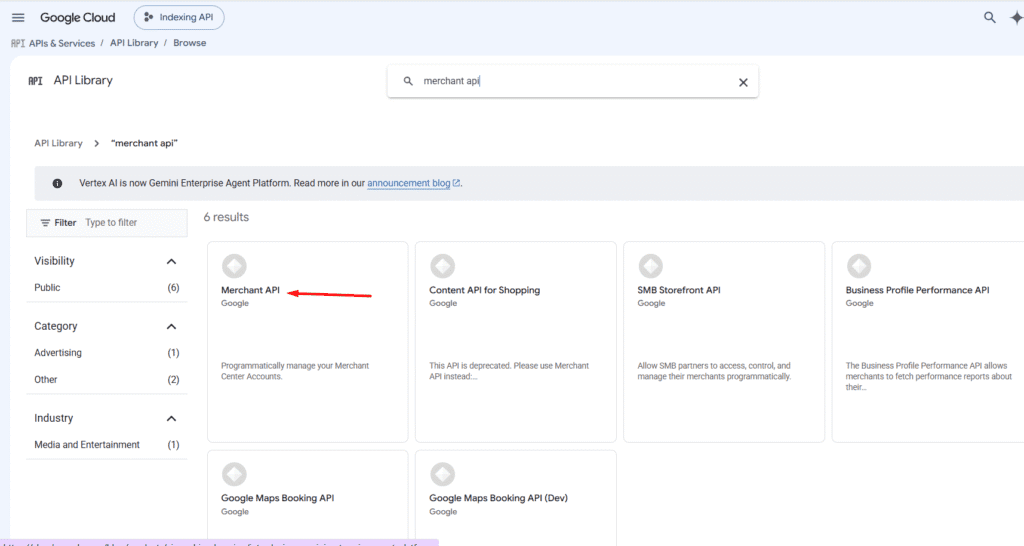
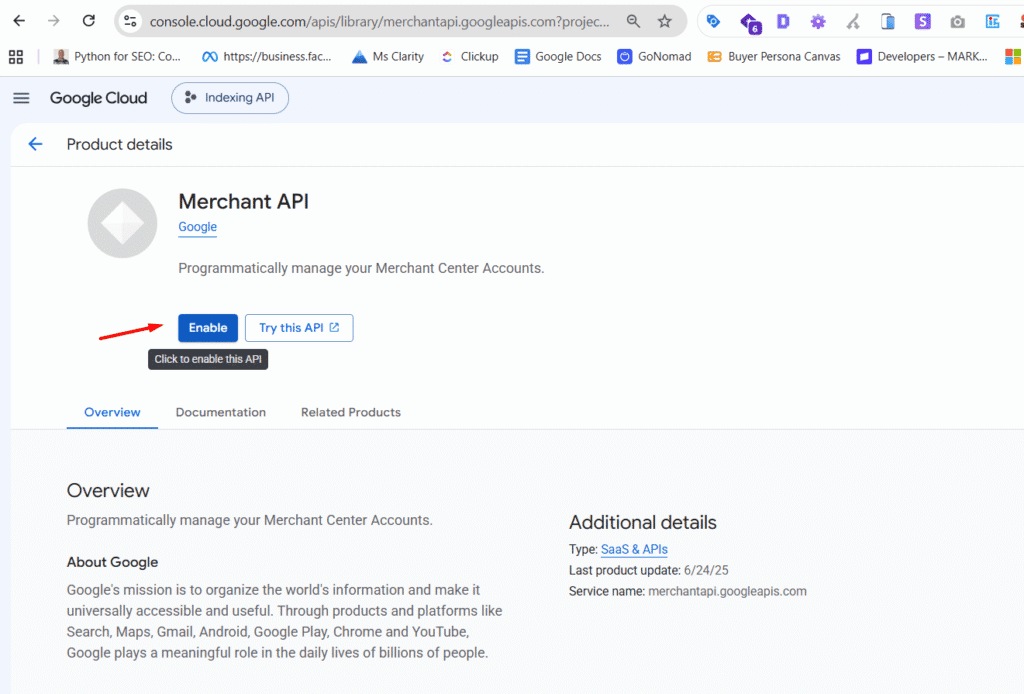
Merchant API enabled
A service account or another supported authentication method
Merchant Center access for the authenticated identity
Developer registration for the Merchant Center account
The setup looks complicated at first, but it can be broken into a few steps.
Step 1: Find Your Merchant Center Account ID
Log into Google Merchant Center.
Your account ID is displayed in the Merchant Center interface.
You will need this number when configuring the script.
For example:
ACCOUNT_ID = "5609626931"
Keep this number available.
You will use it when registering the developer project and when running reports.
Step 2: Create a Google Cloud Project
Open Google Cloud Console and create a project.
You can also use an existing project.
Once the project is ready, open:
APIs & Services → Library
Search for Merchant API.
Enable it.
If you skip this step, API requests can return a 403 error.
Step 3: Create a Service Account
Go to:
IAM & Admin → Service Accounts
Create a service account.
You can give it a name such as:
merchant-api-runner
Once it has been created, open the service account and select:
Keys → Add Key → Create new key → JSON
Google will generate a JSON credentials file.
Keep this file secure.
Anyone who has access to the credentials may be able to use the associated Google Cloud permissions.
Step 4: Add the Service Account to Merchant Center
The Google authentication library can then use these credentials to create an authenticated Merchant API client. One important detail is that Google Colab sessions are temporary.
When the session resets, the uploaded JSON file may disappear.
You will therefore need to upload it again when starting a new session.
Step 6: Register Your Developer Project
Before running the reporting workflow, Google requires the Merchant Center account to be linked to the Google Cloud project.
This determines the market you want to investigate.
For example:
COUNTRY = "US"
Category
You can provide a Google product taxonomy category ID.
Or you can use:
CATEGORY_ID = None
to query across categories.
Date range
You define the period you want to investigate.
Granularity
You can use:
"WEEKLY"
or:
"MONTHLY"
The script handles the reporting dates automatically.
Report 1: Best-Selling Products
The first report uses:
best_sellers_product_cluster_view
This is one of the most valuable reports for ecommerce SEO research.
It can provide:
Product rank
Previous rank
Relative demand
Product title
Brand
Category
Inventory status
The script queries these fields and organizes them into a dataset.
The important distinction is that this is market-level information.
You are not simply looking at which products sold best on your own website.
You are looking at products appearing in Google’s Shopping market data.
That creates a completely different SEO opportunity.
Finding Products That Are Gaining Demand
One of the most useful things you can do with this data is compare current rank with previous rank.
Imagine you find this:
Product
Previous Rank
Current Rank
Change
Product A
42
17
+25
Product B
28
31
-3
Product C
16
8
+8
Product A has made a significant move.
That should immediately trigger an SEO question:
Do we sell Product A?
If you do, check the product’s organic visibility.
If you do not, ask whether the product represents an emerging opportunity for the business.
The script can calculate these movements across the reporting period.
It compares the first and latest appearances of products and calculates the rank change.
This makes it much easier to identify products that are gaining momentum.
Report 2: Best-Selling Brands
The second report uses:
best_sellers_brand_view
Instead of looking at individual product clusters, it aggregates the information at the brand level.
The report includes:
Brand
Rank
Previous rank
Relative demand
Category
The script queries the brand data separately and produces a brand-level dataset.
This is useful for competitor research.
Suppose your ecommerce store sells products from 50 brands.
The Merchant API could help you identify which brands are gaining market visibility.
You can then compare those brands against your own SEO data.
For example:
Merchant API
Brand A is rising.
Search Console
Brand A is receiving more impressions.
Your website
You have a category page for Brand A but it has weak internal links.
SEO action
Improve the category and brand architecture.
This is a much more evidence-based way to prioritize work.
Report 3: Price Competitiveness
Price is another important factor in ecommerce.
A technically strong product page can still struggle if the product is significantly more expensive than competing offers.
Google provides price competitiveness reporting that can help you understand how your prices compare with market benchmarks.
This creates another useful diagnostic question:
“Is this an SEO problem or a commercial competitiveness problem?”
For example, suppose:
Impressions are high
Rankings are reasonable
Product information is complete
Organic traffic is healthy
Conversion rate is poor
Price may be one of the factors worth investigating.
SEO should not be viewed separately from the commercial offer.
Visibility, product quality, availability, price, and demand all influence ecommerce performance.
How Merchant API Data Can Improve SEO Decisions
The most useful way to think about Merchant API data is as a source of market signals.
For example:
Market signal
A product moves from rank 50 to rank 15.
SEO question
Do we have adequate visibility for this product?
Website investigation
The product exists but has weak internal links and limited organic visibility.
SEO action
Improve the product page, category connections, internal links, structured data, and supporting content.
Measurement
Track organic impressions, clicks, rankings, conversions, and revenue.
The API does not perform the SEO strategy.
It gives you better information for deciding where the strategy should be applied.
Using Merchant API Data for Content Strategy
The same process can be applied to content.
Suppose you operate an ecommerce website selling skincare products.
Merchant API data shows that certain product clusters are gaining demand.
You can use that information to determine whether your content architecture reflects the market.
You might need:
A stronger category page
New product pages
Supporting informational content
Comparison content
Buying guides
Use-case pages
Brand pages
The important thing is that the content strategy is being influenced by market data rather than only by keyword volume.
Keyword research tells you what people search for.
Merchant API data can help show what products and brands are actually important within the Shopping market.
Those are related but different signals.
Using Merchant API Data for Internal Linking
Merchant data can also help with internal linking.
Suppose the API identifies a group of products that are gaining demand.
You can check whether those products are adequately connected to the rest of the site.
For example:
Homepage → Category → Subcategory → Product
You may discover that an important product sits several clicks away from the main category.
Or perhaps the product has no contextual links from relevant informational content.
The market signal gives you a reason to investigate the internal link structure.
This is especially useful on large ecommerce websites where thousands of products make manual prioritization difficult.
Using Merchant API Data for GEO
The Merchant API is not a direct API for ChatGPT, Gemini, Claude, or other AI search engines.
It does not tell you which brand an AI system will recommend.
That distinction is important.
The GEO value comes from something different.
Merchant API data can help you understand which products, brands, categories, and markets matter.
You can then use those insights to improve how clearly your own website represents those entities.
For example, suppose the data shows that a particular product category is becoming important in the US.
You can ask:
Do we have a page for this category?
Is the category clearly defined?
Are the products connected to the category?
Are product attributes clearly stated?
Is our structured data complete?
Are the brand and product relationships clear?
Do supporting articles explain the use cases?
Is the same information represented consistently across the website and Merchant Center?
This creates a useful connection between Shopping intelligence and GEO.
Using Country-Level Data for International SEO and GEO
The Merchant API workflow can also be used to investigate different markets.
For example:
COUNTRY = "US"
could be changed to another supported country.
This allows you to compare market signals between countries.
That matters because product demand is not always universal.
A product can be highly competitive in the US but relatively weak in another market.
This can affect:
International SEO
Category prioritization
Product assortment
Localization
Content strategy
GEO strategy
Instead of creating the same ecommerce strategy for every country, you can use market-level data to identify where the biggest opportunities exist.
Choosing the Right Product Category
The script uses Google’s product taxonomy.
You can either query across all categories or specify a category ID.
A broad category is useful when you want to understand a large market.
A narrower category is useful when you want to investigate a specific niche.
For example, a broad report can help answer:
“What is happening in the overall market?”
A narrow report can answer:
“What is happening specifically within this product category?”
The script supports both approaches.
Working With Weekly and Monthly Data
The script supports weekly and monthly reporting.
There is an important technical detail here.
Weekly best-seller rows are associated with Mondays.
Monthly rows are associated with the first day of the month.
The script includes a date helper that automatically generates the appropriate reporting dates.
This matters because an apparently valid date range can still return no data if it does not contain an appropriate reporting date.
For example, if you request weekly data for a range that contains no Monday reporting date, an empty response does not necessarily mean something is broken.
Exporting the Data
Once the reports have been processed, the script creates Pandas dataframes.
The product and brand datasets can then be exported as CSV files.
The Colab script handles the extraction and initial processing.
The Chrome extension helps bring the information into your browser-based research workflow.
Your SEO tools provide website performance data.
Your analytics provide commercial outcomes.
Your GEO tools provide visibility across AI search environments.
Together, these sources can create a much richer picture of ecommerce demand.
You are no longer asking only:
“How do we rank this page?”
You can start asking:
“Where is the market moving, and is our website positioned to capture it?”
That is a much more powerful SEO question.
Final Thoughts
Google’s Merchant API is more than a technical interface for Merchant Center.
For ecommerce SEOs and GEO practitioners, it can become a source of market intelligence.
You can use it to identify best-selling product clusters, track ranking changes, understand brand competition, analyze relative demand, investigate price competitiveness, and compare markets.
The important part is what you do with the information.
The API itself does not create an SEO strategy.
It gives you data that can improve the strategy.
With the Colab script, much of the technical work involved in querying the API can be automated.
With the Chrome extension, the resulting information can become part of your browser-based SEO and GEO research workflow.
The resulting process is simple:
Google Merchant API
↓
Colab script
↓
Market intelligence
↓
Chrome extension
↓
SEO and GEO analysis
↓
Website optimization
↓
Measurement
That is the real opportunity.
Instead of relying only on keyword volume, rankings, or what competitors are doing on their websites, you can bring Google’s own Shopping market data into the SEO decision-making process.
For ecommerce businesses operating across thousands of products, multiple categories, or multiple countries, that can turn Merchant API data into a repeatable source of SEO and GEO opportunities.
AI Visibility, Occupancy Scores, and LLM SEO – Complete Guide
Ever since ChatGPT was launched in late 2023, information retrieval on the internet has undergone a significant transformation. Rather than clicking on links in search engine results pages (SERPs), people now prefer to save time by interacting directly with LLM chatbots. This trend has altered search activity on Google, with ChatGPT processing 1.7 billion search-like requests per day, accounting for 12% of global search traffic.
To respond to this shift, Google launched multiple AI products, including Gemini, AI Mode, and AI Overviews. Combined with the rise of alternative LLMs like Grok, DeepSeek, Claude, and Perplexity, AI-generated responses have continued to expand, displacing the clickable blue links that previously dominated results pages.
This shift has created a new SEO focus: visibility is increasingly about mentions and citations within AI responses, not just traditional rankings.
Why AI Responses Matter for Marketing and Traffic
AI responses are important both as a traffic source and as a marketing channel because:
People increasingly use AI to discover and research products, tools, and companies.
The traffic benefits of first-page rankings are diminishing, as AI responses push top-ranking pages further below the fold.
AI results are more volatile than traditional SERP rankings, creating opportunities for smaller or lesser-known entities to appear in front of their target audience.
AI responses are highly query-relevant and often more trusted than information found in standard blog posts.
AI adoption is accelerating across apps, websites, and devices, including customer service chatbots, voice assistants, and IoT gadgets.
These factors make LLM visibility an essential competency in modern SEO and digital marketing.
What is AI Invisibility?
Many brands, people, and organizations are well-known among humans, yet there can be a gap between human knowledge and AI model recall. This phenomenon is known as AI invisibility.
AI invisibility is defined as the gap between human recall and model recall:
Human Recall−Model Recall=AI Visibility Gap\text{Human Recall} – \text{Model Recall} = \text{AI Visibility Gap}Human Recall−Model Recall=AI Visibility Gap
Human recall depends on advertising, education, and cultural exposure, while model recall is based on training data, which includes encyclopedias, research articles, books, and public content.
A gap emerges when AI models fail to recognize entities that are widely known by humans, often due to limitations in their training data or the way information is structured online.
Factors Contributing to AI Invisibility
Four main factors contribute to AI invisibility:
1. Source Asymmetry
If references to an entity are behind paywalls or in closed-source datasets, AI models may underrepresent it. For example, a popular politician who only publishes paywalled articles may be less visible in AI responses than in human awareness.
2. Category Misalignment
How an entity defines itself may differ from how models categorize it. Differences between self-perception and public perception can create misalignment, affecting AI visibility.
3. Absence of Structured Data Anchors
Structured data, such as Product, Person, or Article schema, helps AI models identify and classify entities. Without these “anchors,” AI may fail to recognize important entities.
Analogy: Structured data is to AI what uniforms and badges are to humans. Without them, a random observer might underreport the number of soldiers on a road; similarly, AI underreports entities without schema.
4. Decay Tendencies
AI responses can diminish over time due to model updates, competitive content, or changes in data ingestion. Even repeated prompts may see declining mentions over 30, 60, or 90-day periods.
Why Traditional SEO Metrics Fall Short
Standard SEO metrics are insufficient for measuring AI visibility because:
Snapshot Bias: AI responses are less consistent than SERPs. The same prompt can produce different answers, making static ranking measures unreliable.
Framing Bias: Minor changes in prompt wording can significantly change AI responses, unlike traditional keyword rankings.
Dynamic Decay: AI mentions can disappear or shift as models update, unlike relatively stable search rankings.
To measure AI visibility effectively, new metrics such as occupancy scores have been developed.
Occupancy Scores: Measuring AI Visibility
Occupancy scores are standardized metrics for capturing entity mentions within LLM responses. There are two main types:
1. Answer Space Occupancy
This measures the share of answer surfaces where an entity appears when the same prompt is repeated. For example:
Prompt: “What is the oldest civilization on earth?” If “Egyptian civilization” appears in 3 out of 4 responses, its Answer Space Occupancy is 75%.
2. Prompt Space Occupancy
This measures the share of related prompts within a category or vertical that mention the entity. Dimensions include:
Occupancy: % of prompts citing the entity
Positioning: Average rank of the entity in responses
Decay: Persistence over time (30/60/90 days)
Example: For acne treatment brands, prompts like “best cream for pimples” and “best cream for blackheads” form a prompt space. If Neutrogena appears in 6 of 7 prompts, its prompt space occupancy is high.
How to Improve Your AI Visibility & Occupancy Scores
1. Be Mentioned in Credible Sources
LLMs learn from reputable content. Secure citations in:
Media outlets
Industry publications
Academic and technical reports
Reputable directories and knowledge bases
Consistency is key; repeated mentions build credibility with AI models.
2. Increase Industry Centrality
Appear alongside leading entities in your category. Achieve this by:
Guest writing on respected platforms
Collaborating with known organizations
Speaking at conferences and events
Network centrality improves AI recognition.
3. Make Your Website AI-Friendly
Ensure your content is readable and structured:
Mobile-optimized and fast-loading
Clear headings and structured layout
Avoid paywalls on key entity information
Include About pages, FAQs, and detailed product descriptions
4. Strengthen Associations
Repeatedly link your brand with its industry, category, and geography. Example: A fintech company in Nigeria should appear alongside African fintech, digital payments, Flutterwave, and Paystack.
5. Use Structured Data
Implement schema markup for:
Company name and location
Products or services
Founders and social profiles
Structured data clarifies identity and relationships for AI models.
Conclusion
LLM SEO is no longer optional—it is essential for brands aiming to be discoverable in AI-driven search. By understanding AI invisibility, measuring occupancy scores, and strategically improving mentions, structured data, and centrality, you can ensure your brand is visible and trusted across LLMs like ChatGPT, Claude, and Perplexity.
Traditional SEO metrics are no longer sufficient; success in AI visibility requires a strategic, multi-layered approach that integrates content, backlinks, schema, and network positioning.
How To Use the Copyscape API for SEO With this Python Script
If you are serious about SEO, making sure your content is original is key. Duplicate content can hurt your search engine rankings and reduce your website traffic. One tool that helps solve this problem is the Copyscape API. This tool allows you to check your content for duplication across the web in a programmatic way.
What is the Copyscape API
Copyscape is a popular plagiarism detection service. It helps you find content that has been copied or duplicated from your website or any other source. The API version of Copyscape lets developers integrate its plagiarism detection capabilities into software or scripts. This is especially useful for websites with many pages or for agencies managing multiple clients.
Some of the main features include:
Plagiarism detection: Check if content has been copied anywhere on the internet.
Batch processing: Check multiple URLs or content pieces at once.
Flexible integration: Use multiple programming languages to work with the API.
These features make it a valuable tool for anyone involved in SEO, content publishing, or digital marketing.
Why SEO Professionals Use the Copyscape API
The Copyscape API is useful for different groups:
Content publishers: Verify content originality before publishing.
SEO agencies: Monitor client websites to protect content from plagiarism.
Educational institutions: Check student submissions for academic integrity.
Content aggregators: Filter out duplicated content from multiple sources.
In addition, detecting duplicated content can help prevent negative SEO tactics. Some people copy content from high-ranking websites and publish it elsewhere to reduce the original site’s authority. By regularly checking your content, you can identify and address this type of issue.
How to Get Started with the Copyscape API
To start using the Copyscape API, follow these steps:
Create a Copyscape account and purchase credits. Each search costs a small fee, usually around $0.03 per search.
Obtain your API key from your account. This key allows you to access the Copyscape servers programmatically.
Prepare a list of URLs you want to check. This is usually done in an Excel file with a column called URL.
Use a Python script to send requests to the API and gather duplication data.
Here is a simple example using Python:
This script reads a list of URLs, sends them to Copyscape, and collects duplication information in an Excel file. You can then review which content has been copied and take action if necessary.
Interpreting Results
Once the script runs, the output Excel file will show:
from urllib.request import urlopen
from bs4 import BeautifulSoup
import pandas as pd

# Copyscape credentials
username = "your_username"
myapikey = "your_api_key"

# Load URLs from Excel
df = pd.read_excel('urls.xlsx')
list_urls = df['URL'].tolist()

# Store results
all_data = []

for url in list_urls:
    try:
        page = urlopen(f"https://www.copyscape.com/api/?u={username}&k={myapikey}&o=csearch&c=10&q={url}")
        soup = BeautifulSoup(page, 'xml')
        results = soup.find_all("result")
        for result in results:
            data = {
                'URL': result.find("url").text,
                'Title': result.find("title").text,
                'Text Snippet': result.find("textsnippet").text,
                'Min Words Matched': result.find("minwordsmatched").text,
                'View URL': result.find("viewurl").text,
                'Percent Matched': result.find("percentmatched").text
            }
            all_data.append(data)
    except Exception as e:
        print(f"Error processing {url}: {e}")

df_combined = pd.DataFrame(all_data)
df_combined.to_excel('results.xlsx', index=False)

print("Data extraction complete. Excel file saved as 'results.xlsx'.")
The original URL
Titles of copied content
A snippet of the matched text
How many words matched
The percentage of duplication
With this information, you can determine which content needs to be rewritten or protected.
Conclusion
Using the Copyscape API for SEO is a smart way to maintain content originality and protect your website from plagiarism. Whether you are managing a single blog or a large site, the API makes it easier to detect duplication, monitor client content, and take action when necessary. By integrating it into your workflow, you can improve your SEO strategy and keep your content unique.
How to Use Python Scripts to Get TF IDF Scores for SEO Content Audits
If you want to improve your SEO performance, you need to understand how your content compares to other pages that talk about the same topic. One simple way to do this is to use TF IDF. TF IDF stands for term frequency inverse document frequency. It is a statistical method that shows how important a word is inside one page and across a group of pages.
In this guide, you will learn what TF IDF means, why it matters for SEO, and how to use a Python script to calculate TF IDF scores for any list of URLs.
What TF IDF Means
TF IDF is a combination of two parts:
1. Term Frequency
This measures how often a word appears on one page. A word that appears many times will have a higher term frequency.
2. Inverse Document Frequency
This measures how rare or common the word is across all the pages you are comparing. If a word appears in every page, it is not special. If a word appears in only one or two pages, it is more important.
When you multiply these two parts, you get the TF IDF score. A high TF IDF score means the word is important in that page and is not too common across the other pages.
Why TF IDF Matters for SEO
Before search engines began using advanced language models, TF IDF was one of the main ways they measured relevance. Even today TF IDF can help you understand how your content focuses on important keywords.
Here is what TF IDF can help you do:
Discover the words your page truly emphasizes
Check if your page aligns with the keywords you want to target
Compare your page with competitor pages
Identify content gaps
Improve on-page SEO
TF IDF gives you a more objective picture than simple keyword counts.
What You Need Before Running the Script
To calculate TF IDF scores with Python, you need:
A list of URLs
A Python environment such as Google Colab
A few libraries like TextBlob, BeautifulSoup, Pandas, and Cloudscraper
You can paste as many URLs as you want. Some users work with twenty pages. Others go up to hundreds.
The Python Script That Calculates TF IDF
Below is the script used in the video demonstration. It does three main things:
!pip install cloudscraper

import cloudscraper
from bs4 import BeautifulSoup
from textblob import TextBlob as tb

list_pages = [
    "https://emmanueldanawoh.com/how-to-use-google-bert-scores-in-seo-content-writing/",
    "https://emmanueldanawoh.com/how-to-avoid-being-a-victim-of-domain-squatting-homograph-attacks/",
    "https://emmanueldanawoh.com/seo-content-writing-how-to-optimize-for-entity-salience/",
    # Add more URLs as needed
]

scraper = cloudscraper.create_scraper()

list_content = []

for x in list_pages:
    content = ""
    html = scraper.get(x)
    soup = BeautifulSoup(html.text)

    for y in soup.find_all('p'):
            content = content + " " + y.text.lower()

    list_content.append(tb(content))

import math
from textblob import TextBlob as tb

def tf(word, blob):
    return blob.words.count(word) / len(blob.words)

def n_containing(word, bloblist):
    return sum(1 for blob in bloblist if word in blob.words)

def idf(word, bloblist):
    return math.log(len(bloblist) / (1 + n_containing(word, bloblist)))

def tfidf(word, blob, bloblist):
    return tf(word, blob) * idf(word, bloblist)

import nltk
nltk.download('punkt')

list_words_scores = [["URL","Word","TF-IDF score"]]
for i, blob in enumerate(list_content):
    scores = {word: tfidf(word, blob, list_content) for word in blob.words}
    sorted_words = sorted(scores.items(), key=lambda x: x[1], reverse=True)
    for word, score in sorted_words[:5]:
        list_words_scores.append([list_pages[i],word,score])

import pandas as pd

df = pd.DataFrame(list_words_scores)
df.to_excel('filename.xlsx', header=False, index=False)
Scrapes the content of each URL
Extracts all paragraph text
Calculates TF IDF scores and stores the top words for each page
What the Output Means
When the script finishes running, you will get an Excel file with three columns:
URL The page the script analyzed
Word The most important words on that page
TF IDF score A score that shows how strongly each word stands out
This is helpful because it shows you which terms your page is truly known for. If the top TF IDF terms on your page do not match the target keywords you want to rank for, you may need to adjust your content.
How to Use TF IDF in Your SEO Process
Here are practical ways to use these scores:
1. Improve keyword targeting
Check if your page highlights the right phrases.
2. Compare against competitors
Run the script for competitor pages. Compare their top terms with yours.
3. Guide content rewrites
If your high-value keywords are missing, you will know exactly where to focus.
4. Spot content strengths
Some pages may already have a strong topical focus. TF IDF helps you identify them.
Final Thoughts
TF IDF is simple but powerful. It gives you a clear understanding of how your content communicates its main ideas. When combined with Python, you can run large content audits quickly and with very little manual work.
If you want to take your SEO work to the next level, learning how to calculate TF IDF with Python is a great step forward.
Before we begine, here is a chrome extension that allows you explore wayback machine snapshots for large URL lists across any date range of your choosing
If you work in SEO, you already know how important it is to understand what changed on a website over time. Sometimes a site drops in ranking, and you need to know why. Other times you want to check how a competitor changed their content or design. The Wayback Machine is one of the best tools for this job. It stores snapshots of millions of websites so you can travel back in time and see older versions of any page.
In this guide, you will learn what the Wayback Machine does, why it matters for SEO, and how you can use its API along with a simple Python script to pull historical snapshots at scale.
What the Wayback Machine Does
The Wayback Machine is a digital archive of the internet. It crawls websites and saves snapshots of pages at different points in time. You can visit the website, enter any URL, and browse how that page looked on specific dates.
Here are the main things it offers:
A large archive of snapshots from many years ago
A date selector that lets you choose a specific day
A search feature that works across URLs and domains
With this tool, you can study any website and see its past content, layout, and structure.
Why the Wayback Machine Matters for SEO
SEO changes all the time. When a site drops in traffic, the problem may be something that changed months ago. The Wayback Machine helps you find clues.
Here are ways SEOs use it:
1. Analyze historical content
You can check what your content looked like before rankings changed. Maybe a section was removed. Maybe keywords disappeared. Maybe the structure changed.
2. Recover lost content and backlinks
If a page was deleted or rewritten, older versions may still exist in the archive. This helps you restore useful content or rebuild lost link value.
3. Study competitor strategy
Competitors are always updating their pages. By checking their old snapshots, you can study their design choices, their content growth, and the changes they made over time.
4. Audit site performance
Large SEO audits often need long term data. The Wayback Machine can reveal patterns that help explain traffic drops or improvements.
The Practical Use of the Wayback Machine API
Checking one or two URLs is easy. Checking hundreds is not. This is where the API helps. The API lets you interact with the Wayback Machine using code so you can pull snapshots for many URLs at once.
The Wayback Machine offers three main APIs:
JSON API
Memento API
CDX API
In this guide, we will focus on the Memento API because it is simple to use and works well with Python.
What You Need Before Running the Script
To use the Python script, prepare two things:
An Excel file that contains all the URLs you want to study
A date range that defines how far back you want to look
For example, you can select a one-year period, such as June 2023 to June 2024.
Your Excel sheet should have:
No empty rows
No empty columns
A header in the first row
URLs starting from the second row
The Python Script That Pulls Wayback Machine Data
Here is the script used to collect snapshots:
# Install the necessary libraries
!pip install --upgrade wayback
!pip install pandas openpyxl

import wayback
import pandas as pd
from datetime import date
from openpyxl import load_workbook  # Import for reading Excel files

# Define paths and date range
excel_file = "time_travel_pages.xlsx"  # Replace with your Excel file path
sheet_name = "Sheet1"  # Replace with the sheet name containing URLs
date_from = date(2023, 6, 1) # date( Year, Month, Day)
date_to = date(2024, 6, 1) # date( Year, Month, Day)

# Initialize a list to store records
records_list = []


# Create Wayback Machine client
client = wayback.WaybackClient()

# Read URLs from Excel
wb = load_workbook(filename=excel_file, read_only=True)
sheet = wb[sheet_name]  # Access the specified sheet

# Loop through each row in the sheet (assuming URLs are in the first column)
for row in sheet.iter_rows(min_row=2):  # Skip the header row (row 1)
  url = row[0].value  # Assuming URLs are in the first column (index 0)
  if url:  # Check if there's a value in the cell
    # Search the Wayback Machine
    for record in client.search(url, from_date=date_from, to_date=date_to):
      # Construct memento URL (optional, if needed)
      # memento_url = f"http://web.archive.org/web/{record.timestamp}/{record.url}"

      # Collect data
      record_data = {
          'original_url': record.url,
          'timestamp': record.timestamp,
          # Use memento_url if needed, otherwise use view_url
          'memento_url': record.view_url  # Or memento_url if constructed
      }
      records_list.append(record_data)

# Create DataFrame and export to Excel
df = pd.DataFrame(records_list)
df['timestamp'] = df['timestamp'].dt.tz_localize(None)
df.to_excel('wayback_records.xlsx', index=False)

print("Data exported to wayback_records.xlsx")
When you run the script:
It reads your Excel file
It checks the Wayback Machine for each URL
It collects snapshots that fall within your date range
It exports all results into a spreadsheet
Your output file will contain:
The original URL
The exact snapshot timestamps
A memento link you can click to see how the page looked on that date
This gives you a clean archive of snapshot data for your entire URL list.
How This Helps You in SEO
With your output spreadsheet, you can now:
Compare content across dates
Detect structural changes
Restore old high-performing copy
Track competitor updates
Run timeline-based audits
This process speeds up SEO analysis and makes it easier to explain historical issues to clients or teammates.
Final Thoughts
The Wayback Machine is one of the most powerful but underrated tools in SEO. When paired with the API and a simple Python script, it becomes even more useful. You can collect large amounts of historical page data in minutes and use it to improve rankings, recover content, and study competitors.
If you want to level up your SEO practice, start using the Wayback Machine API. It gives you the power to see the past and improve the future.