


Google Search is no longer just a list of ten blue links.
As search queries became more complex, Google began separating results into different search surfaces based on the type of information and user intent behind a query.
This led to dedicated surfaces for news, maps, books, scholarly publications, images, and shopping.
For ecommerce businesses, Google Shopping is especially important because it provides a different view of how products and brands compete in search.
A product can rank well in traditional organic search but still lose clicks because another seller has a better price, stronger reviews, faster shipping, or better product information.
This creates an interesting opportunity for SEOs.
What if you could access Google’s Shopping data directly and use it to understand what products are gaining demand, which brands are dominating a category, and how your products compare with the wider market?
That is where Google’s Merchant API becomes useful.
In this guide, we will look at how SEOs and GEO practitioners can use the Merchant API to extract market intelligence and turn it into actionable SEO and GEO insights.
We will also look at a practical workflow using a Google Colab script and Chrome extension that makes the process easier.
What Are Merchant Listings and Google Shopping?
Merchant listings are product-focused results that can appear across Google Search.
They can show a product, the stores that sell it, and information that can influence a person’s purchase decision.
Depending on the product and the information available to Google, this can include:
- Product name
- Price
- Reviews
- Ratings
- Shipping information
- Estimated delivery dates
- Product availability
- Store information
- Other product attributes
Google Shopping is the dedicated shopping search surface where products are displayed in response to commercial and transactional searches.
For example, someone searching for:
“best running shoes”
has a different intent from someone searching for:
“how to choose running shoes.”
The first query has a stronger commercial intent.
Google therefore needs structured product information to decide which products to show and how to present them.
For ecommerce businesses, there are several ways to provide Google with this information.
One is structured data on product pages.
Another is a product feed submitted through Google Merchant Center.
This makes Merchant Center more than a platform for managing shopping campaigns.
It is also a major source of product information that Google can use across its shopping ecosystem.
Why Should SEOs Care About Merchant Center Data?
Most SEO workflows start with the website.
You crawl the site.
You research keywords.
You analyze competitors.
You look at Search Console.
You review rankings and traffic.
All of this is useful.
But there is another question worth asking:
What is actually happening in the market?
For example:
- Which products are becoming more popular?
- Which brands dominate a category?
- Which products are moving up the Shopping rankings?
- Are we selling products that are gaining demand?
- Are our products competitively priced?
- Which categories deserve more attention?
- Which products should receive more internal links?
- Are there differences between countries?
These questions are difficult to answer using traditional SEO tools alone.
Merchant API data provides another layer of market intelligence.
The API allows you to query Merchant Center reporting data programmatically and analyze it at a much larger scale than would be practical through a graphical interface.
This is where the Merchant API becomes particularly interesting for ecommerce SEO.
What Is Google’s Merchant API?
The Google Merchant API is a programmatic interface for interacting with Google Merchant Center.
Instead of manually navigating the Merchant Center interface, you can use code to authenticate with Google, send requests, retrieve data, and process the results.
This is particularly useful for large ecommerce websites.
Imagine that you are working with 50,000 products.
You may want to compare market demand across several categories, countries, and time periods.
Doing that manually would take a significant amount of time.
An API allows you to automate the process.
Instead of asking:
“What information can I see in Merchant Center?”
you can ask:
“What information can I extract from Merchant Center that can help me make better SEO decisions?”
That is the more useful question.
The API can also be connected to Python, Pandas, Google Colab, spreadsheets, databases, and other systems.
This means you can extract the data, analyze it, compare it across periods, and combine it with other SEO datasets.
What Can You Use the Merchant API For?
Google provides a wide range of Merchant API functionality.
For SEO and GEO, some of the most useful applications include:
- Managing Merchant Center data sources
- Managing product information
- Updating product attributes
- Managing inventory
- Managing prices
- Working with reviews
- Accessing reporting data
- Analyzing best-selling products
- Analyzing best-selling brands
- Reviewing price competitiveness
- Comparing markets
- Studying changes in product demand
Not every API capability is directly an SEO metric.
The real value comes from using the information to answer SEO questions.
For example, Google might show that a particular product cluster is gaining demand.
Google does not necessarily tell you:
“Create a new category page.”
That interpretation is the SEO’s job.
The API provides the market signal.
The SEO strategy turns that signal into an action.
A Simpler Way to Use the Merchant API
The Merchant API is powerful, but working with APIs can be intimidating if you are not a developer.
You have to deal with authentication, Google Cloud, service accounts, API requests, Merchant Center Query Language, reporting tables, date formats, and data processing.
That is why I built a workflow around the API that removes much of this technical work.
The workflow has two main components:
- A Google Colab script
- A Chrome extension
The Colab script handles the API connection and reporting.
The Chrome extension provides a simpler browser-based way to work with the resulting information as part of an SEO and GEO research workflow.
The idea is simple:
Merchant API → Market data → Analysis → SEO/GEO action
Instead of building the entire process yourself, you can use the tools to get from API access to useful market intelligence faster.
The Google Colab Script
The Google Colab script handles the technical part of communicating with the Merchant API.
Google Colab is useful because it allows you to run Python in your browser.
You do not need to configure a local Python environment to get started.
The script handles authentication and allows you to configure the main variables needed for the research.
These include:
- Merchant Center account ID
- Country
- Product category
- Start date
- End date
- Reporting granularity
- Number of results
For example:
ACCOUNT_ID = "000000000"
COUNTRY = "US"
CATEGORY_ID = None
START_DATE = date(2026, 1, 1)
END_DATE = date.today()
GRANULARITY = "WEEKLY"
TOP_N = 10
Once configured, the script can query Google’s best-seller reports.
The workflow currently focuses on two important datasets:
Best-selling product clusters
and
Best-selling brands
It can also be extended to other Merchant API reporting workflows.
The script processes the results and converts them into Pandas dataframes.
It can then export the results as CSV files for further analysis.
The source script uses Google’s ReportServiceClient and the best_sellers_product_cluster_view and best_sellers_brand_view reporting tables.
This means the user does not have to manually construct every API request.
The Chrome Extension
The second part of the workflow is the Chrome extension – View Merchant API Explorer Extension
The extension is designed to make the Merchant API research process easier to use from the browser.
This is important because SEO research rarely happens inside one tool.
You may be looking at:
- A Google Search result
- A competitor’s product page
- A category page
- Product information
- Market data
- Search results
- AI-generated answers
The extension provides a bridge between the raw Merchant API data and the browser-based research process.
Instead of treating Merchant API data as a separate spreadsheet that you look at once, the extension can become part of the way you investigate products, brands, categories, and competitive opportunities.
The broader workflow becomes:
1. Merchant API
Extract market information.
2. Colab script
Process and organize the information.
3. Chrome extension
Use the information during browser-based research.
4. SEO/GEO analysis
Identify opportunities.
5. Website action
Optimize the relevant pages and entities.
This is the main reason for having both tools.
The script handles the data extraction.
The extension helps bring the research into the working environment where SEO decisions are made.
Who Is This Workflow For?
You do not need to be a developer to use the workflow.
It is particularly useful for:
- Ecommerce SEOs
- Technical SEOs
- GEO practitioners
- SEO agencies
- Ecommerce growth teams
- Product marketers
- Competitive intelligence teams
It becomes especially valuable when you work with large product catalogs or multiple markets.
Instead of manually researching every category, you can automate the collection of market information and focus your time on interpreting the results.
How to Access the Google Merchant API
Before using the Colab script, you need to establish access to the Merchant API.
At a basic level, you need:
- A Google Merchant Center account
- Admin access to that account
- A Google Cloud project
- Merchant API enabled
- A service account or another supported authentication method
- Merchant Center access for the authenticated identity
- Developer registration for the Merchant Center account
The setup looks complicated at first, but it can be broken into a few steps.
Step 1: Find Your Merchant Center Account ID
Log into Google Merchant Center.
Your account ID is displayed in the Merchant Center interface.
You will need this number when configuring the script.
For example:
ACCOUNT_ID = "5609626931"
Keep this number available.
You will use it when registering the developer project and when running reports.
Step 2: Create a Google Cloud Project
Open Google Cloud Console and create a project.
You can also use an existing project.
Once the project is ready, open:
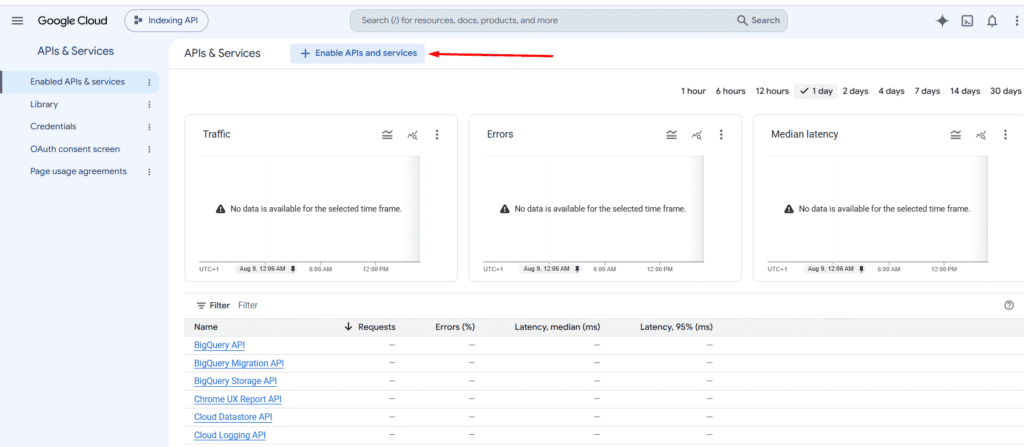
APIs & Services → Library
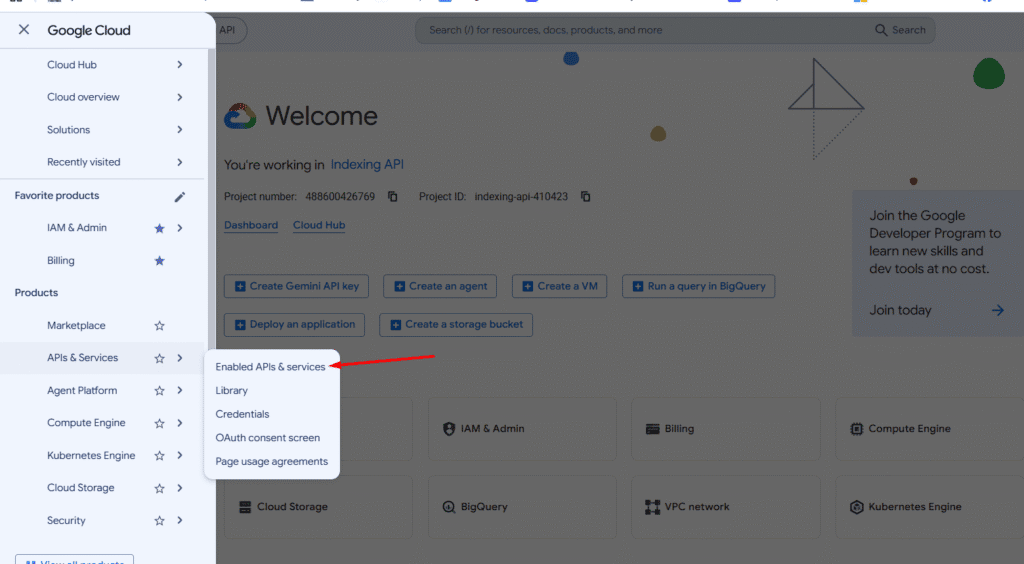
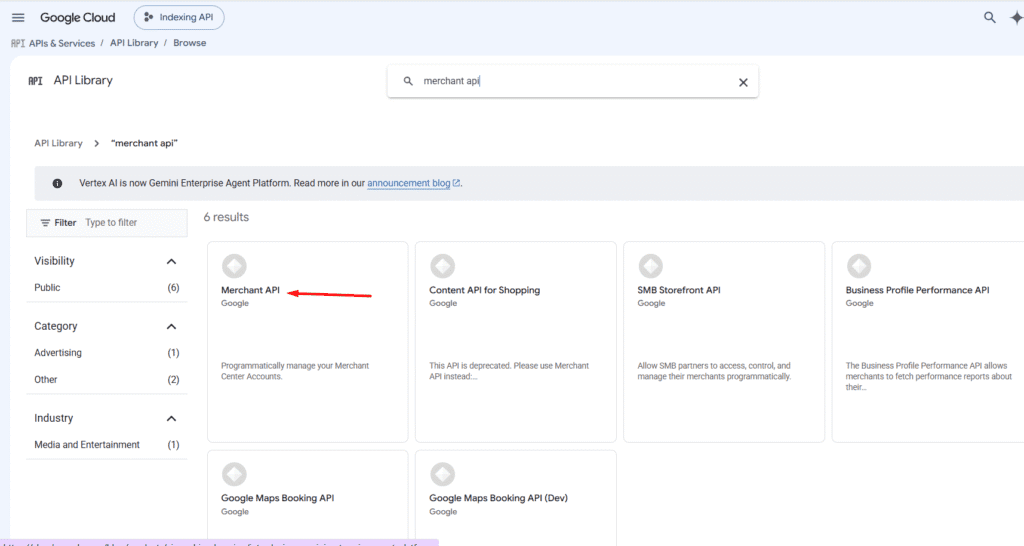
Search for Merchant API.
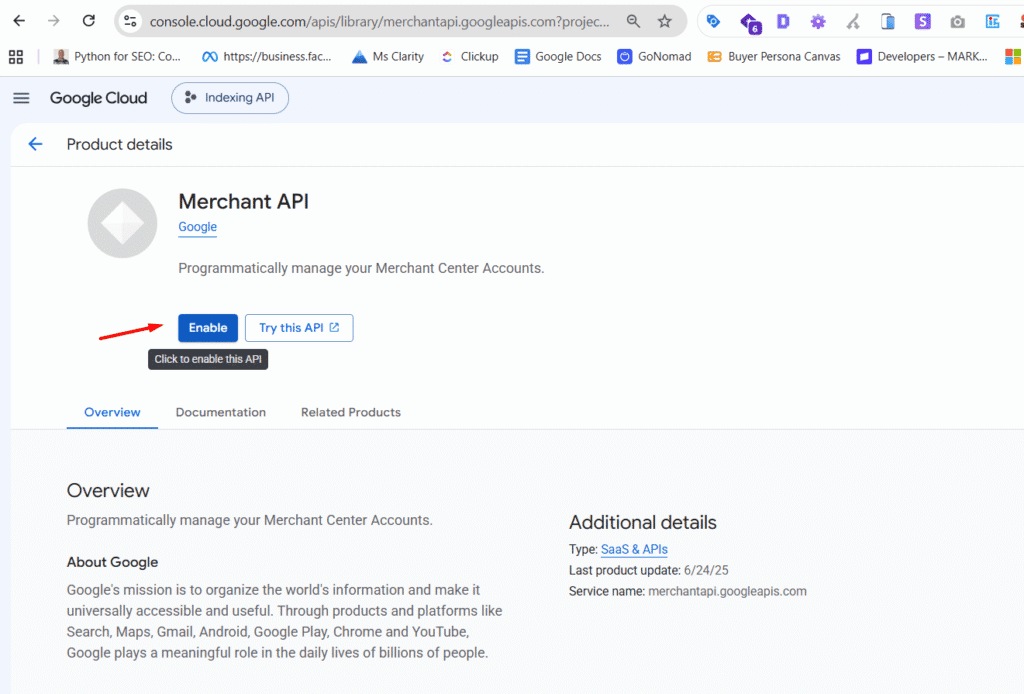
Enable it.
If you skip this step, API requests can return a 403 error.
Step 3: Create a Service Account
Go to:
IAM & Admin → Service Accounts
Create a service account.
You can give it a name such as:
merchant-api-runner
Once it has been created, open the service account and select:
Keys → Add Key → Create new key → JSON
Google will generate a JSON credentials file.
Keep this file secure.
Anyone who has access to the credentials may be able to use the associated Google Cloud permissions.
Step 4: Add the Service Account to Merchant Center
Copy the email address of the service account.
It will normally look something like:
merchant-api-runner@project-name.iam.gserviceaccount.com
Then add it as a user in your Merchant Center account.
For the workflow described here, Admin access is the simplest setup.
If the API authenticates successfully but your queries return permission errors, check this step first.
Step 5: Authenticate the Colab Script
Upload the JSON credentials file to Google Colab.
The script can then point Google’s authentication libraries to the file.
For example:
import os
from google.oauth2 import service_account
os.environ["GOOGLE_APPLICATION_CREDENTIALS"] = (
 "/content/your-service-account-key.json"
)
The Merchant API scope used by the workflow is:
MERCHANT_API_SCOPE = (
 "https://www.googleapis.com/auth/content"
)
The Google authentication library can then use these credentials to create an authenticated Merchant API client.
One important detail is that Google Colab sessions are temporary.
When the session resets, the uploaded JSON file may disappear.
You will therefore need to upload it again when starting a new session.
Step 6: Register Your Developer Project
Before running the reporting workflow, Google requires the Merchant Center account to be linked to the Google Cloud project.
The script handles this using the:
developerRegistration:registerGcp
endpoint.
You provide:
ACCOUNT_ID = "Your GMC ID"
DEVELOPER_EMAIL = "Your Email"
The script then sends a POST request to Google’s Merchant API.
A successful response confirms that the project has been linked to the Merchant Center account.
This is generally a one-time step for the account.
After registration has been completed, you can move on to reporting.
Running Your First Merchant API Report
Once authentication and developer registration are complete, you can start querying Merchant API reporting data.
The Colab script has a configuration section where you define the market you want to investigate.
For example:
COUNTRY = "US"
CATEGORY_ID = None
START_DATE = date(2026, 1, 1)
END_DATE = date.today()
GRANULARITY = "WEEKLY"
There are four particularly important variables.
Country
This determines the market you want to investigate.
For example:
COUNTRY = "US"
Category
You can provide a Google product taxonomy category ID.
Or you can use:
CATEGORY_ID = None
to query across categories.
Date range
You define the period you want to investigate.
Granularity
You can use:
"WEEKLY"
or:
"MONTHLY"
The script handles the reporting dates automatically.
Report 1: Best-Selling Products
The first report uses:
best_sellers_product_cluster_view
This is one of the most valuable reports for ecommerce SEO research.
It can provide:
- Product rank
- Previous rank
- Relative demand
- Product title
- Brand
- Category
- Inventory status
The script queries these fields and organizes them into a dataset.
The important distinction is that this is market-level information.
You are not simply looking at which products sold best on your own website.
You are looking at products appearing in Google’s Shopping market data.
That creates a completely different SEO opportunity.
Finding Products That Are Gaining Demand
One of the most useful things you can do with this data is compare current rank with previous rank.
Imagine you find this:
| Product | Previous Rank | Current Rank | Change |
|---|---|---|---|
| Product A | 42 | 17 | +25 |
| Product B | 28 | 31 | -3 |
| Product C | 16 | 8 | +8 |
Product A has made a significant move.
That should immediately trigger an SEO question:
Do we sell Product A?
If you do, check the product’s organic visibility.
If you do not, ask whether the product represents an emerging opportunity for the business.
The script can calculate these movements across the reporting period.
It compares the first and latest appearances of products and calculates the rank change.
This makes it much easier to identify products that are gaining momentum.
Report 2: Best-Selling Brands
The second report uses:
best_sellers_brand_view
Instead of looking at individual product clusters, it aggregates the information at the brand level.
The report includes:
- Brand
- Rank
- Previous rank
- Relative demand
- Category
The script queries the brand data separately and produces a brand-level dataset.
This is useful for competitor research.
Suppose your ecommerce store sells products from 50 brands.
The Merchant API could help you identify which brands are gaining market visibility.
You can then compare those brands against your own SEO data.
For example:
Merchant API
Brand A is rising.
Search Console
Brand A is receiving more impressions.
Your website
You have a category page for Brand A but it has weak internal links.
SEO action
Improve the category and brand architecture.
This is a much more evidence-based way to prioritize work.
Report 3: Price Competitiveness
Price is another important factor in ecommerce.
A technically strong product page can still struggle if the product is significantly more expensive than competing offers.
Google provides price competitiveness reporting that can help you understand how your prices compare with market benchmarks.
This creates another useful diagnostic question:
“Is this an SEO problem or a commercial competitiveness problem?”
For example, suppose:
- Impressions are high
- Rankings are reasonable
- Product information is complete
- Organic traffic is healthy
- Conversion rate is poor
Price may be one of the factors worth investigating.
SEO should not be viewed separately from the commercial offer.
Visibility, product quality, availability, price, and demand all influence ecommerce performance.
How Merchant API Data Can Improve SEO Decisions
The most useful way to think about Merchant API data is as a source of market signals.
For example:
Market signal
A product moves from rank 50 to rank 15.
SEO question
Do we have adequate visibility for this product?
Website investigation
The product exists but has weak internal links and limited organic visibility.
SEO action
Improve the product page, category connections, internal links, structured data, and supporting content.
Measurement
Track organic impressions, clicks, rankings, conversions, and revenue.
The API does not perform the SEO strategy.
It gives you better information for deciding where the strategy should be applied.
Using Merchant API Data for Content Strategy
The same process can be applied to content.
Suppose you operate an ecommerce website selling skincare products.
Merchant API data shows that certain product clusters are gaining demand.
You can use that information to determine whether your content architecture reflects the market.
You might need:
- A stronger category page
- New product pages
- Supporting informational content
- Comparison content
- Buying guides
- Use-case pages
- Brand pages
The important thing is that the content strategy is being influenced by market data rather than only by keyword volume.
Keyword research tells you what people search for.
Merchant API data can help show what products and brands are actually important within the Shopping market.
Those are related but different signals.
Using Merchant API Data for Internal Linking
Merchant data can also help with internal linking.
Suppose the API identifies a group of products that are gaining demand.
You can check whether those products are adequately connected to the rest of the site.
For example:
Homepage → Category → Subcategory → Product
You may discover that an important product sits several clicks away from the main category.
Or perhaps the product has no contextual links from relevant informational content.
The market signal gives you a reason to investigate the internal link structure.
This is especially useful on large ecommerce websites where thousands of products make manual prioritization difficult.
Using Merchant API Data for GEO
The Merchant API is not a direct API for ChatGPT, Gemini, Claude, or other AI search engines.
It does not tell you which brand an AI system will recommend.
That distinction is important.
The GEO value comes from something different.
Merchant API data can help you understand which products, brands, categories, and markets matter.
You can then use those insights to improve how clearly your own website represents those entities.
For example, suppose the data shows that a particular product category is becoming important in the US.
You can ask:
- Do we have a page for this category?
- Is the category clearly defined?
- Are the products connected to the category?
- Are product attributes clearly stated?
- Is our structured data complete?
- Are the brand and product relationships clear?
- Do supporting articles explain the use cases?
- Is the same information represented consistently across the website and Merchant Center?
This creates a useful connection between Shopping intelligence and GEO.
Using Country-Level Data for International SEO and GEO
The Merchant API workflow can also be used to investigate different markets.
For example:
COUNTRY = "US"
could be changed to another supported country.
This allows you to compare market signals between countries.
That matters because product demand is not always universal.
A product can be highly competitive in the US but relatively weak in another market.
This can affect:
- International SEO
- Category prioritization
- Product assortment
- Localization
- Content strategy
- GEO strategy
Instead of creating the same ecommerce strategy for every country, you can use market-level data to identify where the biggest opportunities exist.
Choosing the Right Product Category
The script uses Google’s product taxonomy.
You can either query across all categories or specify a category ID.
A broad category is useful when you want to understand a large market.
A narrower category is useful when you want to investigate a specific niche.
For example, a broad report can help answer:
“What is happening in the overall market?”
A narrow report can answer:
“What is happening specifically within this product category?”
The script supports both approaches.
Working With Weekly and Monthly Data
The script supports weekly and monthly reporting.
There is an important technical detail here.
Weekly best-seller rows are associated with Mondays.
Monthly rows are associated with the first day of the month.
The script includes a date helper that automatically generates the appropriate reporting dates.
This matters because an apparently valid date range can still return no data if it does not contain an appropriate reporting date.
For example, if you request weekly data for a range that contains no Monday reporting date, an empty response does not necessarily mean something is broken.
Exporting the Data
Once the reports have been processed, the script creates Pandas dataframes.
The product and brand datasets can then be exported as CSV files.
For example:
my_category_best_sellers_products.csv
my_category_best_sellers_brands.csv
This gives you a portable dataset that can be used elsewhere.
You can:
- Open it in Excel
- Import it into Google Sheets
- Process it with Python
- Combine it with Search Console data
- Combine it with analytics data
- Build dashboards
- Create automated opportunity scoring
The script’s export section writes the datasets to CSV files after the reporting process is complete.
Building an SEO Opportunity Score
Once you combine Merchant API data with your existing SEO data, you can start building an opportunity model.
For example:
| Signal | Finding |
|---|---|
| Market rank | Improving |
| Relative demand | High |
| Organic visibility | Low |
| Product availability | Yes |
| Internal links | Weak |
| Conversion rate | Good |
This would be a strong candidate for SEO investment.
You could create a simple scoring system based on:
Market demand + rank movement + organic visibility gap + commercial value
This is much more useful than prioritizing pages only by keyword volume.
A Practical Merchant API SEO Workflow
The complete workflow can be summarized like this:
1. Choose a market
Select the country you want to investigate.
2. Choose a category
Use Google’s taxonomy to define the product area.
3. Select a date range
Look at recent data or compare multiple periods.
4. Run the Colab script
The script retrieves the Merchant API reports.
5. Identify market movements
Look for products and brands gaining rank or demand.
6. Compare against your website
Check whether your site has adequate visibility for those opportunities.
7. Use the Chrome extension
Bring the findings into your browser-based SEO and GEO research workflow.
8. Prioritize actions
Decide whether the opportunity requires:
- New content
- Product page optimization
- Category expansion
- Internal linking
- Structured data improvements
- Product assortment changes
- Pricing investigation
- Better Merchant Center data
9. Measure the result
Track:
- Organic impressions
- Organic clicks
- Rankings
- Shopping visibility
- Product traffic
- Conversions
- Revenue
This creates a repeatable system rather than a one-time analysis.
Turning It Into an Automated System
The real value of the API appears when you use it repeatedly.
You could run the workflow every week.
For example:
Monday
Pull the latest best-seller data.
Tuesday
Compare it against the previous period.
Wednesday
Identify products with large ranking gains.
Thursday
Compare those products with your organic visibility.
Friday
Review the highest-value opportunities.
The process can eventually produce a table such as:
| Product | Market Rank | Rank Change | Demand | Organic Visibility | Opportunity |
|---|---|---|---|---|---|
| Product A | 12 | +25 | High | Low | High |
| Product B | 24 | +8 | High | Medium | Medium |
| Product C | 7 | -2 | Very High | High | Low |
The Merchant API provides the market side.
Your SEO systems provide the website side.
Your strategy connects the two.
Important Limitations
There are several limitations you should understand.
Relative demand is not search volume
If Google reports HIGH or VERY_HIGH relative demand, do not treat it as a monthly search volume figure.
It is a directional demand signal.
Use it with keyword research, Search Console, analytics, and sales data.
Best-seller data is not your own sales data
The best-seller reports provide market information.
They do not simply represent what your store sold.
That distinction should remain clear throughout your analysis.
Empty results do not always indicate an API failure
A successful query can still return zero rows.
Possible reasons include:
- No data for the selected country
- No data for the category
- Invalid reporting dates
- Account eligibility
- Insufficient published data
- Permission issues
The script checks for empty datasets and provides a warning when no rows are returned.
Colab sessions are temporary
If you use a service account JSON file in Colab, you may need to upload it again after a session resets.
Keep credentials secure
Your service account JSON file should be treated as sensitive credentials.
Do not publish it publicly or commit it to a public code repository.
Common Errors
403 PERMISSION_DENIED
Check that:
- Merchant API is enabled
- The service account has access to Merchant Center
- The authenticated identity has sufficient permissions
401 UNAUTHENTICATED
Check your credentials and authentication scope.
If using Colab, confirm that the JSON file exists and the path is correct.
404 NOT_FOUND
Check your Merchant Center account ID.
Query succeeds but returns zero rows
Check:
- Country
- Category
- Date range
- Reporting granularity
- Account eligibility
For weekly reports, make sure your date range contains valid Monday reporting dates.
Merchant API vs Traditional SEO Tools
The Merchant API should not replace your existing SEO tools.
It should complement them.
Think of the different data sources this way:
Keyword research
What are people searching for?
Search Console
How does your website appear in Google?
Analytics
What happens after users arrive?
Merchant Center
How is your product data represented to Google?
Merchant API
What market and Shopping signals can be extracted programmatically?
Crawling tools
What technical problems exist on the site?
GEO monitoring
How is your brand represented across AI search and answer engines?
Each source answers a different question.
The Merchant API is valuable because it adds a market-level view to the SEO process.
Why This Matters for Ecommerce SEO
Traditional ecommerce SEO often starts with what already exists on the website.
You have a product catalog.
You have category pages.
You have existing rankings.
You then try to improve them.
Merchant API data gives you another approach.
You can start with the market.
What products are gaining demand?
Which brands are gaining ground?
Which categories are changing?
Where are competitors stronger?
Which products are missing from our strategy?
Then bring those findings back to the website.
This changes SEO from a purely website-focused exercise into a market-informed process.
Why This Matters for GEO
GEO requires a similar shift.
Instead of only asking:
“What keywords should we optimize?”
you can also ask:
“Which products, brands, categories, and entities matter in this market?”
Merchant API data can help answer part of that question.
If a product category is important in a specific country, your website should make its relationship with that category clear.
That may mean improving:
- Product pages
- Category pages
- Brand pages
- Product attributes
- Structured data
- Internal links
- Supporting content
- Merchant Center data
The API does not guarantee that an AI system will mention your brand.
No such guarantee should be made.
Instead, the opportunity is to use market intelligence to build a stronger information footprint around the entities that matter.
From Merchant API to an SEO and GEO Intelligence System
The most interesting opportunity is not using the Merchant API once.
It is turning it into a recurring intelligence system.
The basic model is:
Extract → Analyze → Prioritize → Optimize → Measure
The Colab script handles the extraction and initial processing.
The Chrome extension helps bring the information into your browser-based research workflow.
Your SEO tools provide website performance data.
Your analytics provide commercial outcomes.
Your GEO tools provide visibility across AI search environments.
Together, these sources can create a much richer picture of ecommerce demand.
You are no longer asking only:
“How do we rank this page?”
You can start asking:
“Where is the market moving, and is our website positioned to capture it?”
That is a much more powerful SEO question.
Final Thoughts
Google’s Merchant API is more than a technical interface for Merchant Center.
For ecommerce SEOs and GEO practitioners, it can become a source of market intelligence.
You can use it to identify best-selling product clusters, track ranking changes, understand brand competition, analyze relative demand, investigate price competitiveness, and compare markets.
The important part is what you do with the information.
The API itself does not create an SEO strategy.
It gives you data that can improve the strategy.
With the Colab script, much of the technical work involved in querying the API can be automated.
With the Chrome extension, the resulting information can become part of your browser-based SEO and GEO research workflow.
The resulting process is simple:
Google Merchant API
↓
Colab script
↓
Market intelligence
↓
Chrome extension
↓
SEO and GEO analysis
↓
Website optimization
↓
Measurement
That is the real opportunity.
Instead of relying only on keyword volume, rankings, or what competitors are doing on their websites, you can bring Google’s own Shopping market data into the SEO decision-making process.
For ecommerce businesses operating across thousands of products, multiple categories, or multiple countries, that can turn Merchant API data into a repeatable source of SEO and GEO opportunities.