

Back in 2022 I wrote about entity salience as a way to write better ranking content. The idea still holds. What has changed is where the content ends up.
Google now writes answers at the top of the results page. ChatGPT, Gemini, Perplexity and Copilot pull passages from pages and quote them. These systems break a page into chunks, work out what each chunk is about, and decide which chunk answers the question.
The middle step is the one salience speaks to. If a machine cannot tell what your paragraph is about, it will not pick your paragraph. Entity salience gives you a number for how clearly a block of text signals its subject.
This article covers what the metric is, how to check it without writing any code, where it pays off across different page types, and how to run it over a whole site with Python.
What entities and salience actually are
An entity is a noun or group of nouns that names a thing. People, places, brands, products, numbers and dates are all entities. If something in your copy has a name, it is an entity.
Salience is how central that entity is to the text. The score runs from 0 to 1. A score near 1 means the text is mostly about that thing. A score near 0 means the thing is barely relevant to the text.
Salience works as a share of a fixed total. The scores for all the entities in one block of text add up to roughly 1. That means every entity’s score depends on what else is in the text.
This has two practical effects:
- Adding more topics to a page lowers the score of the main topic. Each new entity takes a slice of the same pie.
- Removing filler raises the score of what is left. Cutting the sentences that stray from your subject often does more for the score than adding sentences about it.
This is why the same page can score very differently depending on what you feed into the tool. If you paste a full page with the navigation, cookie notice and footer included, you are mostly scoring the template.
Why salience matters for SEO and GEO
The metric does two different jobs now. It helps with classic ranking, and it helps with getting quoted in AI answers. The second use is newer and less understood.
What it does for SEO
Search engines have to work out what a page is about before they can decide which queries it suits. Salience is a direct read on how well your page communicates that.
When I run salience checks on pages that underperform, the same three problems show up:
- The brand name outranks the product. The company name comes back as the dominant entity and the product type sits well below it. The page reads as being about the business rather than about what the searcher wants.
- The page has no clear subject at all. Scores are spread thin across a long list of entities with nothing standing out. This usually means the copy tries to cover too many things at once.
- The main entity is there but sits low. Often the page buries its subject under an intro that warms up for three paragraphs before saying what the page is about.
None of these are keyword problems. You can hit your keyword density target and still have all three. Salience catches what keyword counting misses, because it looks at position, grammar and sentence structure rather than frequency alone.
What it does for GEO
Generative engines work in chunks. They split pages into passages, build a representation of each passage, and retrieve the ones that match a question. A passage gets quoted when the system is confident about what it covers.
Salience is a rough proxy for that confidence. A passage with one dominant entity is easy to classify. A passage with eight entities at similar scores is ambiguous, and ambiguous passages lose to clearer ones.
This changes how you should write for AI visibility:
- Write in self-contained blocks. Each section should make sense if someone lifts it out of the page. A retrieval system often does exactly that.
- Keep one subject per block. A paragraph covering shipping, returns and warranty gives the machine three weak signals instead of one strong one.
- Name things explicitly inside each block. Pronouns that refer back three paragraphs are fine for human readers but lose the thread when a chunk is extracted on its own.
All of this is measurable. You can score a passage, rewrite it, and score it again to see whether the change worked.
The easy way to check: a Chrome extension
You do not need to write code to use this. I built a Chrome extension called Entity Salience Analyzer that calls the same Google API the script at the end of this article uses.
It works in two modes.
Single text block. Paste in a paragraph, a product description or an FAQ answer. You get back a ranked list of entities with salience bars, entity types, how many times each was mentioned, and a link where Google matched the entity to something in its Knowledge Graph. That last signal is useful on its own. It tells you which of your terms Google recognises as a real thing rather than just a phrase.
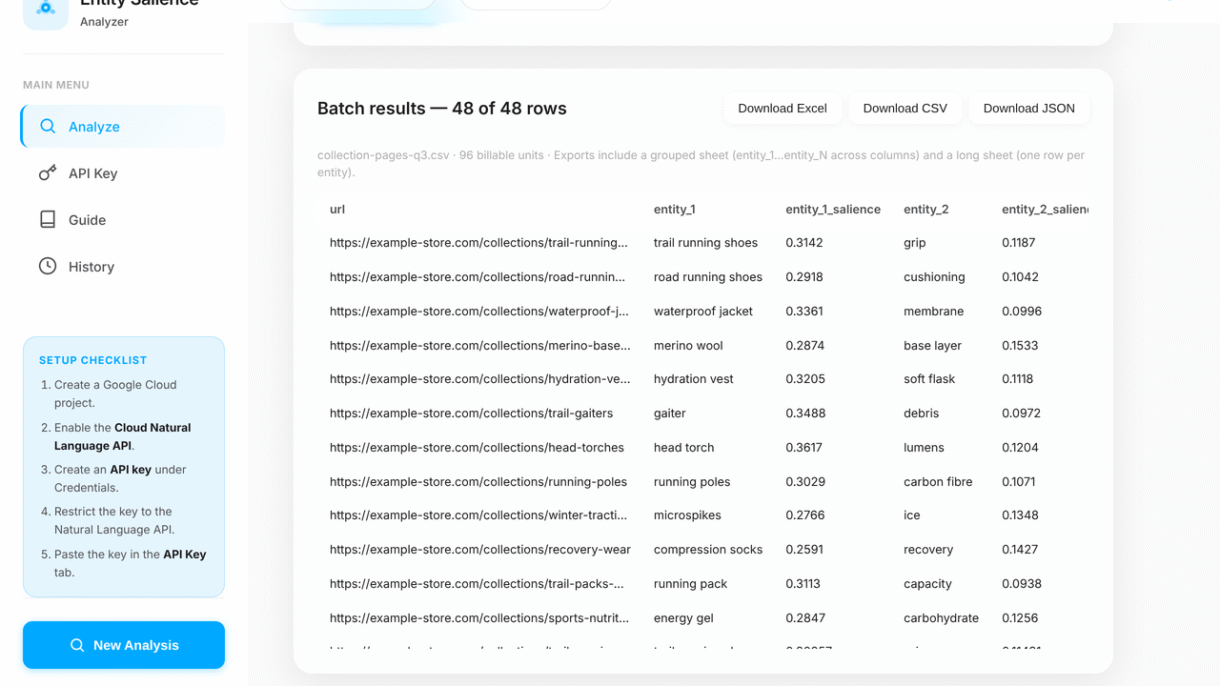
CSV or Excel batch. Upload a file with one column of URLs and one column of text. The extension works through every row and gives you one spreadsheet with everything in it. This is how you audit a category of pages rather than one page.
A few things it handles that save time:
- It estimates cost and runtime before you spend anything. The API charges per thousand characters, so a large file can add up.
- It keeps going when a row fails, then lists the failures at the end so you can fix and rerun just those.
- It exports to Excel, CSV or JSON. The Excel file has a sheet in wide format, a sheet in long format that pivots easily, and a sheet recording the settings used.
You still need a Google Cloud API key, which is free to create. The setup is five steps and the extension walks you through them. Restrict the key by API rather than by HTTP referrer. Referrer restrictions do not work from a browser extension, and every request will fail.
If you have used Google’s public NLP demo before, the extension does the same job with three differences. It handles bulk input, it keeps a record of what you ran, and it does not cut off long text the way the demo page does.
The five things that move a salience score
Based on Google’s own research papers, five textual features decide how salient an entity is. Each one gives you something specific to change in the copy.
1. Where the entity sits
Beginnings carry the most weight. An entity near the start of the text scores higher than the same entity near the end. The same applies within each paragraph and each sentence, though less strongly. The end of a sentence is slightly stronger than the middle.
What to do: Put your target entity near the start of the text, the start of paragraphs, and the start of sentences.
2. Its grammatical role
The subject of a sentence outranks the object. The subject is the thing doing something. The object is the thing being acted on.
This is easier to see with an example. Take these two sentences:
- “Messi scored the winning goal” gives Messi 0.70 and goal 0.30.
- “The winning goal was scored by Messi” gives goal 0.69 and Messi 0.31.
Switching from active to passive voice moved the score by nearly forty points, using the same words both times.
What to do: Rewrite so your target entity is the subject of the sentence wherever it reads naturally.
3. How it links to the rest of the sentence
An entity does not have to be repeated in every clause to be prominent. What matters more is whether the other parts of the sentence depend on it for their meaning.
Take “France held Argentina to penalties but could not have done it without Mbappe’s hattrick.” France connects to most of the sentence through the verb “held”. That dependency is what lifts its score.
What to do: In longer sentences, build the clauses so they hang off your target entity rather than running alongside it.
4. How clearly it is named
Google’s model is good at recognising entities but not perfect. It can fail to connect two mentions of the same thing when the capitalisation, plural form or acronym changes. Switching between “SEO” and “search engine optimization” can split one entity into two, and both halves score lower than the whole would have.
What to do: Refer to your target entity the same way throughout, especially if it is a multi-word phrase.
5. How often it is mentioned, and in what form
Frequency matters, but not in the way keyword counting suggests. Google recognises three kinds of reference to the same thing:
- Named: Mo Salah
- Nominal: the striker
- Pronominal: he
All three count toward the entity. This means you can raise salience without repeating the same phrase over and over.
What to do: Increase mentions using a mix of all three forms. Do not use this as cover for keyword stuffing. Repeating the exact phrase every time reads badly to people and does not score better than a natural mix.
Product page descriptions
Product descriptions are the best place to start with salience. They are short, so the API handles them cleanly, and the text usually has one obvious subject, so a bad score is easy to diagnose.
Three patterns come up again and again.
The brand outranks the product. A description mentions the brand name in the first sentence, again in the second, and again in the third. The brand finishes as the dominant entity and the product type lands far below it. The page reads as being about the company. Shoppers searching for the product type will not find it, and a shopping surface trying to classify the item has to work harder than it should.
Features outrank the product. Descriptions that lead with a feature list often score the features above the thing itself. A kettle description can come back with “stainless steel” scoring above “kettle”. The fix is to name the product in the opening sentence and let features follow.
No entity dominates. Marketing copy that spends its words on mood rather than substance produces a flat spread with no clear winner. The API has found no clear subject, which usually means a reader would struggle too.
For retail pages there is a second benefit beyond ranking. Shopping feeds and AI shopping agents both have to work out what a product is from its text. A description where the product type is clearly dominant classifies more reliably than one where it is buried.
A practical approach for a product description:
- Put the product type in the first six words.
- Make the product the subject of the opening sentence, not the brand.
- Name the product again in nominal form later in the text (“the kettle”, “this jacket”) rather than repeating the full name.
- Keep the description to one product. Cross-sells and bundle mentions pull salience away.
Run the description through the extension before and after. On a short block you will see the change immediately.
Collection pages: above and below the fold
Collection and category pages are harder, because the copy is split into two blocks that do different jobs. Most teams write them as one piece of text and let the template cut it in half, which hides problems in both halves.
Score the two blocks separately. The intro above the product grid and the long copy below it are different documents as far as a chunking system is concerned. They will be split apart anyway. Measuring them together gives you an average that hides problems in both.
Above the fold
This is usually a short paragraph sitting between the H1 and the product grid. It is the highest-value text on the page for salience, because position weighting is strongest at the start of a document.
It is also the block most likely to be wasted. Typical above-the-fold copy opens with a line about the brand’s heritage or a general statement about the category. Both push the actual category term down the page and away from the strongest position.
What to aim for:
- The category term as the subject of the first sentence.
- The category term as the clear top entity when that block is scored on its own.
- No brand mention in the first sentence unless the brand is the search term.
- No mention of other categories. Links to sibling categories belong in navigation, not in this paragraph, because each one takes a slice of the salience.
Below the fold
The long copy under the grid has a different purpose. It covers buying considerations, materials, sizing, use cases and whatever else supports the decision. It is also where most sites dump keyword variations.
Treat this block as several blocks. If it covers four subtopics, give each one its own subheading and score each section on its own. A 600-word block scored as a whole will return a flat spread that tells you nothing, because the API is averaging four different subjects.
Scored section by section, the same copy becomes useful. You can see which subtopics read clearly and which ones wander. Sections that cover two things at once show up as two mid-range entities instead of one strong one, and those are the sections worth splitting.
This matters for GEO more than for ranking. Below-the-fold category copy is exactly the kind of text a generative engine pulls from when answering a question about how to choose a product. A section with one clear subject is retrievable. A paragraph that covers materials, sizing and care in six sentences is not.
FAQ answer blocks and getting cited
FAQ answers are the easiest place to apply this metric. An FAQ answer is already short, self-contained and tied to one question, which is the shape a retrieval system looks for. Salience tells you whether a given answer holds that shape.
A strong FAQ answer scores one entity well clear of the second. A weak one spreads its score across several entities with nothing dominant.
Why the gap matters
When a system chunks your page, each FAQ answer becomes its own candidate passage. The system has to decide what that passage is about and whether it answers the question in front of it. A passage with one dominant entity makes that easy. A passage with four competing entities could be about any of them.
This is also why answers that start with throat-clearing do badly. “That’s a great question, and the answer depends on several factors” spends the strongest position in the passage on words that carry no subject. By the time you name the thing, you are in the middle of the block where position weighting is weakest.
How to write an answer block that scores well
- Repeat the question’s subject in the first sentence of the answer. Do not rely on the question above it. When the passage is extracted, the question may travel with it, but the answer should stand alone either way.
- Answer in the first sentence. Put the actual answer first and the explanation after. This serves readers and puts the key entity in the strongest position at the same time.
- Keep each answer to one question. If an answer drifts into a related question, split it into two FAQ entries.
- Avoid pronouns in the opening. “It usually takes three days” is weaker than “Standard delivery takes three days.” The second names the entity.
- Keep answers short. A paragraph or two is long enough for the API to find a subject and short enough that one subject stays dominant.
Checking a set of FAQs
Batch mode is the practical way to do this. Put every FAQ answer on the site into a spreadsheet with its question as the label, run the whole file, and sort the output by the top entity’s salience.
The answers at the bottom of that sort are your weakest candidates for citation. The weak ones usually share a problem. They answer a question the heading did not ask, or they cover two things at once. Both are quick to fix once you can see which answers they are.
Running it in bulk with Python
If you are comfortable with Python, the script below does what the extension does and gives you room to change the logic. This is the version I use when a job needs something the extension does not cover, such as joining the output to crawl data or running it inside a bigger pipeline.
The setup
The script reads a CSV with two columns, url and text, calls the API once per row, and writes one output CSV where each row keeps its top ten entities.
import csv
import json
import time
import requests
API_KEY = "YOUR_GOOGLE_API_KEY"
NLP_ENDPOINT = "https://language.googleapis.com/v1/documents:analyzeEntities"
INPUT_CSV = "text_blocks.csv"
OUTPUT_CSV = "entity_salience_output_grouped.csv"
REQUEST_DELAY = 1
MAX_ENTITIES = 10
Four settings matter here.
NLP_ENDPOINT points at v1 of the API. That choice matters. Google also publishes a v2 endpoint, but v2’s entity analysis returns a probability field instead of salience. Probability is the model’s confidence that it identified the entity correctly, which is a different question from how central the entity is. If you switch this URL to v2, the script will break, because the salience field it sorts on will not be there.
REQUEST_DELAY is a one second pause between calls. It keeps you inside the per-minute quota. On small files you can lower it. On files of several thousand rows, leave it alone.
MAX_ENTITIES sets how many entities each row keeps. Ten is enough for most work. Raise it if you are looking for whether a specific term appears at all, rather than what dominates.
API_KEY should never be committed to a repository or pasted into a shared notebook. If a key leaks, delete it in Google Cloud Console and issue a new one. Restricting the key is good practice but does not undo exposure.
The API call
def analyze_entities(text):
 payload = {
 "document": {
 "type": "PLAIN_TEXT",
 "content": text,
 "language": "en"
 },
 "encodingType": "UTF8"
 }
 response = requests.post(
 f"{NLP_ENDPOINT}?key={API_KEY}",
 headers={"Content-Type": "application/json"},
 data=json.dumps(payload)
 )
 response.raise_for_status()
 return response.json().get("entities", [])
Two fields in that payload change your results.
type is set to PLAIN_TEXT. If you send HTML with this setting, the API scores the tags as if they were words. Change it to HTML when you are genuinely passing markup, and the API will parse the tags and weight headings and emphasis differently. Scores will shift, so do not mix the two settings in one audit.
language is hardcoded to English. Setting it explicitly is safer than leaving it out, because auto-detection can go wrong on short blocks and return entities from the wrong language model. Change it if you work on non-English sites.
The main loop
def process_text_blocks():
 results = []
 with open(INPUT_CSV, newline="", encoding="utf-8") as f:
 reader = csv.DictReader(f)
 for row in reader:
 url = row["url"]
 text_block = row["text"]
 print(f"Analyzing text block for URL: {url}")
 try:
 entities = analyze_entities(text_block)
 entities = sorted(entities, key=lambda e: e["salience"], reverse=True)
 row_result = {"url": url, "text_block": text_block}
 for i, entity in enumerate(entities[:MAX_ENTITIES], start=1):
 row_result[f"entity_{i}"] = entity["name"]
 row_result[f"entity_{i}_type"] = entity["type"]
 row_result[f"entity_{i}_salience"] = round(entity["salience"], 5)
 row_result[f"entity_{i}_mentions"] = len(entity.get("mentions", []))
 results.append(row_result)
 except Exception as e:
 print(f"Failed for URL {url}: {e}")
 time.sleep(REQUEST_DELAY)
 write_output(results)
The sort on salience descending is what puts the most central entity in the entity_1 columns. Everything after that is reshaping.
The mentions count comes from the length of the mentions array the API returns. This counts every reference the model resolved to that entity, including nominal and pronominal ones. A high mention count with low salience is a useful signal on its own. It usually means the entity appears in repeated boilerplate rather than in the substance of the page.
One thing to watch in this loop. The except block prints the error and moves on, which means a failed row disappears from the output entirely. If 400 rows go in and 388 come out, you will not know which twelve are missing without comparing the files. For client work, collect the failures into a list and write them to a second file.
Writing the output
def write_output(rows):
 fieldnames = ["url", "text_block"]
 for i in range(1, MAX_ENTITIES + 1):
 fieldnames.extend([
 f"entity_{i}",
 f"entity_{i}_type",
 f"entity_{i}_salience",
 f"entity_{i}_mentions"
 ])
 with open(OUTPUT_CSV, "w", newline="", encoding="utf-8") as f:
 writer = csv.DictWriter(f, fieldnames=fieldnames)
 writer.writeheader()
 writer.writerows(rows)
The output is in wide format, one row per URL with forty entity columns across. This suits eyeballing and filtering in a spreadsheet.
It does not suit pivoting. If you want to count how often a given entity appears as the top entity across a site, or chart the salience distribution, you need long format instead: one row per entity, with the URL repeated. That is a small change to the writer, and it is worth having both.
Things worth adding
The script as written is a starting point. Four changes make it production-ready:
- Capture failures. Append failed rows to a list and write them out, so your row counts reconcile.
- Stop early on auth errors. A bad key fails every row the same way, so checking for a 401 or 403 and breaking out saves you watching a thousand identical errors.
- Guard the character limit. The API rejects very large documents, so check the length of each text block before sending and skip or split anything oversized.
- Keep the Knowledge Graph metadata. The response includes
metadata.wikipedia_urlandmetadata.midfor entities Google recognises, and the script discards both. They tell you which of your terms map to known entities rather than loose phrases.
A workflow you can repeat
The metric is only useful inside a process. This is the one I use on client sites.
1. Pick one page type. Do not audit a whole site at once. Product pages, category intros and FAQ blocks each need different fixes, and mixing them produces a spreadsheet nobody acts on.
2. Extract clean text. Pull the copy without navigation, footers, cookie notices or related-product blocks. This step decides whether your results mean anything. Scoring a full page template tells you about the template.
3. Split long pages into sections. Anything over roughly 300 words should be scored in parts. One score for a 900-word page is an average across several subjects and will not point you at anything specific.
4. Run the batch and sort by the top entity’s salience. The bottom of that sort is your work queue.
5. Check whether the top entity is the right one. This is the judgment step and no tool does it for you. A page can have a strong top entity that is the wrong entity. A category page dominated by the brand name scores well on clarity and badly on relevance.
6. Rewrite using the five factors. Move the target entity earlier, make it the subject, keep its naming consistent, add nominal and pronominal references, cut the entities that compete with it.
7. Rescore and compare. Keep both files. The before-and-after is the clearest way to show a client that a rewrite did something measurable.
For competitor work, run the same extraction on the pages ranking above you for your target query. You are looking for which entities their copy makes dominant that yours does not. That comparison is usually more useful than the absolute scores, because both pages are measured the same way.
What the score will not tell you
A few limits are worth knowing before you build reporting around this metric.
It is not a ranking factor. This is Google’s general-purpose language model, not the ranking system. A high salience score does not mean a page will rank. It means the text communicates its subject clearly, which is a sensible thing to aim for regardless.
Scores are only comparable within the same text. Because salience is a share, a 0.30 in a 60-word FAQ answer and a 0.30 in a 500-word article are not the same achievement. Compare blocks of similar length or compare the same block before and after a rewrite.
The demo tool and the API can disagree. If a client compares your numbers against Google’s public demo and gets different results, the usual cause is that different text went in. It can also be a version difference. Check whether the demo is showing salience or probability, since v2 returns probability instead and the two measure different things.
Long text dilutes everything. The API processes the text you send as one document. Past a few hundred words, scores flatten out and stop being actionable. Section-by-section scoring is not a workaround, it is the correct method for long pages.
Entity recognition has gaps. The model misses entities, merges things it should keep apart, and sometimes splits one thing into two when the naming varies. Treat a surprising result as a prompt to look at the text rather than a finding in itself.
Structural entity types are noise for content work. The API returns DATE, NUMBER, PRICE, ADDRESS and PHONE_NUMBER alongside the useful types. On product pages these can crowd the top ten. Filter them out of your reporting.
The numbers are directional. What they catch well are problems a keyword report cannot show you, such as a brand name swamping the product it should be selling, or an FAQ answer covering two questions at once.
Where to start
If you have never used this metric, start with one FAQ block. Paste an answer into the Chrome extension and look at what comes back. You will usually find at least one answer whose dominant entity is something other than what the question asked about.
From there the work scales in order of effort:
- Score your top twenty FAQ answers and fix the weakest quarter.
- Score the above-the-fold copy on your main category pages.
- Batch your product descriptions and look for pages where the brand outranks the product.
- Compare your key pages against the competitors ranking above them.
The writing advice has not changed much since I first wrote about this in 2022. Put your subject early, make it the subject of the sentence, name it consistently, and cut what competes with it. What has changed is that there is now a second reason to do it. Search engines use this kind of signal to decide what your page is about. Generative engines use it to decide which passage to quote.