Lorem ipsum dolor sit amet, consectetur adipisicing elit. Eum in eos saepe ipsa cupiditate accusantium voluptatibus quidem nam, reprehenderit, et necessitatibus adipisci.
The education should be very interactual. Ut tincidunt est ac dolor aliquam sodales. Phasellus sed mauris hendrerit, laoreet sem in, lobortis mauris hendrerit ante.
Examples Of Personal Portfolio
University of DVI (1997 - 2001))
4.30/5
Contrary to popular belief. Ut tincidunt est ac dolor aliquam sodales. Phasellus sed mauris hendrerit, laoreet sem in, lobortis mauris hendrerit ante.
Tips For Personal Portfolio
University of DVI (1997 - 2001))
4.30/5
Generate Lorem Ipsum which looks. Ut tincidunt est ac dolor aliquam sodales. Phasellus sed mauris hendrerit, laoreet sem in, lobortis mauris hendrerit ante.
2007 - 2010
Education Quality
Diploma in Web Development
BSE In CSE (2004 - 2008)
4.70/5
Contrary to popular belief. Ut tincidunt est ac dolor aliquam sodales. Phasellus sed mauris hendrerit, laoreet sem in, lobortis mauris hendrerit ante.
The Personal Portfolio Mystery
Job at Rainbow-Themes (2008 - 2016)
4.95/5
Generate Lorem Ipsum which looks. Ut tincidunt est ac dolor aliquam sodales. Phasellus sed mauris hendrerit, laoreet sem in, lobortis mauris hendrerit ante.
Tips For Personal Portfolio
University of DVI (1997 - 2001))
4.30/5
Maecenas finibus nec sem ut imperdiet. Ut tincidunt est ac dolor aliquam sodales. Phasellus sed mauris hendrerit, laoreet sem in, lobortis mauris hendrerit ante.
How GEO Drove a 1,276% spike in AI Traffic for Cheer Apparel Seller
A Cheer customization brand was losing organic demand to PPC cannibalizations, zero-click SERPs, and AI overviews.
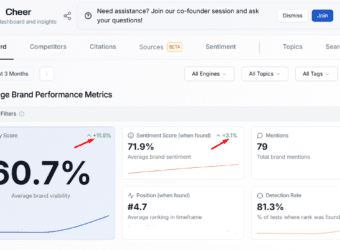
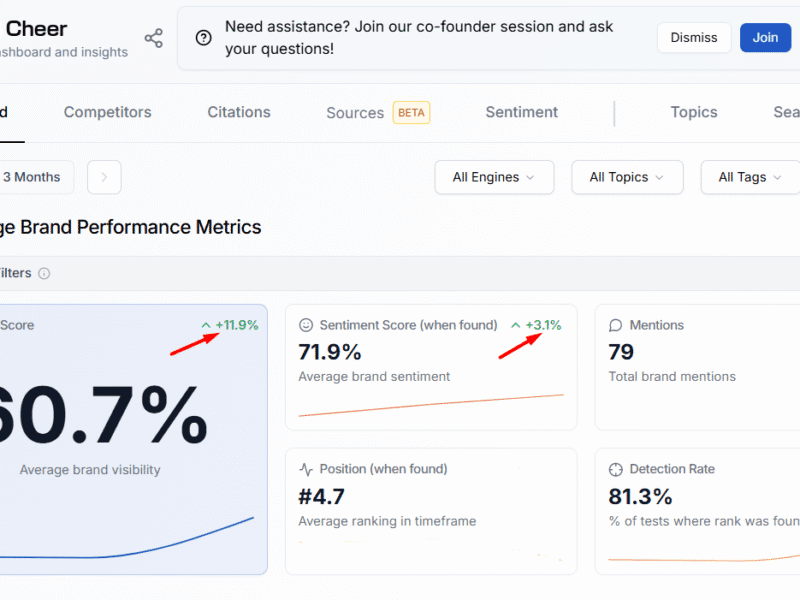
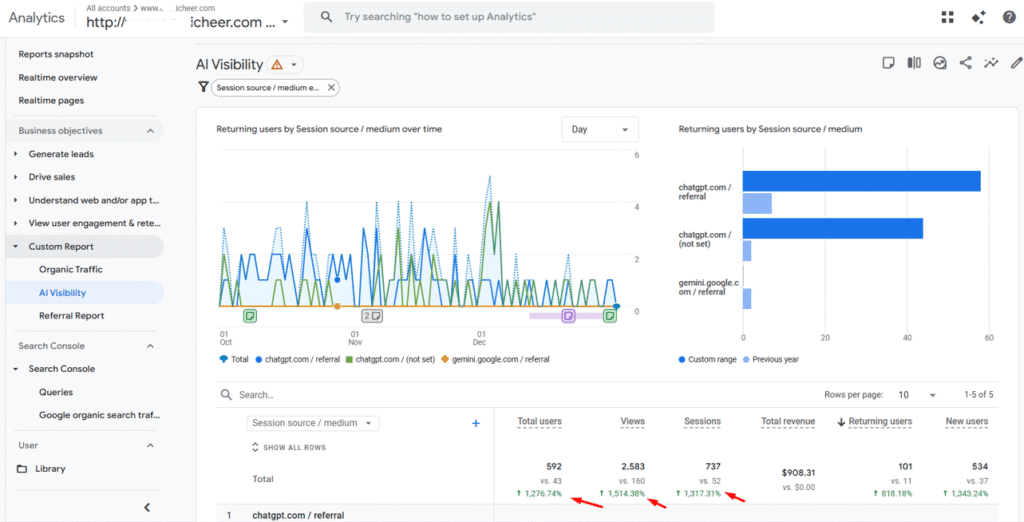
By deploying a technical and semantic GEO strategy, we increased aggregate AI visibility by 11.9% and grew AI-originating users by 1,276% across ChatGPT, Gemini, Perplexity, and Claude.
A Cheer apparel customization store was facing growing pressure from AI-induced CTR declines and paid media overcrowding.
Product-relevant queries were increasingly cannibalised by PPC, driving rising CPCs alongside a decline in clicks per search.
Informational content was losing acquisition value as zero-click SERPs and AI overviews absorbed demand.
The brand’s visibility within emerging answer engines and LLM interfaces was limited, reducing discoverability at the moment of intent.
The result was a shrinking organic opportunity space. followed by higher acquisition costs and growing dependency on paid channels.
Task
The objective was to inoculate the Cheer store’s organic traffic against zero-click outcomes and adapt the site for AI-mediated discovery. Specifically, the GEO initiative aimed to:
(a) Diversify search visibility across GUI and API-based LLM surfaces
(b) Improve model recall and prompt relevance
(c) Increase citation frequency within AI responses
(d) Reduce the negative CTR impact of ads and AI overviews
Success was to be measured by AI visibility growth, answer-engine traffic, and response detection rates.
Action
With these AI visibility objectives in mind, we then took the following steps
(i) We created clear AI-friendly accessibility directives in the robots.txt file. This helped prevent any incidental restriction of the site’s content to both AI agents and answer engine crawlers
(ii) We created an LLMs.txt file and uploaded it to the site’s root folder. The role of this file was to expose the information architecture of the site to LLM crawlers such that at inference time, they can access information about the site’s pages without having to expend crawl and rendering resources
(iii) We expanded our target keywords into the search queries and prompts they are most likely to be embedded in. This was then used to create
New subheadings and paragraphs in existing blog posts
FAQ copy on collection and product pages
(iv) We also extended the schema footprint of the website by embedding.
Carousel and collection page schema on category pages
Web page schema on product pages
Keyword properties in organisation, product, and article schema snippets
(v) We added the Shopify knowledge base app and provided answers to agent-derived questions about the business and its products
(vi) We added lastmod attributes to the XML sitemap to amplify recency signals associated with the site’s content, thus improving mentions and citation frequency in AI responses
Result
The GEO initiative delivered decisive, measurable gains across AI discovery and engagement metrics:
(1) +11.9% increase in aggregate AI visibility (Rankscale)
(2) +26.1% uplift in AI response detection rates
(3) In GA4, users arriving from Gemini, ChatGPT, Perplexity, and Claude grew by 1,276.74%, increasing from 43 users in Q4 2024 to 592 in Q4 2025.
Collectively, these gains validated the strategy’s effectiveness in offsetting zero-click erosion, reducing reliance on paid acquisition, and positioning Omni Cheer for sustained growth in AI-first search
An EU-based e-commerce store was on a steady growth trajectory in both traffic and revenue when a server migration unintentionally introduced security vulnerabilities. An outdated plugin was exploited, allowing unauthorized access that resulted in widespread on-site manipulation.
The breach caused:
Tampering with Open Graph tags and Search Console branding
Unauthorized modifications to robots.txt, leading to the indexation of dynamic and spam URLs
Overwritten product descriptions, images, and metadata
Injection of fake review snippets and altered product schema properties
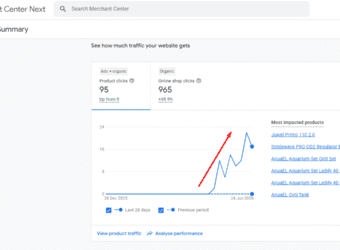
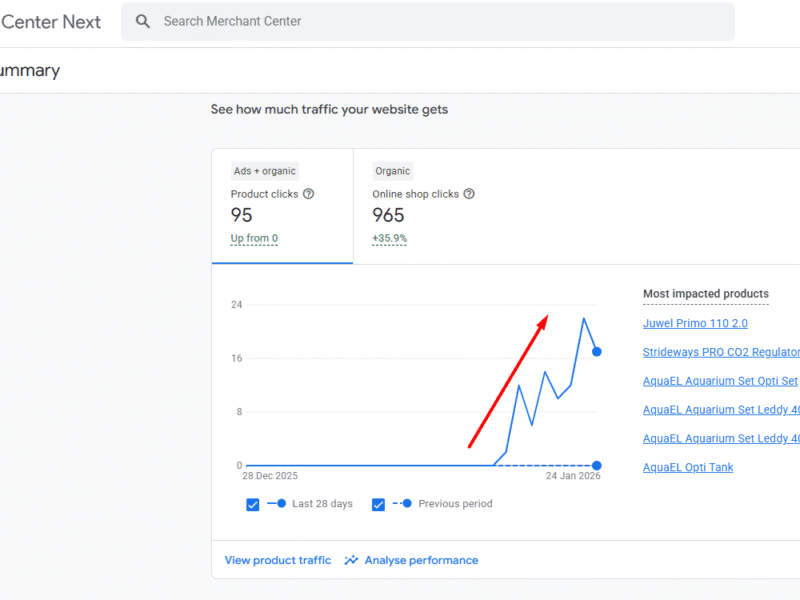
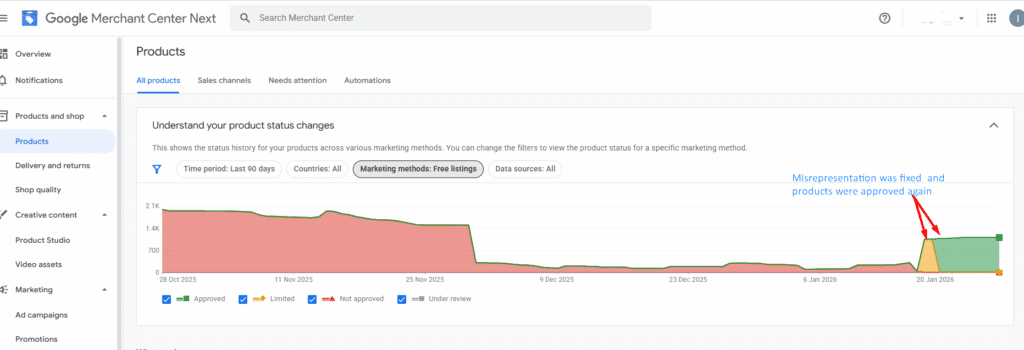
Because Google Merchant Center was pulling data from a “found by Google” feed, these changes propagated into Shopping listings. Products began appearing with misleading reviews, incorrect descriptions, and mismatched images—triggering a Google Merchant Center misrepresentation violation.
The account was subsequently suspended, products were delisted from Shopping surfaces, and revenue dropped immediately.
Task
My objective was to:
Eliminate the root cause of the misrepresentation
Restore content, schema, and feed accuracy
Remove all injected and spam content from Google’s index
Regain Google Merchant Center eligibility through a successful policy appeal
Action
I implemented a remediation strategy focused on security hardening, index cleanup, and misrepresentation resolution:
Containment of Misrepresentation Sources
Disabled all Merchant Center feeds and data sources to prevent further dissemination of corrupted product data
Deployed MalCare to scan for malware, identify vulnerabilities, and remove infected files
Index & Crawl Remediation
Initiated bulk removal of spam URLs in Google Search Console
Enforced 410 status codes on all breach-generated URLs to permanently deindex them
Rebuilt the robots.txt file to restrict crawl access to invalid and spam URL patterns
Resubmitted a clean XML sitemap to re-establish canonical crawl paths
Accelerated Re-evaluation
Used the Google Indexing API to expedite recrawling of eligible pages
Monitored indexation until a sharp decline in invalid indexed pages confirmed misrepresentation cleanup
Merchant Center Reinstatement
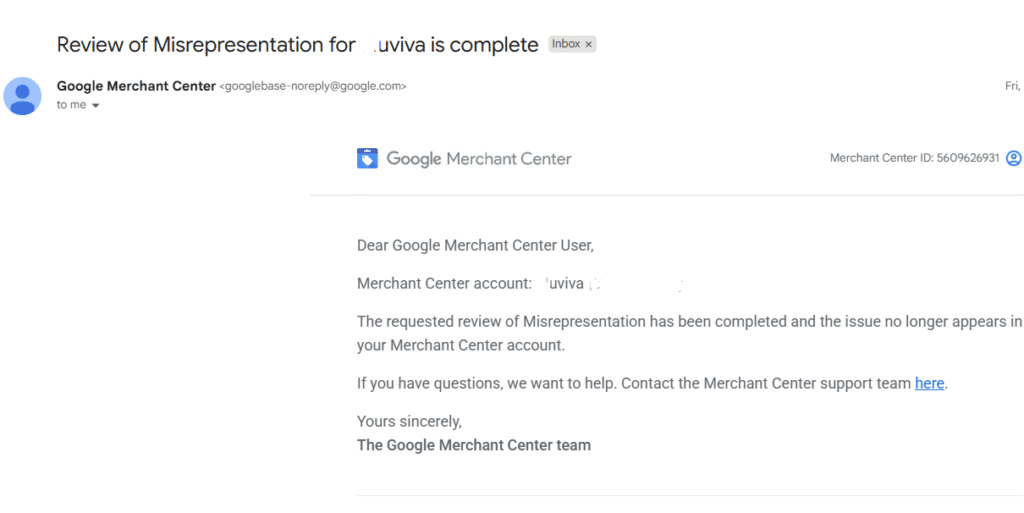
Submitted a detailed appeal documenting the breach, corrective actions, and preventative safeguards implemented to avoid future misrepresentation issues
Result
Google approved the misrepresentation appeal, fully reinstating the Merchant Center account
All affected products were relisted across Shopping surfaces
Spammy reviews, injected schema, and misleading product data were fully removed
Traffic and revenue rebounded, returning the store to a sustained growth path
Drove 878% Revenue Surge For EU Aquarium Store via Google Shopping SEO
An EU aquarium supply store faced cookie blocks, feed errors & product disapprovals. See how strategic technical SEO & feed optimization unlocked an 878% rise in item revenue and massive growth.
A leading online retailer of aquarium supplies, serving customers across the European Union, was navigating a complex digital landscape fraught with technical barriers.
Despite a vast inventory, their international growth was stymied by a series of critical optimisation bottlenecks. A plugin conflict was blocking e-commerce cookies, rendering crucial revenue data in GA4 invisible and leaving the business in the dark about product performance and customer behaviour.
Furthermore, its international structure, with numerous language subfolders (e.g., /fr/, /es/, /it/), created a cascade of issues. Product feeds were flagged for currency mismatches in shipping costs, leading to violations in key markets like the UK, France, and Finland. Simultaneously, a significant portion of these international product and collection pages were being crawled but not indexed, remaining hidden from potential customers.
To compound these issues, essential products like testing kits and fish medicines were frequently disapproved in advertising platforms for “misleading claims,” stifling top-of-funnel growth.
Actions & SEO Interventions
In response, a multi-faceted technical SEO and feed management strategy was deployed.
(1) The first intervention reconfigured the consent management in Google Tag Manager, implementing preloaded consent signals to accurately capture transaction data from the page. This immediately activated comprehensive revenue reporting in GA4, providing the client with their first clear insights into product metrics and audience value.
(2) To tackle the indexation deficit, a custom Python script was developed to automate bulk indexation requests via the Google and Bing Indexing APIs, rapidly increasing the number of products visible in search results and expanding the site’s keyword capture potential.
(3) For the product feeds, we activated the “found by Google” feature in Merchant Center, allowing Google to auto-populate the site’s inventory directly from the website, which accelerated indexation and improved Google’s understanding of the site’s product focus across all languages.
Resolutions
The most impactful fix addressed the currency mismatch violations head-on.
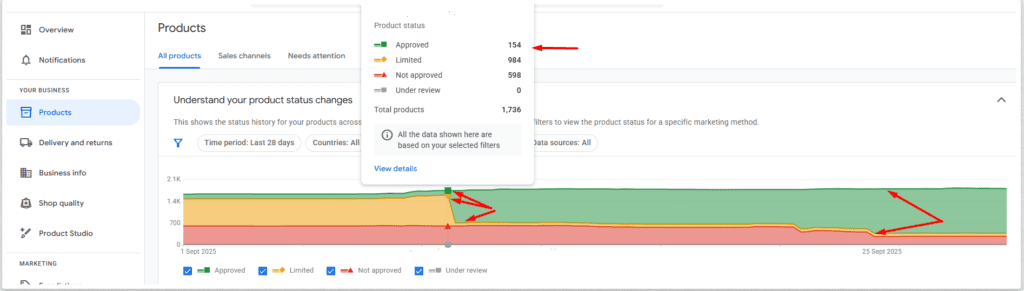
(a) We optimised the product feeds by implementing an on-page currency switcher for customers while standardising the shipping policy definitions to a single currency both on-page and in Merchant Center. This simple yet crucial correction resolved the feed errors and resulted in an astounding 827% spike in product approvals across all affected countries.
(b) Additionally, product titles were enriched with high-intent keywords through supplemental feeds to better align with user search queries.
(c) To cement these technical gains, a targeted backlink campaign built connections with EU-specific business directories and comparison shopping services, strengthening the site’s Domain Authority and entity recognition within Google’s knowledge graph.
Results & Impact Recorded
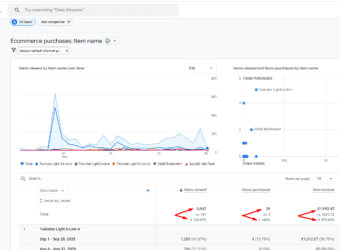
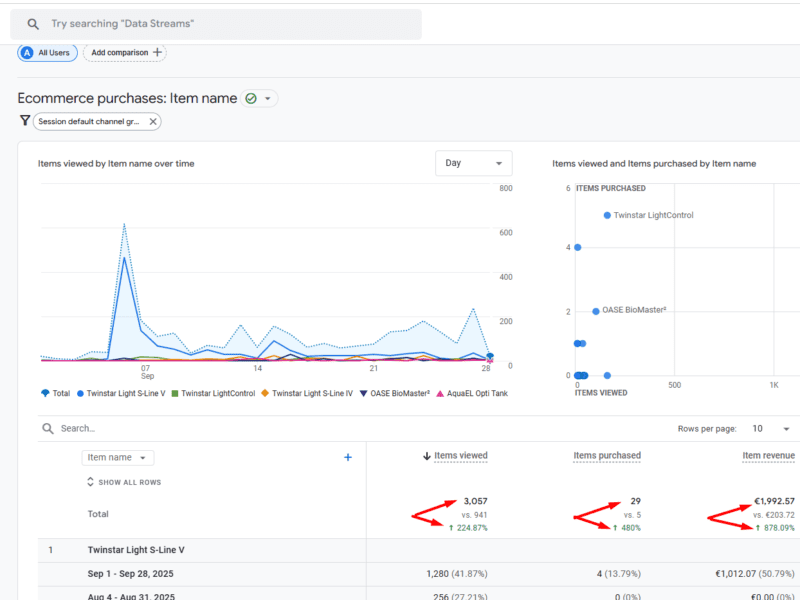
The culmination of these strategic interventions was a dramatic transformation in performance. The store witnessed a 224.87% uplift in items viewed, a 480% expansion in items purchased, and an 878.09% increase in item revenue.
Driving +39% Organic Revenue Growth: How CRO + SEO Reversed Declines For F1 Motorsports’ Dealer
In just one quarter, we turned a -22% revenue decline into a +39% uplift for this F1 Motorsports dealer.
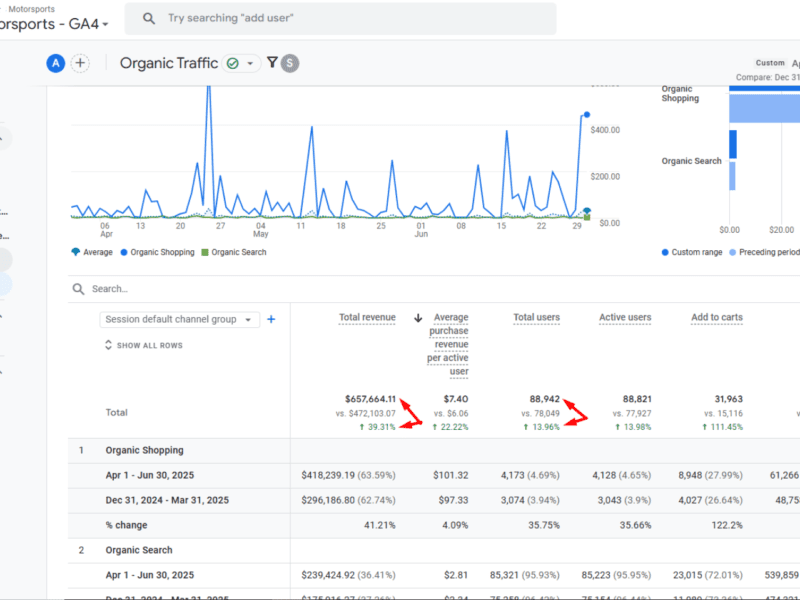
By combining CRO enhancements with SEO fixes, Q2 organic revenue rose to $657K.
At the same time, revenue per user jumped by +22% and organic clicks rose by+12%.
This rebound not only offset the seasonal dip tied to the F1 racing calendar but also proved that protecting branded traffic and reducing checkout friction can drive lasting, scalable growth.
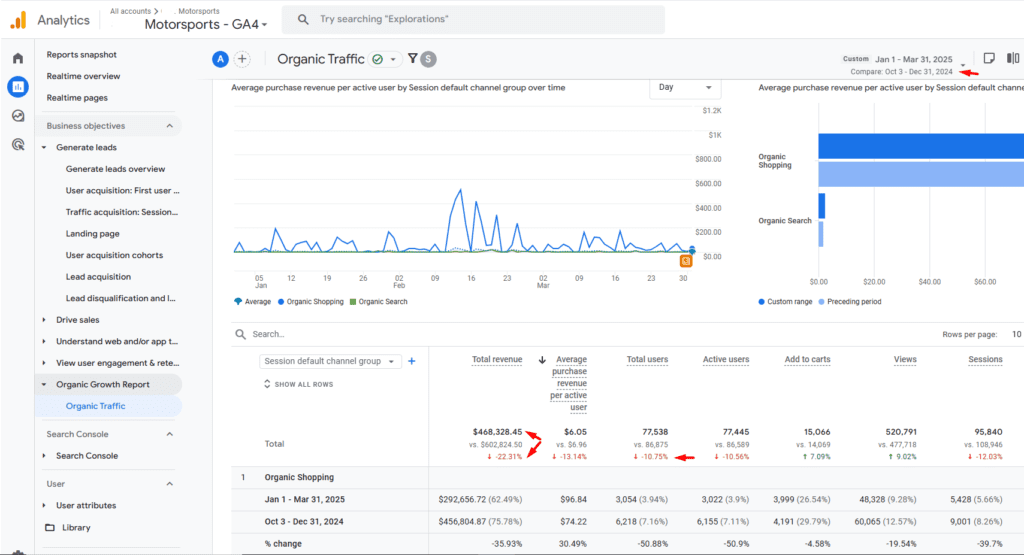
A niche e-commerce brand specializing in Formula 1 merchandise experienced a significant decline in traffic (-10.55%) and revenue (-22.31%) from Q4 2024 to Q1 2025.
This wasn’t entirely surprising — racing events don’t fall evenly across the calendar year, which creates natural fluctuations in demand. But year-over-year comparisons showed deeper challenges:
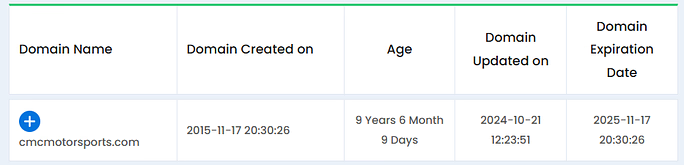
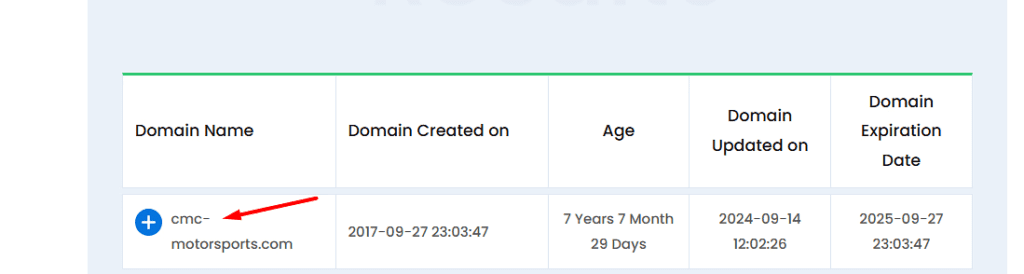
(1) Brand cannibalization was spiking due to the activities of a domain squatting site (cmc-motorsports.com). This site started ranking for branded keywords, hence precipitating declines in domain and branded search traffic.
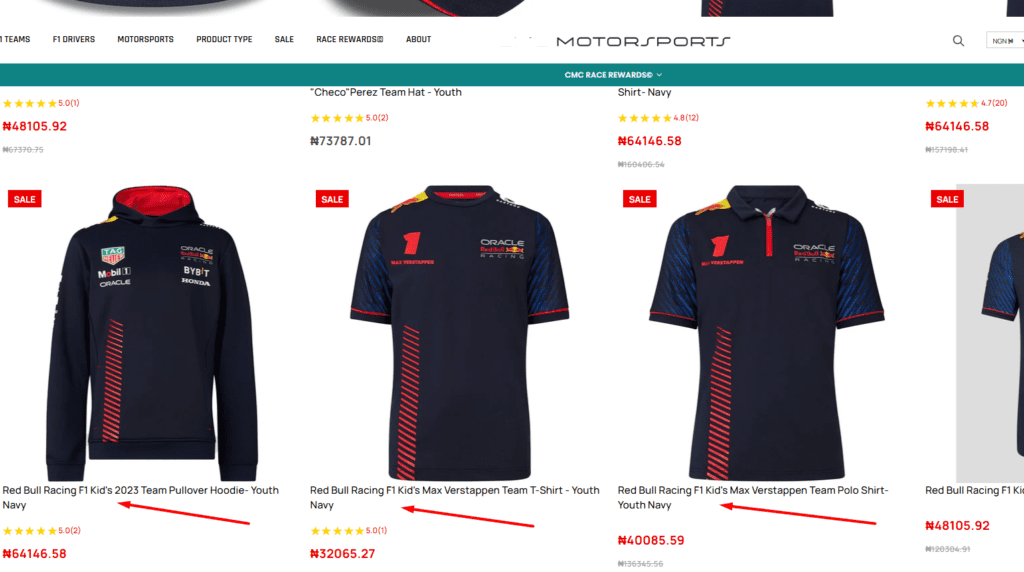
(2) Sharp keyword + organic click losses for products associated with high search volume brands like Red Bull and McLaren.
(3) Product page 404s that eroded revenue from in-demand but no-longer-available products. These 404s also caused site structure dislocations, disrupted inlink equity distribution, and reduced keyword reference counts on the host collection pages.
The business needed a strategy that could both stabilize performance during low-demand periods and capture maximum upside during peak racing months.
Tasks
Our mission was twofold:
Reverse the decline in organic traffic, protect branded search, and improve keyword relevancy.
Increase conversion rates by reducing friction in checkout, enhancing the complementarity of upsell and cross-sell recommendations, improving recurring purchase frequency, and highlighting customer incentives.
We also needed to stabilize performance against external risks like F1’s seasonal search demand (which coincided with the racing calendar)and branded traffic cannibalization from domain squatters.
Action
To address these challenges, we rolled out a combined CRO + SEO strategy:
On the SEO front, these were the ActionsTaken
(a) Filed Infringement Complaints To Overcome IDN Homograph attacks and the Domain Squatting effort of some competitors: This was achieved by initiating steps against the infringing competitor domain through ICANN’s UDRP process.
(b) On-Page Optimization: Wrapped product titles in collection grids with heading tags (H3/H4) to reinforce and amplify relevancy signals.
(c) Schema Implementation: Added WebPage and Carousel schema to expand SERP visibility, SERP coverage, and CTR.
(d) 404 Management: Shifted strategy from product-page 404s to “out of stock” labels. This helped to keep in-demand products available, thus absorbing traffic that would have been lost to their 404 status. We also implemented a sell-on-backorder feature, which allowed us to extract revenue that would have ordinarily been lost to zero stock items and their ensuing 404 status.
To improve the average revenue per site visitor, we undertook some CRO interventions, including
(e) Product Page Injection of Google Pay Button: Integrated credit card display on product pages to trigger “pre-filled convenience” and trust effects.
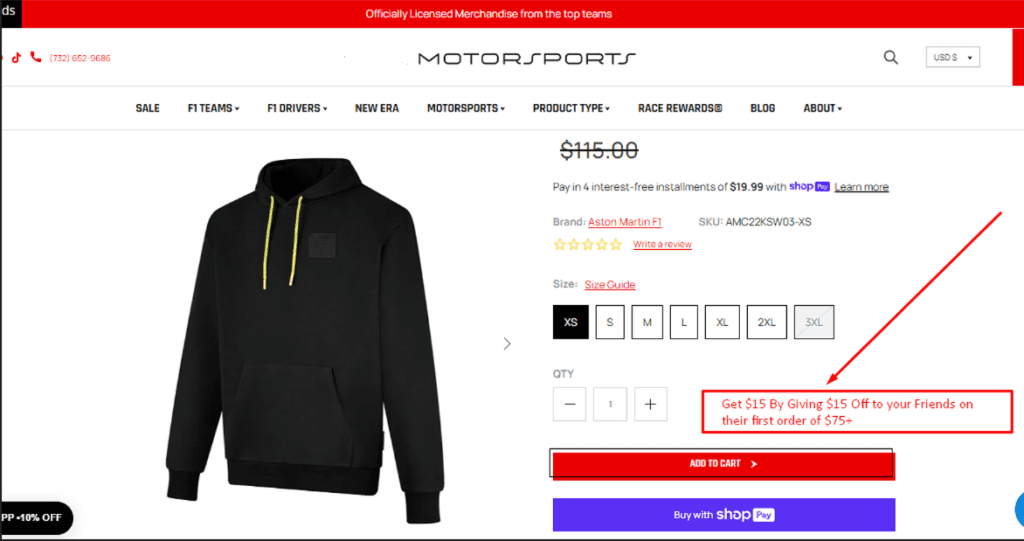
(f) Referral Program Integration: Moved “Give $15, Get $15” referral offer from the rewards page onto product and cart pages. This allowed us to create a traffic acquisition loop that funneled in-market and purchase-ready users to the site, independent of Organic or PPC touch points
(g) Purchase Habituation Via Reward Point-Product Price Associations
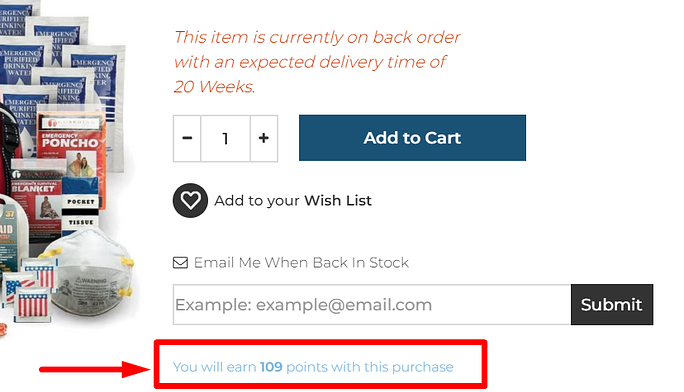
By adding “100 points = $1” on all product pages, we were able to amplify the perceived value associated with every purchase. These reward points were also an “investment” which guaranteed repeat visits to the site (as detailed in the Hooked Model). By offering reward point information side by side with products, we were able to increase the dopamine hits associated with purchases, while using investments (in the form of accumulated points) to create a reliable revisit and repurchase cycle that helped stabilize traffic and revenue
Result
The results between Q2 2025 and Q1 2025 marked a clear turnaround:
Organic Revenue: Increased 39.31%, climbing from $472,103.07 to $657,664.11.
Revenue per Organic User: Rose 22.22%, from $6.06 to $7.40.
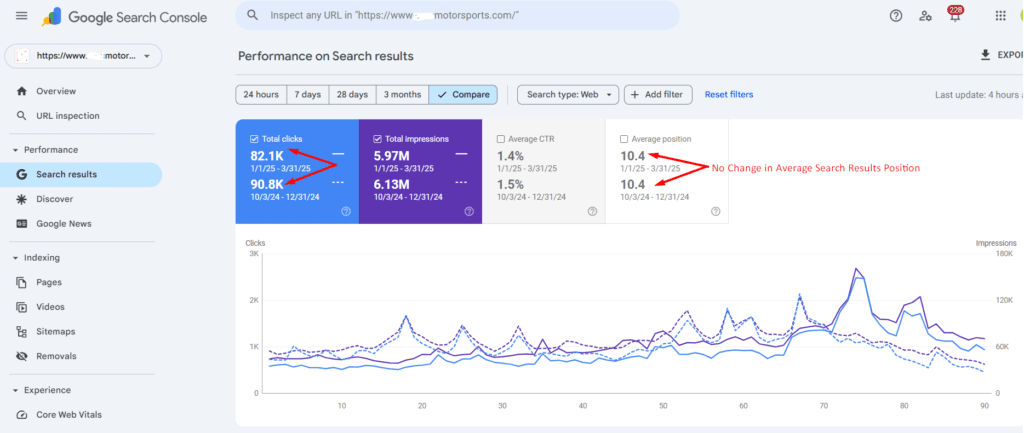
Organic Clicks: Grew 12.48%, from 82.5K to 92.8K in Google Search Console.
From 3.3K to 7.48K Clicks In 120 days: 4 SEO Fixes That Transformed a Custom Planter Business
A custom planter and window box retailer faced severe Merchant Center disapprovals along with traffic and revenue drops across google shopping surfaces (both free and paid).
Through targeted technical SEO and LLM optimization—including structured data fixes, render budget optimization, keyword expansion, and crawl path enhancements—we restored Shopping eligibility, doubled organic clicks, and drove a 137% revenue increase in just four months.
A high-AOV ecommerce retailer specializing in window boxes and outdoor planting systems relied heavily on seasonal demand peaks in summer, with steep declines in winter. To stabilize revenue, the business pivoted toward high-value custom planter and window box solutions for architects, interior decorators, and property managers.
However, a critical mismatch in product availability between Google Merchant Center feed data, product page content, and schema markup led to large-scale disapprovals. This meant the majority of the store’s products were absent from free listings and Shopping Ads across Google, Bing, DuckDuckGo, and Qwant — severely limiting visibility.
Situation
Despite a strong product offering, the site could not appear on Shopping surfaces for its custom planters because of conflicting availability statuses:
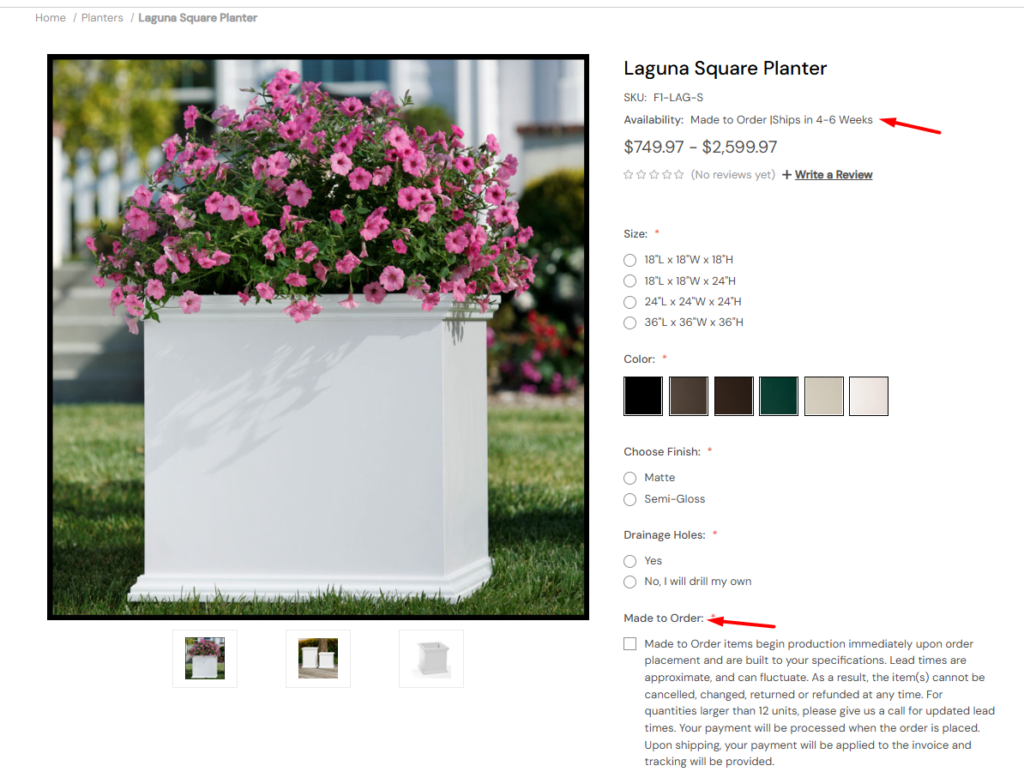
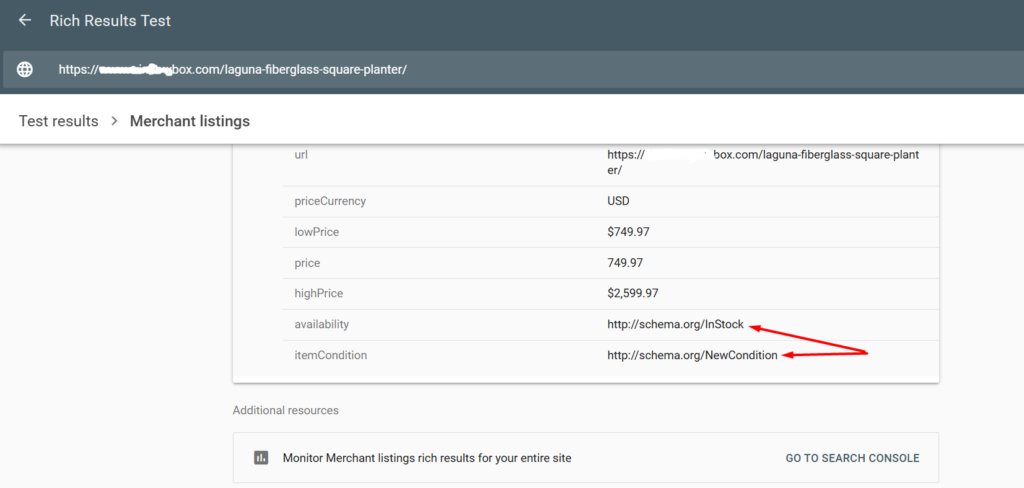
Feed level: “In stock”
Product page: “Made to order”
Schema: “In stock”
This inconsistency triggered disapprovals in the Merchant Center for most products. Compounding the problem, the site’s keyword portfolio leaned heavily on weather-dependent terms, leaving it vulnerable to seasonal demand drops.
Task:
I was tasked with:
Resolving the product availability mismatch to restore Merchant Center eligibility for custom products.
Expanding keyword coverage to include stable, year-round search terms.
Leveraging technical and Generative engine optimization to capture more visibility across general search, map packs, and geo-intent queries — compensating for seasonal Shopping tab volatility.
Action
I executed a comprehensive technical and local SEO strategy, including:
Keyword & Page Type Expansion:
Created Industry and Use Case pages targeting stable B2B queries (e.g., “planters for commercial buildings”).
Applied keyword-rich naming conventions to existing collection pages.
On-Page SEO Enhancements:
Encased all product names in heading tags, especially for collection page listings.
Bolded key commercial and informational keywords sitewide to strengthen relevance signals.
Technical SEO & Crawl Optimization:
Reduced raw vs. rendered HTML discrepancies to improve render ratio and crawl efficacy.
Created llms.txt to enable generative engines to reference site content during inference without full-page rendering.
Modified robots.txt to improve accessibility for LLM crawlers and inclusion in training datasets.
Reduced site “diameter” — the maximum click depth between indexable pages — to strengthen internal link equity.
Off-Site Barnacle SEO:
Established branded product listings and backlinks via Pinterest, Reddit, Listium, and Quora to gain additional SERP real estate.
Merchant Center & Schema Fix:
Updated structured data to reflect “preorder” status for custom products, aligning with product page messaging and feed data.
Eliminated the availability mismatch, restoring Merchant Center eligibility.
Result
Within four months (Jan–Apr 2025 vs. Aug–Dec 2024):
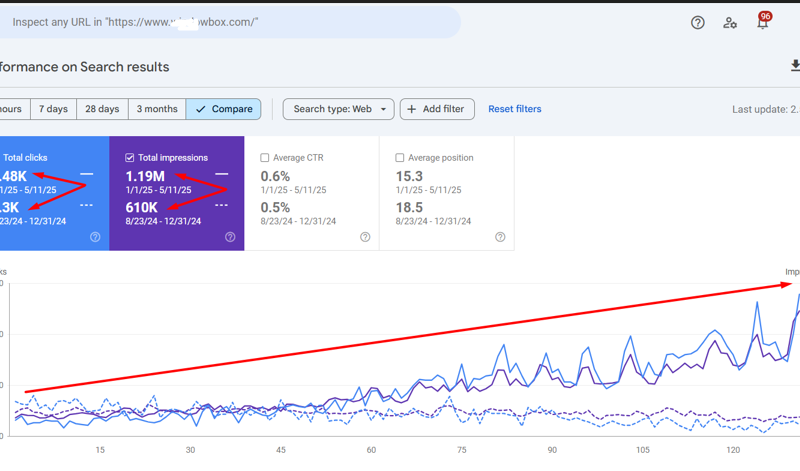
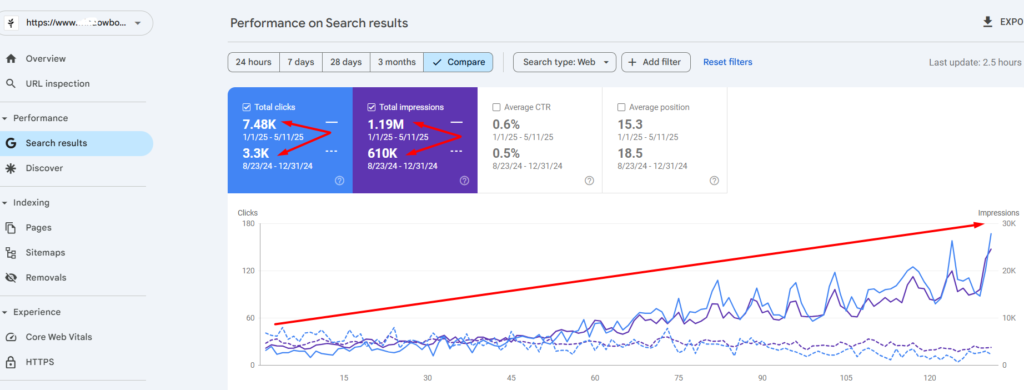
Organic Clicks: Increased from 3.3K to 7.48K (+126%).
Organic Impressions: Increased from 610K to 1.19M (+95%).
Merchant Center Recovery: The Majority of custom products reinstated for free listings and Shopping Ads, driving a measurable spike in Shopping impressions and clicks.
Keyword Stability: New B2B and local-intent keyword rankings reduced reliance on seasonal search trends.
Revenue Impact
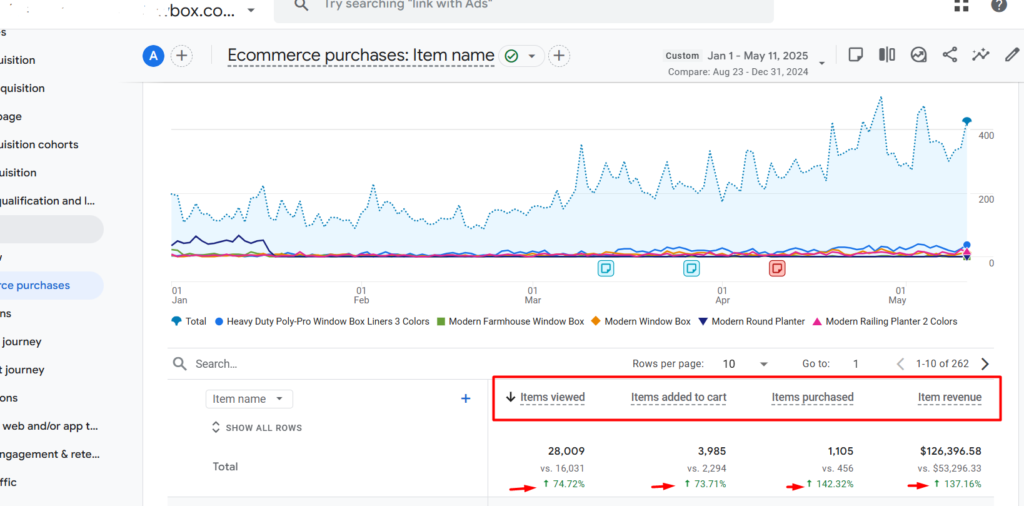
Items Viewed Grew By +74.72% (28,009 vs. 16,031)
Items Added to Cart Rose By +73.71% (3,985 vs. 2,294)
Items Purchased Inclined By +142.32% (1,105 vs. 456)
Item Revenue Improved By +137.16% ($126,396.58 vs. $53,296.33)
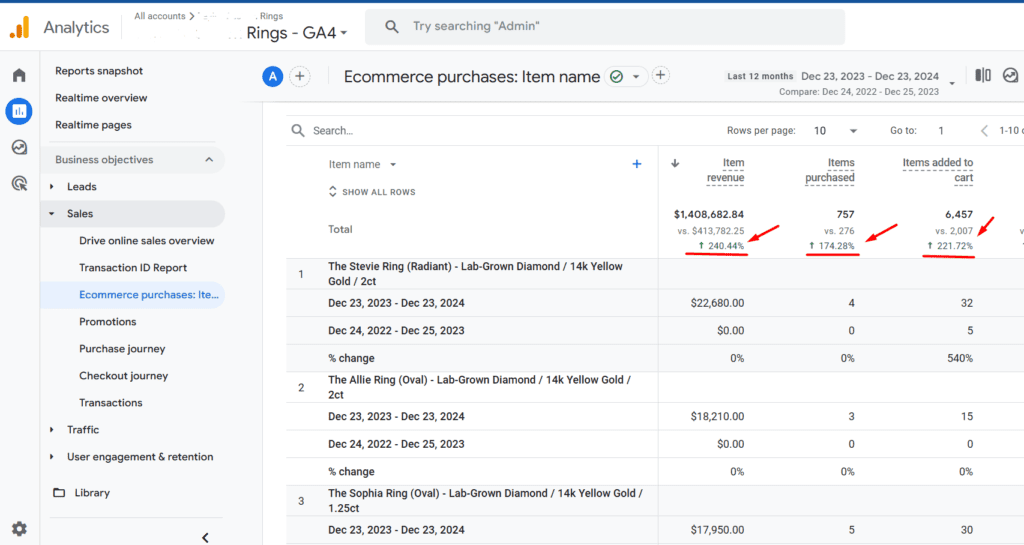
Drove 240% Revenue Growth to $1.4M with a Simple CRO Tweak: Free Resizing Case Study
Discover how I transformed overlooked policy messaging into a powerful sales driver.
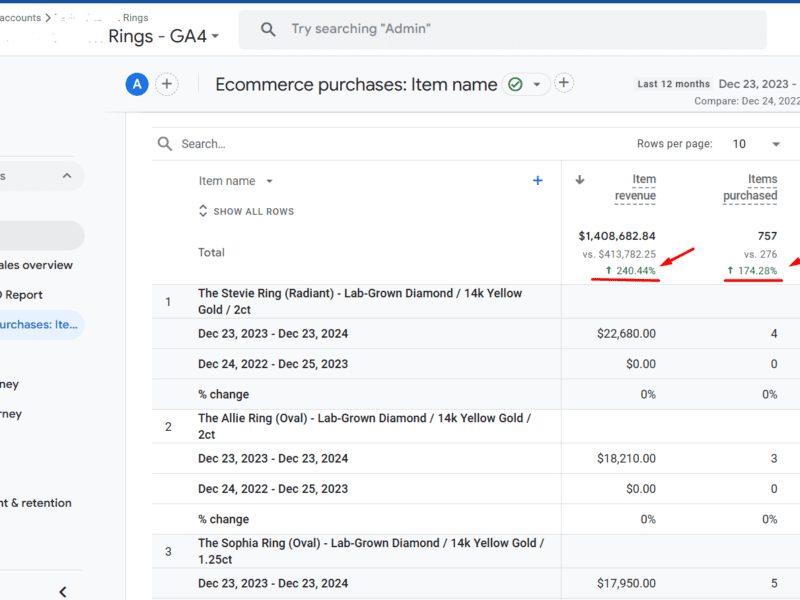
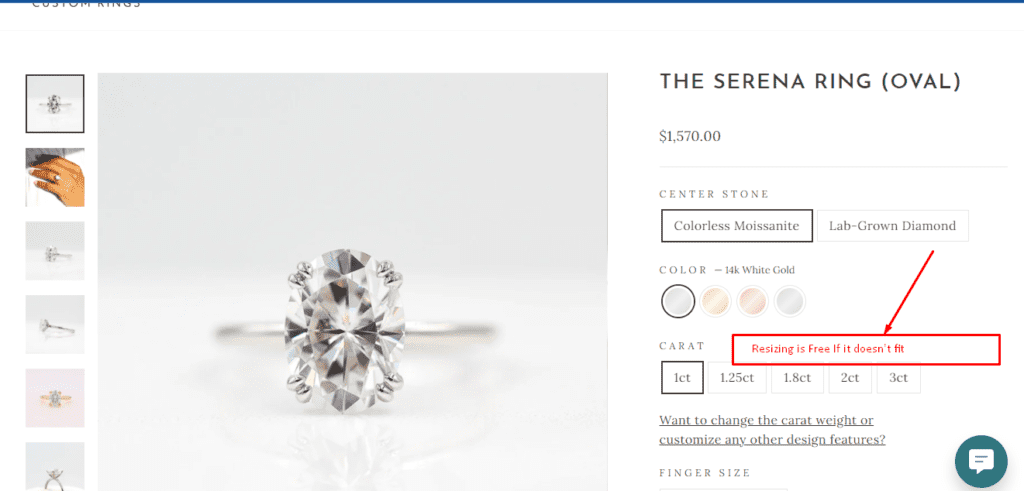
By repositioning the free ring resizing policy above the fold, we reduced customer hesitation, increasing the number of purchases by 174%
Leveraging qualitative insights from heatmaps and click maps, this strategic update directly addressed customer concerns, turning a passive feature into a compelling value proposition
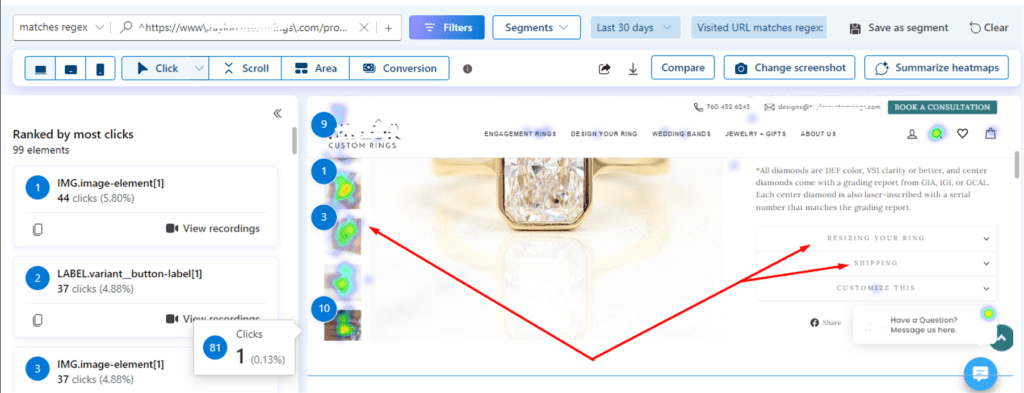
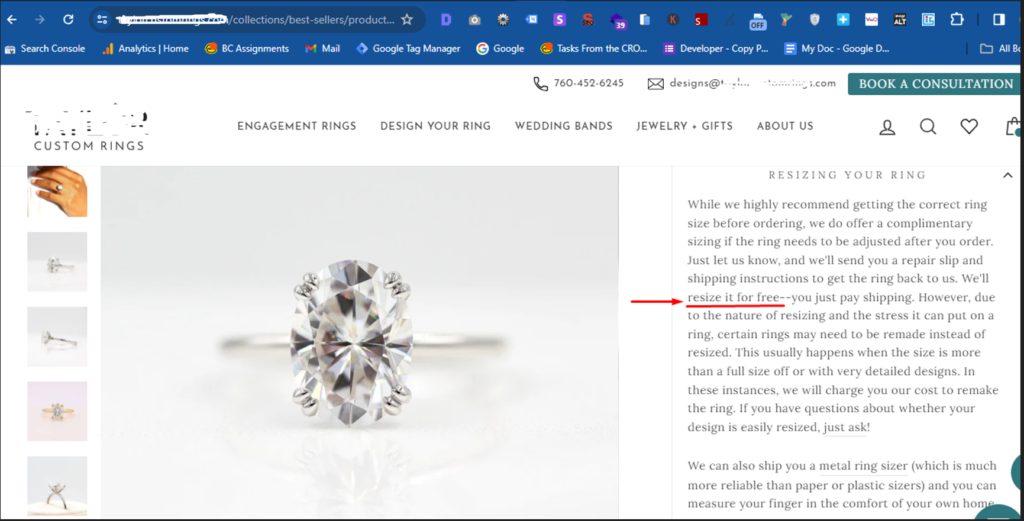
Clarity heat maps revealed that critical product page dropdowns, including the free ring resizing policy, were largely ignored by visitors. The click map showed minimal activity around these dropdowns, indicating a lack of engagement with the information.
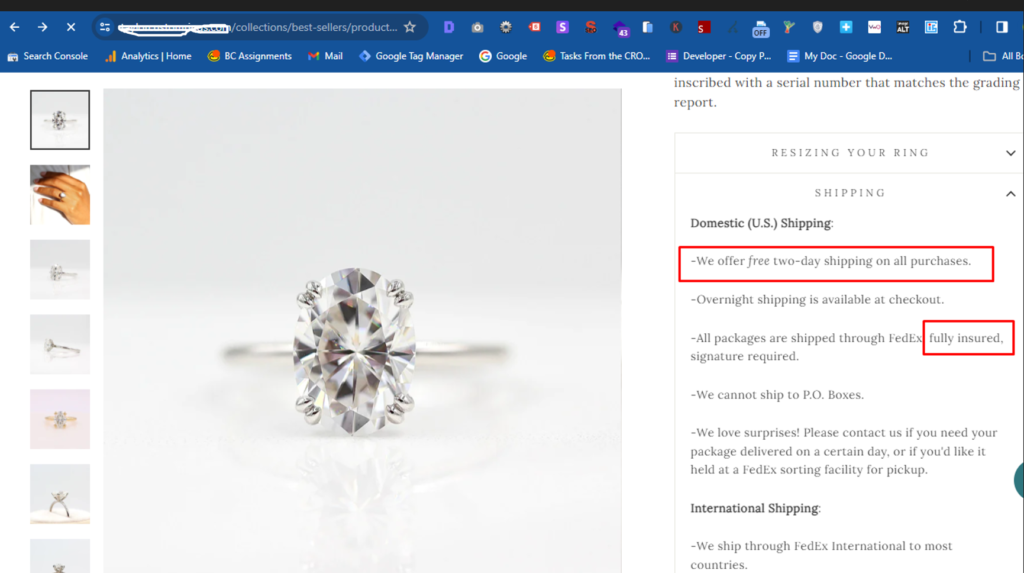
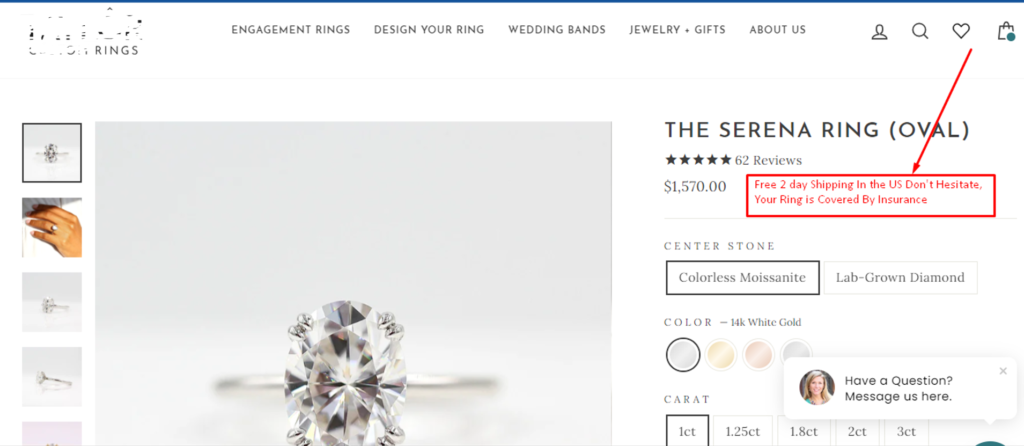
Similar to the resizing policy, the free shipping and ring insurance policies were also buried in dropdowns on product pages, as evidenced by clarity heatmaps and empty click maps. Given the price points of these jewelry products, these unnoticed policies were going to be critical for reassuring customers. Despite their importance, they were not being noticed by product page visitors
Since the information wasn’t getting seen, its sales-enhancing effect was also not influencing the purchase decisions of product page visitors.
Our hypothesis was that if this information was more visible, it would increase the sales performance of ready to ship products (a suit of products that did not require gem stone or ring sizing customizations)
Here is what the resizing, shipping and insurance policy stated across all product pages
Reasoning: For wedding and engagement rings, the worst thing that can happen is for the item to not fit the finger of the recipient. Most times the person making the purchase is not the one who is going to use the ring.
This means that apart from price, size uncertainty is a significant consideration that could be contributing to the time to purchase.
Task
In the resulting experiment, we aimed to embed this info above the fold so that it could get seen at the time when products are being considered To address this, we aimed to make the risk-reversal messaging and policy more visible by embedding the information above the fold on product pages.
This adjustment sought to mitigate insurance, shipping and size-related uncertainty for wedding and engagement rings, a common barrier to purchase due to fear of misfitting.
Actions
The free resizing, shipping and ring insurance policies were prominently displayed above the fold across all product pages. The message was crafted to directly address customer concerns, emphasizing that resizing was free, shipping was free and that the costly rings were insured
The adjustment was implemented while ensuring that the design remained consistent with the overall product page layout.
Result
Over the past 12 months, these experiments have demonstrated a measurable impact in keeping revenue, purchases and product-to-cart-page progression on a steady incline
Product purchases increased by 174.28%, as users engaged more with the visible resizing policy message.
Product-to-Cart Page progression improved by 221.72%
Revenue on ready-to-ship jewelry products improved by 240%, validating the hypothesis that making the resizing policy prominent would positively influence buyer decisions.
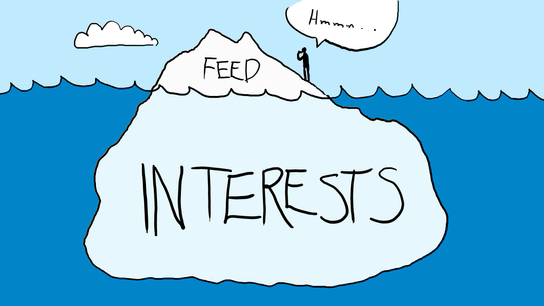
Google Discover is a content distribution platform that Google uses to keep people engaged with topics they have shown some interest in. Their interests in a topic are determined based on signals from their search history, sites and topics they have bookmarked in the Chrome browser, social media activity on platforms their Gmail addresses are connected to, and explicit interest signals sent on Google Discover cards.
Discover is a massive traffic boost to publishers. Apart from traffic, it also increases the geographic reach of content, allowing sites to bypass the organic competition in several countries. But not every site shows up in Google Discover, and there are a number of reasons for this.
So if your site is not showing in anyone’s discover feed, it could be due to any one of these reasons.
(1) Content quality / Entity salience gaps
By content quality, I am referring to the average degree of entity salience your articles are able to achieve relative to the competition. Entities are described by Google as anything or a concept that is unique, singular, well-defined, and distinguishable. In linguistic terms, Google recognized entities are simply nouns.
So any sports personality, economic institution, political system, or nation could be described as an entity.
Google has developed natural language processing models that are able to identify the centrality of an entity or group of entities to any web document. And this model can make comparisons about the level of entity coverage or salience across pages on different sites that are covering similar topics.
Discover works by identifying entities that specific smartphone users are interested in. It then selects articles from a variety of domains that have published highly salient copies around those entities of interest. So if your topical coverage and relevance to the concepts, events or entities is far lower than the threshold in your niche, your content will struggle to gain impressions on the discover platform.
To improve your content quality as it relates to entities, you need to first know what entity salience is and how it is measured in Google’s natural language processors.
(2) Domain popularity
Domain popularity here refers to the likelihood that an unbiased searcher will find your site by randomly clicking on links. This means that the more integrated your site is within the searchable web, the more popular your domain will be deemed to be and the more impressions you will receive on Google Discover. Domain popularity is a concept that is closely tied to PageRank. It simply means that the more the number of backlinks, the more likely it is for your content to be served to a random individual using an Android phone. So if your site is not yet being shown on Google Discover, it could also be due to limited amounts of relevance acquired from other publishers on the web. So, link-building efforts are required to overcome this challenge.
(3) Performance on search results pages
If a site exists that doesn’t rank for any keyword, it obviously cannot break through on Google Discover. If there’s a site that ranks for millions of keywords but gets zero clicks, it would be able to break through on Google Discover.
This means that there are backend thresholds of performance on search results pages that are required before any piece of content can gain impressions on Google Discover. If your site isn’t getting any impressions, it could be due to your performance being below these backend SERP performance thresholds.
(4) Absence of a knowledge panel
The absence of a knowledge panel is one of the main reasons why a site could be totally blocked off on Google Discover. The absence of a knowledge panel means that the site doesn’t exist in Google’s knowledge and entity graphs. This is a trustworthiness issue that puts the site on the wrong end of Google’s expertise, authoritativeness, and trustworthiness (EAT) philosophy. If an artisan isn’t known, he can never get any word-of-mouth referrals. The same reasons apply to sites without a knowledge panel. To acquire a knowledge panel, it’s best to verify your site on Google My Business or get a Wikipedia listing.
5 SEO Losses you Might be Incurring from Content Thieves
Content is the lifeblood of internet traffic. Be it commercial, informational or navigational surfing, every searcher is only online to find and consume content.
What makes content visible is the extent to which it satisfies the underlying search intent behind sets of recurring queries, and this is why great content is the key to all SEO success.
The SEO problems arising from content theft stem from the way search engines manage the relative visibility of websites in their index. The engines place a priority on the match between documents and queries, but this can become of benefit to content thieves since they can eat into your visibility by duplicating information that should be unique to your website.
The losses from such duplication are of enormous ramifications, but for the sake of simplicity, I have classified them into five major groupings which are;
1. Lost Backlink Opportunities
Backlinks are critical to SEO success because of Google’s PageRank algorithm. Using PageRank, google determines the authority of a website based on the number of backlinks it has gained around a particular topic. Since backlinks are only acquired through content, a prolific content theft operation could cause backlinks you deserve to be ascribed to other websites. This can slow down the accumulation of PageRank and the growth of your sites’ domain authority. In this case, your competition would be gaining ranking power on your own efforts.
2. Diminished keyword relevance
Google processes over 40,000 search queries per second and about 3.5 billion per day. All of those queries come with permutations of text that are mapped to different search intents. Your content is your tool for capturing keyword relevance based on the kind of topics you cover, but with content theft, you end up having to split this keyword relevance with a host of different websites, some of which may have a higher Domain rating that yours. When this happens, instead of ranking for 1000 keywords, you may end up only being relevant for 650. This is not a good situation to be in, but this is what content thieves can do to a website.
3. Lost potential for Organic & Referral traffic
This is a consequence of the two points listed above. Organic traffic is traffic that you get from search engines, while referral traffic are the visits you get from backlinks. If you lose keyword relevance to content scrapers, you would also lose search engine visibility and your organic traffic will drop. In the same vein, if you lose backlinks to valuable content that you’ve worked hard to create, you would also lose out on the visits you should have gotten through those links. All in all, the number of web visits would decline steadily until you do something about the plagiarism campaigns being launched against your site.
4. Risk of Algorithmic penalties
In 2011, Google launched an algorithm (Panda update) that enabled it to penalize websites with thin content, autogenerated posts and plagiarized work. While this is a positive development, it also comes with certain risks for websites with content that is widely duplicated on higher authority domains. So if your site is relatively new or just started publishing around a topic, depending on your site health and crawl budget utilization, scenarios could arise where Googlebot is unable to index your content first even though you are the original owner. This can cause your site to be marked as a plagiarizer by the panda algorithm, leading to ranking problems for all other types of content published on your domain.
5. Slower aggregation of positive user engagement signals
In 2007, Google was assigned a patent called “Modifying search rankings based on implicit user feedback”. The user feedback Google uses to modify rankings are click through rate (number of impressions/number of clicks on a search results page), the bounce rate, time on page, scroll depth, pages per session, direct visits, bookmarks etc..
If you are losing keyword positions, organic traffic and referrals, you will lose a slice of visitors who would not bounce, who would scroll far down the page, who would spend time on your site, who would bookmark your pages and become direct visitors. This means that all of the positive engagement signals they could have contributed to your rankings would be perpetually lost to those who are stealing your content. This is why you must take action against content thieves.
How content theft occurs
Now that you know the implications of content duplication across domains, you may be curious about how to stop it. The truth is that you cannot stop theft with a one size fits all approach, rather, your content protection strategy must be tailored to the different tactics that can be used to pillage your intellectual property. The different content duplication tactics are of three main types which are;
Manually theft
Automatic theft and
Indirect theft
Manual content theft is done by right clicking and copying content on a page, downloading videos and saving crisp images. This type of content theft is equally hurtful, but it’s slow pace diminishes the scale of impact because of the time gap between when the content is produced, when it is copied and and when the infringing actors are able to republish it. Manual theft is the most common type but it is also easy to mitigate against. For example, you can disable the right click button on your front end using plugins like Right click disabledfor WordPress or WP Content Copy Protection & No Right Click
Automatic content theft
This is usually the most hurtful because it enables your posts to be duplicated as soon as they are published. This is incredibly risky because of the likelihood that the plagiarizer’s site is more crawlable than yours. In this scenario, the search engines will index the plagiarized version before the original on your website. If this continues to occur, Google’s panda algorithm might penalize your site, and you will just wake up to a sudden loss of traffic. Such advanced content duplication is carried out by using scrapers that mine a target website for useful information. To prevent content scrapers from stealing your content, you might consider blocking the bots in your htaccess files or by blocking out their IPs altogether. To detect the scraper bots as user-agents or through their IP addresses, you may need to conduct a log file analysis on your server.
Indirect content theft
This usually occurs through your RSS feeds. This allows a recipient site to access your content and automate it’s republication. In some instances, AI powered content spinners like Chimp Rewriter or X-spinner are used to rewrite the stolen copy in order to make it more unique. To prevent this from continuing to happen, you could switch to a summary RSS feed. This will prevent the full availability of all posts on your site to the plagiarizer.
7 Ways To Increase your Crawl Budget For Better SEO Rankings
The web is a transfinite space. It is incredibly large and just like the universe, it is continually expanding. Search engine crawlers are constantly discovering and indexing content, but they can’t find every single content update or new post in every single crawling attempt. This places a limit on the amount of attention and crawling that can occur on a single website. This limit is what is referred to as a crawl budget.
The crawl budget is the amount of resources that search engines like Google, Bing or Yandex have allocated to extracting information from a server at a given time period, but it is determined by three other components which are;
Crawl rate: The amount of bytes that the search engine crawlers is downloading per unit time
Crawl demand: The crawl necessity due to how frequently new information or updates appears on a website
Server resilience: The amount of crawler traffic that a server can respond to without a significant dip in its performance
Why did I list those three components above? I listed them because the crawl budget is not fixed. It can rise and fall for a website, and it’s rise and fall affect the ranking and visibility of all content that the website holds.
So what are ranking the implications? you may wonder. The SEO implications of crawl budget changes are profound for many reasons, some of which are;
Large crawl budgets increase the ease with which your content can be found, indexed and ranked
The only content that can be indexed is content that can be found, hence the more quickly your content can be found, the more competitive you become in expanding your keyword relevance relative to your competitors. It is only content that is found that can be ranked so when the news breaks, the site with a larger crawl budget is likely to be ranked higher than others because its content gets out there first.
Crawl budget increases lead to resilience against the impact of content theft
The more crawl budget a site possesses, the greater the likelihood of its being able to get away with content theft, content spinning, and the more immune it becomes to the harmful effects of content scraping. This is because a site with a large crawl budget can steal content, but may get this content discovered and indexed before the original website.
Lastly, search engines compare websites based on their crawl budget rank
This is why related information is explicitly available in search console and Yandex SQI reports. The crawl budget rank or CBR of a website is given as:
IS – the number of indexed websites in the sitemap
NIS – the number of websites sent in the sitemap
IPOS – the number of indexed pages outside sitemap
SNI – the number of pages scanned but not yet indexed
The closer the CBR is to zero, the more work needs to be done on the site, the farther it is from zero, the more crawling, visibility and traffic the site gets.
How to increase your crawl budget
You can increase your crawl budget by increasing the distance that a web crawler can comfortably travel as it wriggles through your website. There are six major ways by which it can be accomplished and these are;
This can be achieved by eliminating duplicate pages
Eliminating 404 and other status code errors
Reducing the number of redirects and redirect chains
Improving the amount of internal linking between your pages and shrinking your site depth (number of clicks needed to reach any page in your site)
Improving your site speed
Improving your server uptime
Using robot.txt files to block crawler access to unimportant pages on your site
Conclusion
Crawl budget optimization is one of the surest paths to upgrading your rankings and website visibility, this is why special attention should be paid to your overall site health. Your site health is the most reliable indicator of the scale and location of your crawl budget leakages
HTTP is an acronym which means hyper text transfer protocol. It is the defined framework for the communication between clients and servers. In the context of the internet, clients are request generators, while servers are request handlers. For example, if you go to a library and request a book, you are the client.. while the librarian who offers you the book is the server.
This same analogy applies to the internet. If you want a document, a video, a picture or any other resource, you would make a request via the browser on your phone, tablet or laptop. These devices are the clients. When the request reaches the server, it then communicates the status of the request back to the clients.
These server-client status responses are of SEO relevance because they impact search engines and human visitors to a site. Search engines use these status codes as indicators of the page quality of a website. These http status codes exist in 5 major groupings which are;
1xx status codes – informational responses with no SEO implications
2xx status codes – success codes with SEO implications
3xx status codes – Redirection responses
4xx status codes– Refer to client errors. These are server to client responses that do not meet the clients expectations
5xx status codes – These are server errors.
There are lots of status codes, but some occur so frequently that they necessitate a thorough understanding of their SEO effects on a website. Let’s start with eight specific types
200 status codes
These are the best possible codes that you can get. Whenever you don’t get a 200 response, this indicates that there was an issue either on the server or client end. When you get a 200 status code, all is well with the URL.
301 status codes
These refer to redirects that are of a permanent nature. This means that one URL is actually pointing to another URL usually of different anchor text. This response is of consequence for SEO because of the effect it can have on crawl budget and the transfer of PageRank. It can also have an effect on the user experience on a website due to the occurrence of an information mismatch between the requested URL and the page it is permanently redirecting to.
302 and 307 status codes
These usually indicate that a temporary redirect has taken place. These are of real SEO consequence because neither of these two redirect methods can pass PageRank to a new URL. This should only be used if the content missing under the old URL will be replaced at a later date.
400, 403 and 404 status codes
The 400 error indicates invalid syntax in the request sent from the client. This could happen if the client is sending a file that is too large, or if it’s request is malformed in some way (expired cookie, sending request via invalid URLs etc.).
The 403 error is a forbidden response from the server to the client. This indicates that the server is not going to allow the request to be fulfilled due to the unauthorized status of the client.
The 404 error on the other hand indicates that the requested resource is missing completely on that url or location.
Understanding the SEO impact
These are all client side errors and their main impact is in the UX experience signals that they send to both humans and search engines. With humans, frequent errors of this nature will lead to bounce rate spikes, low time on page metrics, and drop offs along the conversion funnels of a site. For search engines, this can lead to the deindexing of URLs that were relevant for high value keywords.
What About Server Errors?
All 5XX errors are server related and point to issues with the web host. The implications are by far the most severe because it indicates that the requested resource cannot be offered by the server. Whenever Google encounters errors of this nature, ranking losses and deindexations of URLs are usually not far off.
In Summary
This was a brief overview of common SEO errors and the implications for organic traffic generation. Search engines are the conduit between web surfers and your website. This means that direct access to your audience and customers can be augmented or sabotaged based on the type of status codes that Google’s algorithms are getting. These algorithms are autonomous learning systems which is why negative signals must be avoided at all costs. To succeed at SEO, you must do your best to ensure that 200 status codes dominate on the most important sections of your website.
How to detect and resolve Google analytics errors on your website
Google analytics is an amazing tool that helps to collect data about users and their activity on your website. You can learn amazing things about your online audience such as their demographics (gender and age distribution), how much time they spend on your site, the type of pages they are most interested in, the number of pages they read before leaving and so on.
All of Google’s really cool data is only useful if it is reliable, and there are many reasons why the data that Google collects may be wrong. This is why it is necessary to ensure that your Google analytics codes are properly installed, and properly audited. Even without an audit, you can tell if your tracking code is faulty when you have:
An unusually high or low bounce rate
An unreasonably high or low number of page views, especially when ad revenue does not match the rise and fall in views
When you have static data like time on page that doesn’t improve or diminish over several months.
All these are indicative of a faulty Google analytics implementation and these faults are due to certain errors which are fairly common.
To detect these sort of errors, tools like Google Analytics debugger and tag assistant come in handy. The analytics debugger helps to analyze JavaScript events coming from your Google analytics tag right within your chrome console. The tag assistant extension usually looks like this.
Google tag assistant is a lot easier to work it as it gives a snapshot overview of all detected tags on a page and color codes them based on four characteristics which are:
When the tag is green, then this means that there are no implementation issues associated with it.
When the tag is blue, it means that there are minor implementation problems along with suggestions to correct those issues.
When the tag is yellow, this means that there are risks to your data quality and the tag setup is likely to give unexpected results.
When the tag is red, this means that there are outright implementation errors with the set up which could lead to missing data in your reports.
When using tag assistant, here are some common errors you could find
1. Invalid or missing web property ID
This usually happens when the property ID in your analytics code is either missing or wrong. The property ID is like a phone number that tells Google analytics the exact account it should send all the data it has collected to. So if the property ID is missing, data will be collected but won’t be sent to your analytics account.
Solution: Ensure that the web property ID on your page matches the ID in your Google analytics account. To be safe, just ensure that script on your page matches the script that is generated in your account.
2. Same web ID property is tracked twice
Source of the problem: This error usually results from multiple installations of your Google analytics property ID. This happens when Google analytics is reporting to the same web ID from the global site tag, googlr tag manager and Google analytics. It can also happen when Google analytics code from the same web property is installed through an external file and through a direct installation in the HTML of your website.
Solution: The solution is to ensure that the tracking code of each web property ID is only installed once. So you can look through your site’s source code. Use ctrl + F to find all instances of the web property. Identify the tags through which it’s injection into the page is being duplicated, then proceed to eliminate all but one of them.
3. Missing http response
This error indicates that while Google analytics has been detected on the page, it isn’t sending any responses to Google’s servers. Without a http response, data isn’t being transported to the server and hence, cannot appear in your analytics account.
Solution: Reinstall Google analytics in the head section of your website since this error usually results from faulty installations of the tracking code.
4. Method X has X additional parameters
Each method in Google Analytics has a set number of allowed parameters. You can find out the number and type of allowed parameters for any method by reading the documentation.
This error denotes that you have exceeded the number of allowed parameters for the given method. Exceeding the number of allowed parameters will either cause Google Analytics to drop any parameter over the limit OR cause Google Analytics to fail to record data associated with the given method.
Solution: Review the documentation and parameter allocation for the respective Google Analytics methods and ensure that your implementation follows the documentation appropriately.
This error indicates that your Google Analytics ID is not properly set within the setAccount function in the Google Analytics JavaScript. The error explicitly states the existence of a whitespace or empty space either before or after the account ID that is preventing the correct ID from being identified or collected. Your account ID is important because it indicates the account that the collected data is to be sent to.
Solution: Ensure that there is no space before, after or within your Google a analytics ID. Also check to ensure that the ID in your source code matches with the ID in your analytics account.
6. Move the tag inside the head
This error indicates that the analytics ID is not in the ideal location within your sites HTML. The ideal location for the analytics scripts is the head section because it is it the the head section that the tracking beacon is guaranteed to have fired before the visitor has left your site. If the tracking code is in the body or footer, it may not have fired, recorded a visit or any other event before the user would have left the page. It could also miss certain page events leading to missing and incorrect data in your reports.
Solution: Move your tracking code to the head section of your sites’ HTML and place it just a above the closing head tag <head> Place the code just above the closing head tag </head>
Detected both dc.js and ga.js/urchin.js Remove Depreciated method ‘XXXXX’
6. Missing JavaScript & Missing JavaScript closing tag
Without a closing tag, the JavaScript functions required to collect data from your page and transport it to Google’s servers would fail to execute. When this happens, no data will be collected or reported in your account.
Solution: Ensure that your Google Analytics script contains the full request to google-analytics.com. Ensure that all functions are declared in full just as stated in the tracking code you were given. To be safe, just ensure that script on your page matches the script that is generated in your account.
7. Tag is included in an external script file
This message indicates that Google analytics isn’t present on the page source code but is firing from an external file. While data may still be reported, this sort of set up is fragile and could be responsible for data discrepancies. It might also make your site vulnerable to competitor spying or negative SEO attacks.
Solution: Check through the external file that your code is firing from and ensure that it is working properly. If you had prior problems before you discovered that an external file was hosting your tracking code, it may be best to install Google analytics in the source code of your website and remove it from the external file.
Conclusion
Data collection is extremely important in the optimization or day to day managing of a website. The data you collect can be analyzed to find what works, what doesn’t work, why it doesn’t work, when it doesn’t work and for whom it doesn’t work. This info can change the trajectory of your website for good only if the information your have is reliable. This is why Google analytics auditing is necessary and is something you should embark upon from time to time. If you have any further questions you would like to ask me, feel free to get in touch.
How to Avoid Being a Victim of Domain Squatting & Homograph Attacks
If you had a site that was doing well but suddenly, things just went downhill, it could be worth exploring to see if you have been a victim of a negative SEO attack. Negative SEO attacks are in many forms and each type has a different degree of impact on a website. Of all the negative SEO attacks I’ve experienced, one of the most devastating is a Domain squatting attack. These types of attacks exist in various forms which are:
Typo squatting attacks and
Homograph attacks
What is domain squatting
This is a family of negative SEO techniques which are deployed in order to harvest web credentials, steal direct traffic, harm an organization’s reputation, achieve affiliate marketing monetization, install adware, transmit malware or to achieve other malicious objectives.
How these attacks are initiated
These groups of attacks are initiated by registering a variation of a legitimate domain and building a mirror website of that domain. This enables the attacker to deceive people into mistaking the fake domain as the legitimate URL of the website they were trying to visit (which could be a bank, a fintech solutions provider, or an online store)
When this happens, visitors will interact with the fake domain by clicking through or trying to login. This is what enables the attackers to achieve whatever objective they had in mind. The techniques vary which will be discussed individually under their respective classes which are:
a. Typo squatting attacks: An attacker registers a domain similar to the target domain in spelling. They do this based on the likely keyboard typos that can occur whenever the target domain is being typed into a search bar. They also pick variations of the target domain based on TLD’s (replacing abc.com with abc.ng) with the goal of stealing traffic that people accidentally direct to the target domain. For example, the attacker could replace ab.cd.com with abcd.com or biz.com with biiz.com.
b. IDN homograph attacks: The International Domain Name protocol allows for the display of Tamil, Arabic, Chinese, Amharic, etc. characters in domain names. Some characters, like the Greek “p” (meaning Rho in their language) appear identical to the English “p”, and can resolve to entirely different servers.
This is what attackers exploit when initiating a homograph attack. For example, websites like “picnic.com” could be registered such that the p in picnic is actually not an English but a Greek or German letter. This will allow two domains called “picnic.com” to be registered for two different but identical sites (one fake and one legitimate) on two different servers.
How to protect your website
Any domain can be squatted and this is what makes these types of attacks very common and effective. To protect your website, you might consider the proactive registering of similar variations of your domain name. This is usually an expensive option but if you can snatch of the most similar versions of your site, you can reduce the likelihood of a successful domain squatting attack ever being initiated against you. You can also consider other mitigative measures such as:
Trademarking your assets
Informing your staff, site visitors and other relevant stakeholders
By monitoring domain registrations using tools like swimlane or CipherBox
Use the Anti-cybersquatting Consumer Protection Act or ICANN’s Uniform Domain-Name Dispute-Resolution Policy (UDRP) to take hold of the domains or have them taken down.
Nevine Acotanza
Chief Operating Officer
I am available for freelance work. Connect with me via and call in to my account.