AI Visibility, Occupancy Scores, and LLM SEO – Complete Guide
Ever since ChatGPT was launched in late 2023, information retrieval on the internet has undergone a significant transformation. Rather than clicking on links in search engine results pages (SERPs), people now prefer to save time by interacting directly with LLM chatbots. This trend has altered search activity on Google, with ChatGPT processing 1.7 billion search-like requests per day, accounting for 12% of global search traffic.
To respond to this shift, Google launched multiple AI products, including Gemini, AI Mode, and AI Overviews. Combined with the rise of alternative LLMs like Grok, DeepSeek, Claude, and Perplexity, AI-generated responses have continued to expand, displacing the clickable blue links that previously dominated results pages.
This shift has created a new SEO focus: visibility is increasingly about mentions and citations within AI responses, not just traditional rankings.
Why AI Responses Matter for Marketing and Traffic
AI responses are important both as a traffic source and as a marketing channel because:
- People increasingly use AI to discover and research products, tools, and companies.
- The traffic benefits of first-page rankings are diminishing, as AI responses push top-ranking pages further below the fold.
- AI results are more volatile than traditional SERP rankings, creating opportunities for smaller or lesser-known entities to appear in front of their target audience.
- AI responses are highly query-relevant and often more trusted than information found in standard blog posts.
- AI adoption is accelerating across apps, websites, and devices, including customer service chatbots, voice assistants, and IoT gadgets.
These factors make LLM visibility an essential competency in modern SEO and digital marketing.
What is AI Invisibility?
Many brands, people, and organizations are well-known among humans, yet there can be a gap between human knowledge and AI model recall. This phenomenon is known as AI invisibility.
AI invisibility is defined as the gap between human recall and model recall:
Human Recall−Model Recall=AI Visibility Gap\text{Human Recall} – \text{Model Recall} = \text{AI Visibility Gap}Human Recall−Model Recall=AI Visibility Gap
Human recall depends on advertising, education, and cultural exposure, while model recall is based on training data, which includes encyclopedias, research articles, books, and public content.
A gap emerges when AI models fail to recognize entities that are widely known by humans, often due to limitations in their training data or the way information is structured online.
Factors Contributing to AI Invisibility
Four main factors contribute to AI invisibility:
1. Source Asymmetry
If references to an entity are behind paywalls or in closed-source datasets, AI models may underrepresent it. For example, a popular politician who only publishes paywalled articles may be less visible in AI responses than in human awareness.
2. Category Misalignment
How an entity defines itself may differ from how models categorize it. Differences between self-perception and public perception can create misalignment, affecting AI visibility.
3. Absence of Structured Data Anchors
Structured data, such as Product, Person, or Article schema, helps AI models identify and classify entities. Without these “anchors,” AI may fail to recognize important entities.
Analogy: Structured data is to AI what uniforms and badges are to humans. Without them, a random observer might underreport the number of soldiers on a road; similarly, AI underreports entities without schema.
4. Decay Tendencies
AI responses can diminish over time due to model updates, competitive content, or changes in data ingestion. Even repeated prompts may see declining mentions over 30, 60, or 90-day periods.
Why Traditional SEO Metrics Fall Short
Standard SEO metrics are insufficient for measuring AI visibility because:
- Snapshot Bias: AI responses are less consistent than SERPs. The same prompt can produce different answers, making static ranking measures unreliable.
- Framing Bias: Minor changes in prompt wording can significantly change AI responses, unlike traditional keyword rankings.
- Dynamic Decay: AI mentions can disappear or shift as models update, unlike relatively stable search rankings.
To measure AI visibility effectively, new metrics such as occupancy scores have been developed.
Occupancy Scores: Measuring AI Visibility
Occupancy scores are standardized metrics for capturing entity mentions within LLM responses. There are two main types:
1. Answer Space Occupancy
This measures the share of answer surfaces where an entity appears when the same prompt is repeated. For example:
Prompt: “What is the oldest civilization on earth?”
If “Egyptian civilization” appears in 3 out of 4 responses, its Answer Space Occupancy is 75%.
2. Prompt Space Occupancy
This measures the share of related prompts within a category or vertical that mention the entity. Dimensions include:
- Occupancy: % of prompts citing the entity
- Positioning: Average rank of the entity in responses
- Decay: Persistence over time (30/60/90 days)
Example: For acne treatment brands, prompts like “best cream for pimples” and “best cream for blackheads” form a prompt space. If Neutrogena appears in 6 of 7 prompts, its prompt space occupancy is high.
How to Improve Your AI Visibility & Occupancy Scores
1. Be Mentioned in Credible Sources
LLMs learn from reputable content. Secure citations in:
- Media outlets
- Industry publications
- Academic and technical reports
- Reputable directories and knowledge bases
Consistency is key; repeated mentions build credibility with AI models.
2. Increase Industry Centrality
Appear alongside leading entities in your category. Achieve this by:
- Guest writing on respected platforms
- Collaborating with known organizations
- Speaking at conferences and events
Network centrality improves AI recognition.
3. Make Your Website AI-Friendly
Ensure your content is readable and structured:
- Mobile-optimized and fast-loading
- Clear headings and structured layout
- Avoid paywalls on key entity information
- Include About pages, FAQs, and detailed product descriptions
4. Strengthen Associations
Repeatedly link your brand with its industry, category, and geography.
Example: A fintech company in Nigeria should appear alongside African fintech, digital payments, Flutterwave, and Paystack.
5. Use Structured Data
Implement schema markup for:
- Company name and location
- Products or services
- Founders and social profiles
Structured data clarifies identity and relationships for AI models.
Conclusion
LLM SEO is no longer optional—it is essential for brands aiming to be discoverable in AI-driven search. By understanding AI invisibility, measuring occupancy scores, and strategically improving mentions, structured data, and centrality, you can ensure your brand is visible and trusted across LLMs like ChatGPT, Claude, and Perplexity.
Traditional SEO metrics are no longer sufficient; success in AI visibility requires a strategic, multi-layered approach that integrates content, backlinks, schema, and network positioning.
How To Use the Copyscape API for SEO With this Python Script
If you are serious about SEO, making sure your content is original is key. Duplicate content can hurt your search engine rankings and reduce your website traffic. One tool that helps solve this problem is the Copyscape API. This tool allows you to check your content for duplication across the web in a programmatic way.
What is the Copyscape API
Copyscape is a popular plagiarism detection service. It helps you find content that has been copied or duplicated from your website or any other source. The API version of Copyscape lets developers integrate its plagiarism detection capabilities into software or scripts. This is especially useful for websites with many pages or for agencies managing multiple clients.
Some of the main features include:
- Plagiarism detection: Check if content has been copied anywhere on the internet.
- Batch processing: Check multiple URLs or content pieces at once.
- Flexible integration: Use multiple programming languages to work with the API.
These features make it a valuable tool for anyone involved in SEO, content publishing, or digital marketing.
Why SEO Professionals Use the Copyscape API
The Copyscape API is useful for different groups:
- Content publishers: Verify content originality before publishing.
- SEO agencies: Monitor client websites to protect content from plagiarism.
- Educational institutions: Check student submissions for academic integrity.
- Content aggregators: Filter out duplicated content from multiple sources.
In addition, detecting duplicated content can help prevent negative SEO tactics. Some people copy content from high-ranking websites and publish it elsewhere to reduce the original site’s authority. By regularly checking your content, you can identify and address this type of issue.
How to Get Started with the Copyscape API
To start using the Copyscape API, follow these steps:
- Create a Copyscape account and purchase credits. Each search costs a small fee, usually around $0.03 per search.
- Obtain your API key from your account. This key allows you to access the Copyscape servers programmatically.
- Prepare a list of URLs you want to check. This is usually done in an Excel file with a column called URL.
- Use a Python script to send requests to the API and gather duplication data.
Here is a simple example using Python:
This script reads a list of URLs, sends them to Copyscape, and collects duplication information in an Excel file. You can then review which content has been copied and take action if necessary.
Interpreting Results
Once the script runs, the output Excel file will show:
from urllib.request import urlopen
from bs4 import BeautifulSoup
import pandas as pd
# Copyscape credentials
username = "your_username"
myapikey = "your_api_key"
# Load URLs from Excel
df = pd.read_excel('urls.xlsx')
list_urls = df['URL'].tolist()
# Store results
all_data = []
for url in list_urls:
try:
page = urlopen(f"https://www.copyscape.com/api/?u={username}&k={myapikey}&o=csearch&c=10&q={url}")
soup = BeautifulSoup(page, 'xml')
results = soup.find_all("result")
for result in results:
data = {
'URL': result.find("url").text,
'Title': result.find("title").text,
'Text Snippet': result.find("textsnippet").text,
'Min Words Matched': result.find("minwordsmatched").text,
'View URL': result.find("viewurl").text,
'Percent Matched': result.find("percentmatched").text
}
all_data.append(data)
except Exception as e:
print(f"Error processing {url}: {e}")
df_combined = pd.DataFrame(all_data)
df_combined.to_excel('results.xlsx', index=False)
print("Data extraction complete. Excel file saved as 'results.xlsx'.")
- The original URL
- Titles of copied content
- A snippet of the matched text
- How many words matched
- The percentage of duplication
With this information, you can determine which content needs to be rewritten or protected.
Conclusion
Using the Copyscape API for SEO is a smart way to maintain content originality and protect your website from plagiarism. Whether you are managing a single blog or a large site, the API makes it easier to detect duplication, monitor client content, and take action when necessary. By integrating it into your workflow, you can improve your SEO strategy and keep your content unique.
How to Use Python Scripts to Get TF IDF Scores for SEO Content Audits
If you want to improve your SEO performance, you need to understand how your content compares to other pages that talk about the same topic. One simple way to do this is to use TF IDF. TF IDF stands for term frequency inverse document frequency. It is a statistical method that shows how important a word is inside one page and across a group of pages.
In this guide, you will learn what TF IDF means, why it matters for SEO, and how to use a Python script to calculate TF IDF scores for any list of URLs.
What TF IDF Means
TF IDF is a combination of two parts:
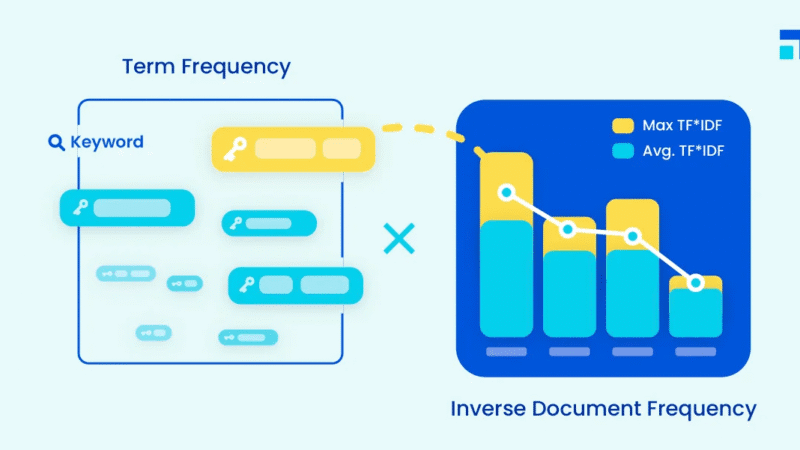
1. Term Frequency
This measures how often a word appears on one page. A word that appears many times will have a higher term frequency.
2. Inverse Document Frequency
This measures how rare or common the word is across all the pages you are comparing. If a word appears in every page, it is not special. If a word appears in only one or two pages, it is more important.
When you multiply these two parts, you get the TF IDF score. A high TF IDF score means the word is important in that page and is not too common across the other pages.
Why TF IDF Matters for SEO
Before search engines began using advanced language models, TF IDF was one of the main ways they measured relevance. Even today TF IDF can help you understand how your content focuses on important keywords.
Here is what TF IDF can help you do:
- Discover the words your page truly emphasizes
- Check if your page aligns with the keywords you want to target
- Compare your page with competitor pages
- Identify content gaps
- Improve on-page SEO
TF IDF gives you a more objective picture than simple keyword counts.
What You Need Before Running the Script
To calculate TF IDF scores with Python, you need:
- A list of URLs
- A Python environment such as Google Colab
- A few libraries like TextBlob, BeautifulSoup, Pandas, and Cloudscraper
You can paste as many URLs as you want. Some users work with twenty pages. Others go up to hundreds.
The Python Script That Calculates TF IDF
Below is the script used in the video demonstration. It does three main things:
!pip install cloudscraper
import cloudscraper
from bs4 import BeautifulSoup
from textblob import TextBlob as tb
list_pages = [
"https://emmanueldanawoh.com/how-to-use-google-bert-scores-in-seo-content-writing/",
"https://emmanueldanawoh.com/how-to-avoid-being-a-victim-of-domain-squatting-homograph-attacks/",
"https://emmanueldanawoh.com/seo-content-writing-how-to-optimize-for-entity-salience/",
# Add more URLs as needed
]
scraper = cloudscraper.create_scraper()
list_content = []
for x in list_pages:
content = ""
html = scraper.get(x)
soup = BeautifulSoup(html.text)
for y in soup.find_all('p'):
content = content + " " + y.text.lower()
list_content.append(tb(content))
import math
from textblob import TextBlob as tb
def tf(word, blob):
return blob.words.count(word) / len(blob.words)
def n_containing(word, bloblist):
return sum(1 for blob in bloblist if word in blob.words)
def idf(word, bloblist):
return math.log(len(bloblist) / (1 + n_containing(word, bloblist)))
def tfidf(word, blob, bloblist):
return tf(word, blob) * idf(word, bloblist)
import nltk
nltk.download('punkt')
list_words_scores = [["URL","Word","TF-IDF score"]]
for i, blob in enumerate(list_content):
scores = {word: tfidf(word, blob, list_content) for word in blob.words}
sorted_words = sorted(scores.items(), key=lambda x: x[1], reverse=True)
for word, score in sorted_words[:5]:
list_words_scores.append([list_pages[i],word,score])
import pandas as pd
df = pd.DataFrame(list_words_scores)
df.to_excel('filename.xlsx', header=False, index=False)
- Scrapes the content of each URL
- Extracts all paragraph text
- Calculates TF IDF scores and stores the top words for each page
What the Output Means
When the script finishes running, you will get an Excel file with three columns:
- URL
The page the script analyzed - Word
The most important words on that page - TF IDF score
A score that shows how strongly each word stands out
This is helpful because it shows you which terms your page is truly known for. If the top TF IDF terms on your page do not match the target keywords you want to rank for, you may need to adjust your content.
How to Use TF IDF in Your SEO Process
Here are practical ways to use these scores:
1. Improve keyword targeting
Check if your page highlights the right phrases.
2. Compare against competitors
Run the script for competitor pages. Compare their top terms with yours.
3. Guide content rewrites
If your high-value keywords are missing, you will know exactly where to focus.
4. Spot content strengths
Some pages may already have a strong topical focus. TF IDF helps you identify them.
Final Thoughts
TF IDF is simple but powerful. It gives you a clear understanding of how your content communicates its main ideas. When combined with Python, you can run large content audits quickly and with very little manual work.
If you want to take your SEO work to the next level, learning how to calculate TF IDF with Python is a great step forward.
How to Use the Wayback Machine API for SEO
If you work in SEO, you already know how important it is to understand what changed on a website over time. Sometimes a site drops in ranking, and you need to know why. Other times you want to check how a competitor changed their content or design. The Wayback Machine is one of the best tools for this job. It stores snapshots of millions of websites so you can travel back in time and see older versions of any page.
In this guide, you will learn what the Wayback Machine does, why it matters for SEO, and how you can use its API along with a simple Python script to pull historical snapshots at scale.
What the Wayback Machine Does
The Wayback Machine is a digital archive of the internet. It crawls websites and saves snapshots of pages at different points in time. You can visit the website, enter any URL, and browse how that page looked on specific dates.
Here are the main things it offers:
- A large archive of snapshots from many years ago
- A date selector that lets you choose a specific day
- A search feature that works across URLs and domains
With this tool, you can study any website and see its past content, layout, and structure.
Why the Wayback Machine Matters for SEO
SEO changes all the time. When a site drops in traffic, the problem may be something that changed months ago. The Wayback Machine helps you find clues.
Here are ways SEOs use it:
1. Analyze historical content
You can check what your content looked like before rankings changed. Maybe a section was removed. Maybe keywords disappeared. Maybe the structure changed.
2. Recover lost content and backlinks
If a page was deleted or rewritten, older versions may still exist in the archive. This helps you restore useful content or rebuild lost link value.
3. Study competitor strategy
Competitors are always updating their pages. By checking their old snapshots, you can study their design choices, their content growth, and the changes they made over time.
4. Audit site performance
Large SEO audits often need long term data. The Wayback Machine can reveal patterns that help explain traffic drops or improvements.
The Practical Use of the Wayback Machine API
Checking one or two URLs is easy. Checking hundreds is not. This is where the API helps. The API lets you interact with the Wayback Machine using code so you can pull snapshots for many URLs at once.
The Wayback Machine offers three main APIs:
- JSON API
- Memento API
- CDX API
In this guide, we will focus on the Memento API because it is simple to use and works well with Python.
What You Need Before Running the Script
To use the Python script, prepare two things:
- An Excel file that contains all the URLs you want to study
- A date range that defines how far back you want to look
For example, you can select a one-year period, such as June 2023 to June 2024.
Your Excel sheet should have:
- No empty rows
- No empty columns
- A header in the first row
- URLs starting from the second row
The Python Script That Pulls Wayback Machine Data
Here is the script used to collect snapshots:
# Install the necessary libraries
!pip install --upgrade wayback
!pip install pandas openpyxl
import wayback
import pandas as pd
from datetime import date
from openpyxl import load_workbook # Import for reading Excel files
# Define paths and date range
excel_file = "time_travel_pages.xlsx" # Replace with your Excel file path
sheet_name = "Sheet1" # Replace with the sheet name containing URLs
date_from = date(2023, 6, 1) # date( Year, Month, Day)
date_to = date(2024, 6, 1) # date( Year, Month, Day)
# Initialize a list to store records
records_list = []
# Create Wayback Machine client
client = wayback.WaybackClient()
# Read URLs from Excel
wb = load_workbook(filename=excel_file, read_only=True)
sheet = wb[sheet_name] # Access the specified sheet
# Loop through each row in the sheet (assuming URLs are in the first column)
for row in sheet.iter_rows(min_row=2): # Skip the header row (row 1)
url = row[0].value # Assuming URLs are in the first column (index 0)
if url: # Check if there's a value in the cell
# Search the Wayback Machine
for record in client.search(url, from_date=date_from, to_date=date_to):
# Construct memento URL (optional, if needed)
# memento_url = f"http://web.archive.org/web/{record.timestamp}/{record.url}"
# Collect data
record_data = {
'original_url': record.url,
'timestamp': record.timestamp,
# Use memento_url if needed, otherwise use view_url
'memento_url': record.view_url # Or memento_url if constructed
}
records_list.append(record_data)
# Create DataFrame and export to Excel
df = pd.DataFrame(records_list)
df['timestamp'] = df['timestamp'].dt.tz_localize(None)
df.to_excel('wayback_records.xlsx', index=False)
print("Data exported to wayback_records.xlsx")
When you run the script:
- It reads your Excel file
- It checks the Wayback Machine for each URL
- It collects snapshots that fall within your date range
- It exports all results into a spreadsheet
Your output file will contain:
- The original URL
- The exact snapshot timestamps
- A memento link you can click to see how the page looked on that date
This gives you a clean archive of snapshot data for your entire URL list.
How This Helps You in SEO
With your output spreadsheet, you can now:
- Compare content across dates
- Detect structural changes
- Restore old high-performing copy
- Track competitor updates
- Run timeline-based audits
This process speeds up SEO analysis and makes it easier to explain historical issues to clients or teammates.
Final Thoughts
The Wayback Machine is one of the most powerful but underrated tools in SEO. When paired with the API and a simple Python script, it becomes even more useful. You can collect large amounts of historical page data in minutes and use it to improve rankings, recover content, and study competitors.
If you want to level up your SEO practice, start using the Wayback Machine API. It gives you the power to see the past and improve the future.
How to Use the PageSpeed Insights API for SEO
In today’s digital world, page speed is more than just a convenience for visitors. It has become a key factor in search engine rankings. Google uses page speed as a signal of user experience, and understanding how your website performs can make a huge difference in SEO. That is where the PageSpeed Insights API comes in. It allows you to check the performance of multiple web pages at once and get actionable suggestions to improve them.
Why Page Speed Matters for SEO
Google cares about how fast your website loads. Slow websites can hurt your rankings and prevent your pages from appearing at the top of search results. Metrics such as Time to First Byte, First Contentful Paint, Largest Contentful Paint, and Cumulative Layout Shift all play a role in measuring page speed. By analyzing these metrics, you can understand what might be holding your site back.
For SEO professionals, this means having a tool that can inspect hundreds or even thousands of URLs quickly. Checking pages one by one is not practical for large websites. The PageSpeed Insights API allows you to do this efficiently and gain insights that can directly impact your SEO strategy.
Understanding the PageSpeed Insights API
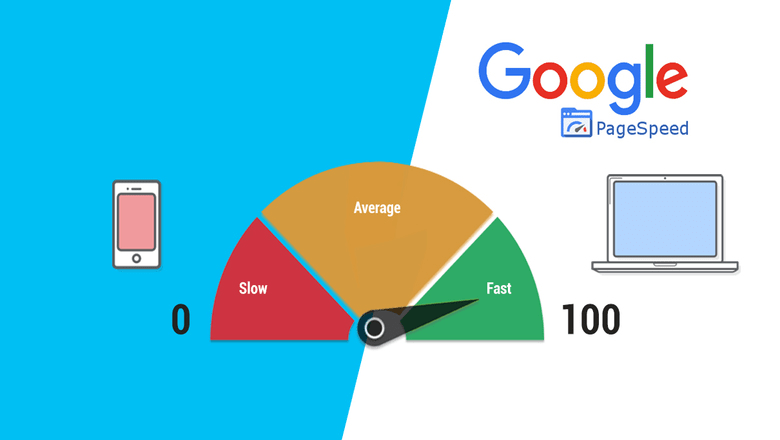
The PageSpeed Insights API analyzes the content of a web page and provides suggestions to improve performance. It produces a performance score that ranges from zero to 100, measures core web vitals like LCP, FID, and CLS, and provides diagnostic information about your site’s compliance with best practices. You also get recommendations on how to improve speed and estimates of the impact of those changes.
Getting Started with the API
To use the API, you first need a Google API key. You can get this key by visiting the Google PageSpeed Insights documentation page. Once you have the key, you will include it in your Python script to authenticate your requests.
Next, you will need a list of URLs you want to analyze. This can be a handful of pages or thousands of URLs. If your list is large, you can use a spreadsheet to organize your URLs in a format that the script can read. Each URL should be wrapped in quotation marks and separated by commas.
Running the Script
The Python script fetches data from the API for each URL in your list. It extracts performance metrics from the API response and saves them in a CSV file. You can then open this file in Google Sheets or Excel to analyze the data.
Each row of the CSV file includes the URL, the metric name, and the numeric value of that metric. Metrics can include DOM size, modern image formats, unused JavaScript, off-screen images, boot-up time, network RTT, duplicated JavaScript, and many others. This allows you to compare different pages on your site and identify areas for improvement.
Analyzing Your Data
Once your data is in a spreadsheet, you can start to see patterns. Some pages may have slow loading times because of large images, unoptimized CSS, or too much JavaScript. Others may perform well in some metrics but need improvement in others. Using this information, you can prioritize fixes that will have the biggest impact on both speed and SEO performance.
Conclusion
The PageSpeed Insights API is a powerful tool for SEO professionals. It allows you to inspect many URLs at once, get a detailed look at performance metrics, and uncover actionable insights. By using this tool, you can improve your website speed, enhance user experience, and increase your chances of ranking higher in search results.
Even if you are not a developer, this API can be a game-changer. With a little setup, you can automate performance checks and make data-driven decisions for your website SEO strategy.
SEO Content Writing: How to optimize for Entity Salience
Entity salience offers a peek into the way Google’s AI appraises content in order to create an objective score for web pages.
Whenever we type in a search, as humans we can easily decide which piece of content is best suited to our needs. On the other hand, Google has to process 2.4 million searches per minute, while matching them to content across a web whose size is tending towards infinity i.e. The web contains trillions of pages, while Google’s index contains only about 50 billion of these pages. So at the speed of thought, Google has to decide which site offers the best content for multiple queries (15% of these searches are unique)
How on earth does Google manage to do this? How can Google manage to consistently serve good results faster than most websites or mobile apps can load content?
We would never really know, however Google gave us a glimpse through the entity salience scores offered in their NLP demo. In this article I will attempt to guide SEO content writers on entity salience as a concept and how to optimize articles against this metric.
What is an entity?
An entity is the noun or set of nouns contained in a text. Anything that has a name in your blog or article is therefore an entity. They are nouns and noun phrases that the AI can identify as a distinct object. Google’s entity categories include people, locations, organizations, numbers, consumer goods and more
What is Entity Salience
The noun “salience” derives from the Latin word saliens – ‘leaping, or bounding’. In modern usage it means “Prominent”, “stand out”.
Entity salience therefore refers to the degree of prominence that’s ascribed to a named object within a piece of text.
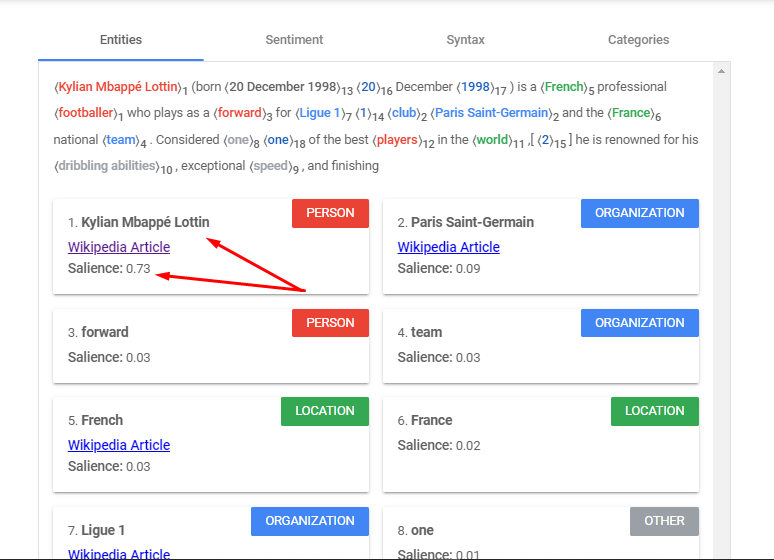
The salience score for an entity provides information about the importance or centrality of that entity to the entire document. Below is an example
Scores closer to 0 are less salient, while scores closer to 1.0 are highly salient.
How Content Writers Can Optimize for Entity Salience
Since salience scores are more important than simplistic keyword stuffing, every writer needs to know how these scores are calculated in order to produce content that can rank
How The Salience Score Is Calculated
Based on Google research papers, there are certain textual attributes that determine the scores assigned to each named object within a sentence. The factors are;
- The entity’s position in the text
- The entity’s grammatical role
- The entity’s linguistic links to other parts of the sentence
- The clarity of the entity
- Named, nominal and pronominal reference counts of the entity
1. The entity’s position in the text
One of the most basic elements of salience is text position. In general, beginnings are the most prominent positions in a text. Therefore, entities placed closer to the beginning of the text and, to a lesser extent, each paragraph and sentence, are seen as more salient. The end of a sentence is also slightly more prominent than the middle.
Advice To Writers: Position the target keyword towards the start of the text, paragraphs and sentences.
2. The entity’s grammatical role
The grammatical role of the entity is usually contingent on its subject or object relationship with the rest of the text.
The subject (the entity that is doing something) of a sentence is more prominent than the object (the entity to which something is being done).
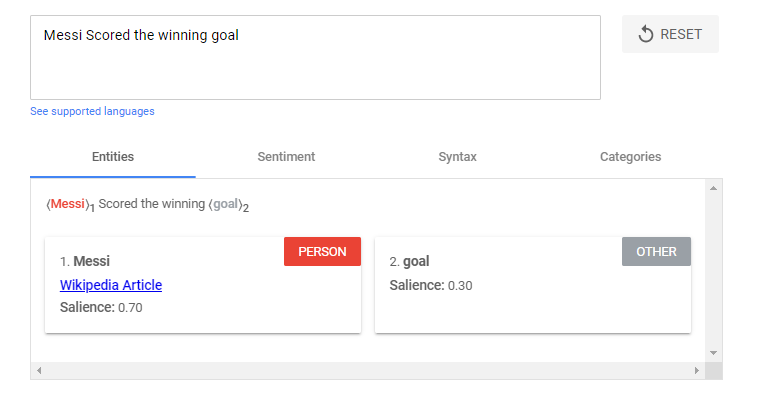
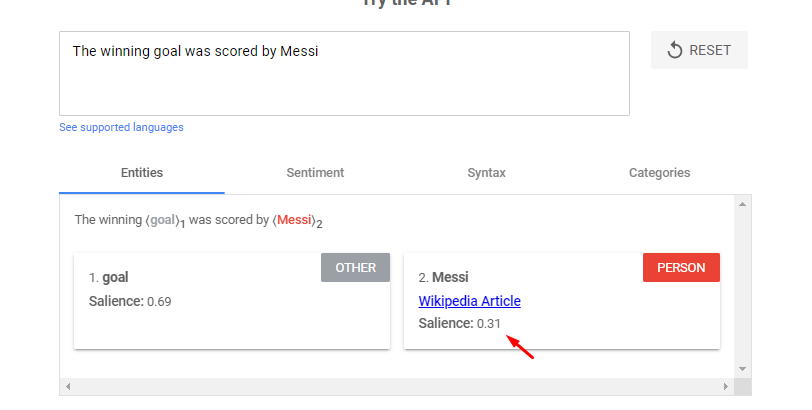
- Messi Scored the winning goal
- The winning goal was scored by Messi
In the first sentence, “Messi” has a score of 0.7, whereas “goal” has a score of 0.3. In the second sentence, “goal” is more salient, with 0.69, whereas “Messi” has a score of 0.31.
Advice to writers: Reword your write ups to ensure that the target keyword is the subject of the sentence wherever possible.
3. The entity’s linguistic links to other parts of the sentence
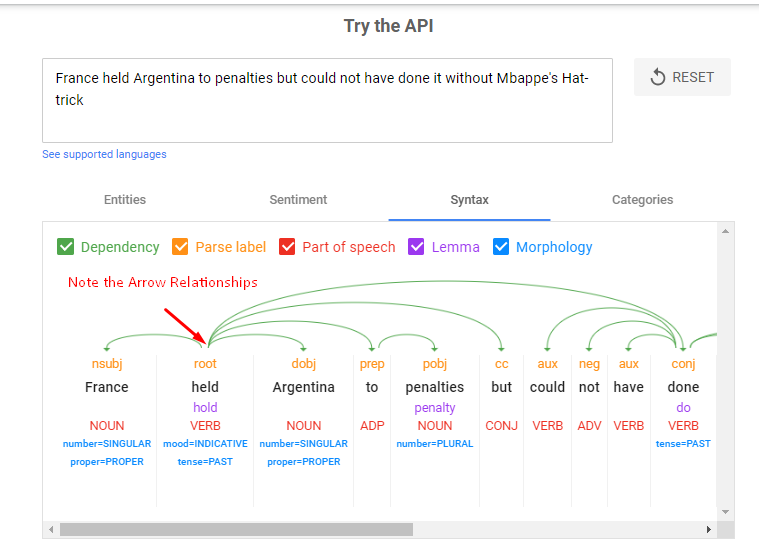
If you use the Syntax tab in Google’s API demo, you’ll actually see a sentence-by-sentence breakdown of which words link to each other, along with a grammatical label.
I plugged this sample sentence in – “France held Argentina to penalties but could not have done it without Mbappe’s hattrick”
We can see how the entity “France” links to so many parts of the sentence through the verb “Held”.
An Entity does not need to be repeated artificially in every clause for it to be seen as prominent. It is more important that the other clauses and entities in the sentence depend on the target keyword for their meaning. This is how the linguistic dependency factors into the entity salience score
Advice for writers: When using target keywords in longer sentences, structure the sentence so that its clauses and other entities depend on your target keyword for sense.
4. The Entity’s Clarity
Google’s NLP tool is good at recognising entities but it’s not perfect. For example, it’s not great at recognising two entities as the same when their capitalisation, pluralisation or acronym changes.
Writers should also be wary of how switching between acronyms and full phrases (“SEO” vs “search engine optimization”) can impact salience scores
Advice To Writers: Refer to your target keyword consistently throughout the text if it is a multi-word phrase.
5. The Named, Nominal And Pronominal Reference Counts Of The Entity
The frequency with which an entity is mentioned in your text is a straightforward but crucial aspect of salience scoring. However, resist the urge to veer into archaic, spammy writing techniques. Increased mentions of your focus entities shouldn’t ever be used as a cover for keyword stuffing.


Note: Google has the ability to recognise different references to the same thing e.g.

- Mo Salah – named
- Striker – nominal
- He – pronominal
Advice To Writers: Increase mentions of your focus entities by using a mixture of named, nominal and pronominal references, don’t just repeat the named phrase every time it comes up.
Limitations of Google’s NLP Demo Tool
The natural language processing API demo is best used for product pages, short service, category pages, meta descriptions and ad copy. However, for long form content, its usefulness diminishes the longer the text you input. There is no way for it to process all the signals given across multiple sections of text.
Hence for longer pages, you may want to analyze single sections bit by bit rather than at once.
Conclusion
Google’s natural language API demo gives content writers a tool to help them craft their writing in a more structured way. If you are a writer and are looking to improve your SEO skillset, then you should integrate entity salience analytics into your practice.
How To Use Google BERT Scores In SEO Content Writing
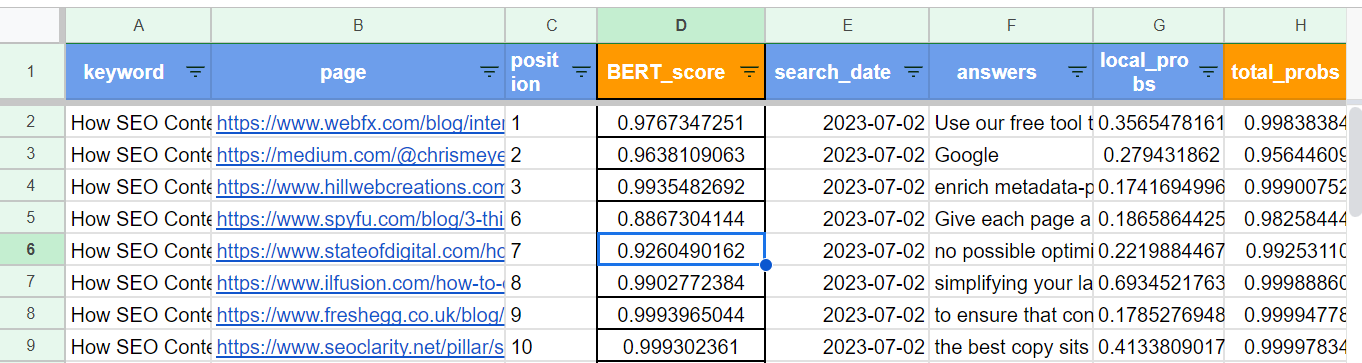
- The Query = How SEO Content Writers Can optimize BERT Scores?
- Top Ranked Page = https://www.webfx.com/blog/internet/google-bert/
- BERT Score of the top page = 0.9767347251 (98%)
As you can see, all the top ranking pages in this sheet have a BERT score that’s above the 80th percentile for the query
Note: the BERT score of a page shows the mathematically derived match between the context and intent of the page in relation to the search query
I believe that BERT score optimization, combined with Higher Entity Salience Scores, can help SEO content writers to achieve first page ranking for their articles
Python Script For Calculating Google BERT Scores
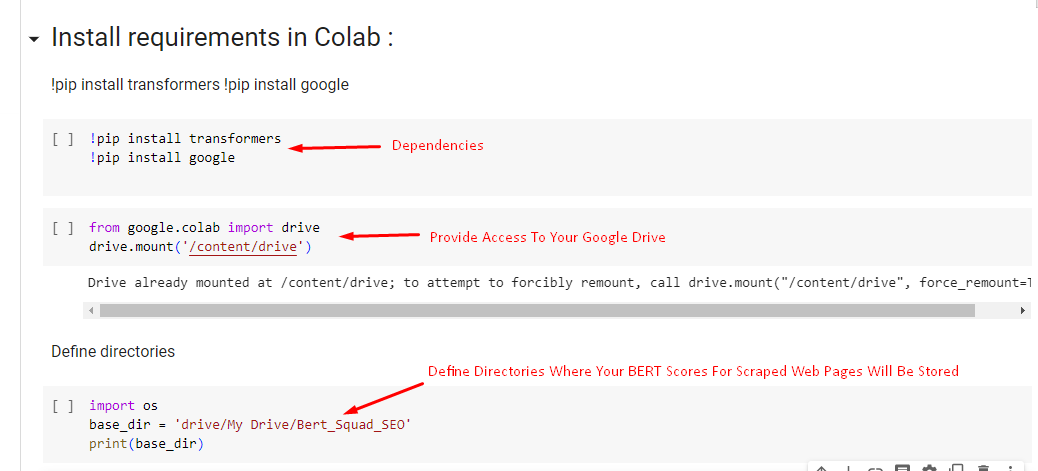
Here is a python script you can use to scrape the web and compare how competitor sites score against yours for various queries.
Here are the steps for running the script
(1) Install the Dependencies in Google Colab
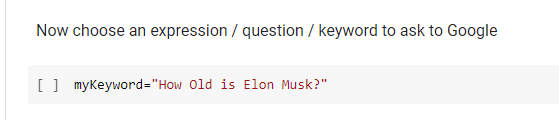
(2) Choose Your Query or Keyword against which the top Websites will be scored
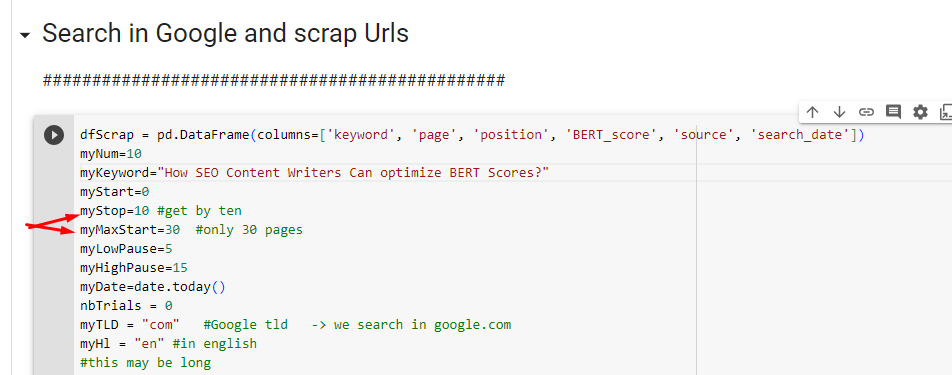
(3) Scrape Google to extract web pages, their ranking position, and the search date
The above is a clear guide on how to calculate BERT scores by yourself. But what are BERT scores, what’s their significance and if you know how an article measures against this metric, how can you improve the scores
Introduction
As search engines become more sophisticated in understanding natural language, traditional metrics for evaluating content are evolving. One such metric that has gained prominence is the BERT Score.
BERT (Bidirectional Encoder Representations from Transformers) Score measures the relevance and quality of content based on contextual understanding.
In this blog post, we will provide a step-by-step guide on how to calculate BERT Scores and leverage this metric to improve your content’s performance.
Understanding BERT Score
BERT Score evaluates how well your content matches the context and intent of search queries. Unlike traditional metrics that focus on keyword density or backlinks, BERT Score emphasizes natural language processing and semantic relevance. It takes into account the fine-grained nuances of user queries, enabling search engines to provide more accurate and relevant search results.
Here’s how BERT takes a look at the context of the sentence or search query as a whole:
- BERT takes a query
- Breaks it down word-by-word
- Looks at all the possible relationships between the words
- Builds a bidirectional map outlining the relationship between words in both directions
- Analyzes the contextual meanings behind the words when they are paired with each other.
How Google Utilizes BERT scores
(a) Enhancing Search Relevance: One of the primary ways Google utilizes BERT Scores is by improving search relevance. BERT allows Google to better comprehend the nuances and context of search queries, enabling it to deliver more accurate search results. By considering the BERT Score, Google can identify content that aligns closely with the user’s intent, resulting in a more satisfying search experience.
(b) Understanding User Intent: BERT Scores help Google understand user intent more effectively. With the ability to interpret complex search queries, Google can decipher the true meaning behind the words used by users. This allows the search engine to provide more precise answers and relevant content, even when the user’s query is not phrased explicitly.
(c) Contextual Understanding: BERT Scores take into account the context in which words are used. Google’s algorithm analyzes the surrounding words and phrases to grasp the meaning and context of the query. This contextual understanding enables Google to present search results that match the user’s intent, even when keywords alone may not capture the full meaning.
(d) Semantic Relevance: Semantic relevance is another crucial aspect that BERT Scores consider. Instead of relying solely on individual keywords, BERT focuses on the overall meaning and semantics of the content. By understanding the relationships between words, BERT helps Google identify content that provides the most accurate and valuable information to users.
(e) Natural Language Processing: BERT Scores leverage the power of natural language processing (NLP) to enhance search results. With NLP, Google can interpret and process human language more effectively, taking into account factors such as sentence structure, grammar, and context. This enables Google to deliver search results that better match the natural language used by users.
Impact of BERT Scores on Search Rankings
BERT Scores play a significant role in determining search rankings. Websites that optimize their content to align with BERT’s contextual understanding and semantic relevance have a higher chance of ranking well in search results. By creating content that aligns with the user’s intent and addresses their queries comprehensively, website owners can improve their BERT Scores and increase their visibility on search engine results pages.
How To Optimize BERT Scores
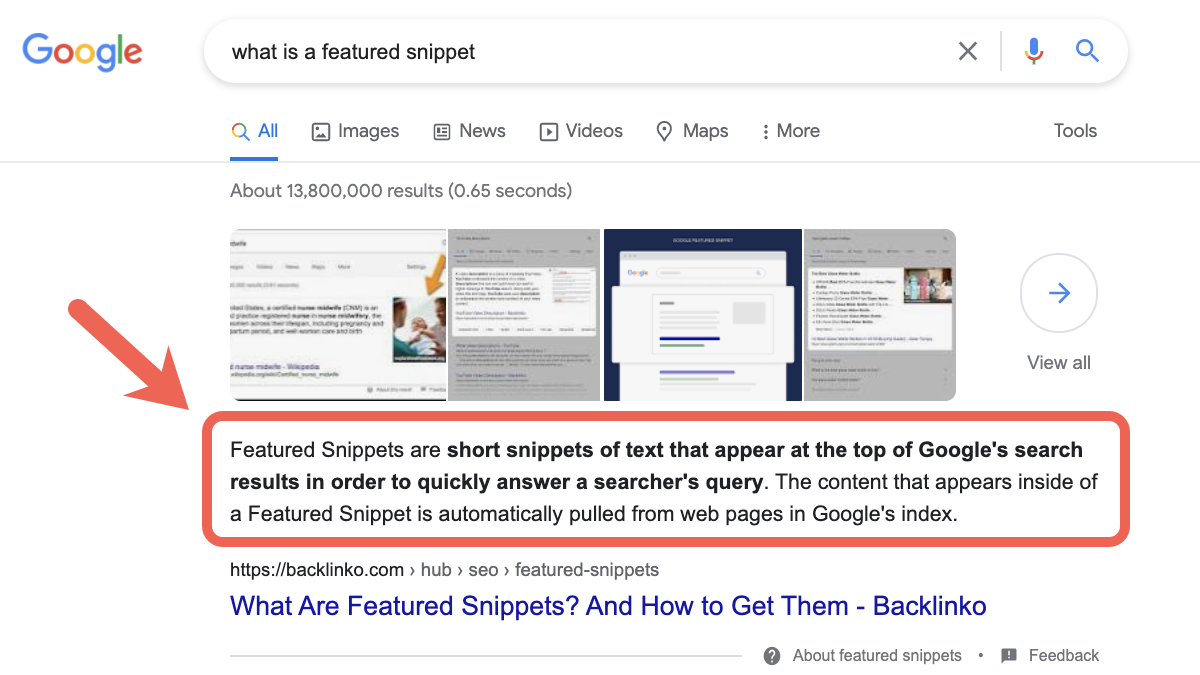
(1) Optimize for Featured Snippets: Featured snippets are highly visible and can significantly boost organic traffic. Content writers should aim to provide concise and direct answers to commonly asked questions related to their target keywords. Structuring content in a way that makes it easy for search engines to extract relevant information increases the chances of obtaining a featured snippet.
Featured Snippet Rules For Content Teams
- Rule 1: Use a “What is [Keyword]”Heading
- Rule 2: The First sentence under the heading should use an Ïs” statement
- Rule 3: Always start the first sentence with the core keyword
- Rule 4; The 1st sentence should provide a definition and the second should explain the most important information about the keyword
- Rule 5: Never Use Brand names in portions of text that will be pulled into a featured snippet e.g. Listicles, Tables etc
- Rule 6: Eliminate all first person language in the featured snippet text
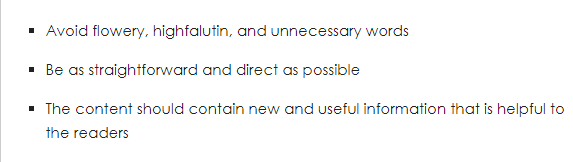
- Rule 7: Be as concise as possible
- Rule 8: Refine. If we don’t capture it, then observe the existing snippet and product a content structure that is of superior concise and explicative quality
(2) Enhance Your Content Structure: Organizing your content with clear headings and subheadings helps search engines understand the structure and hierarchy of information. Proper use of H1, H2, and H3 tags signals the importance of specific sections. Aim for a logical flow and readability, incorporating keywords naturally throughout the content.
(3) Focus On Contextual Relevance: Understanding the user’s intent behind search queries is crucial for creating relevant content. Tailor your content to match user expectations, addressing specific pain points and providing valuable solutions. Analyzing search engine result pages (SERPs) can provide insights into the context surrounding the topic.
(4) Optimal Content Length: Long-form content tends to perform better in terms of BERT Score. Aim for comprehensive and in-depth content that covers the topic thoroughly. Strive to strike a balance between quality and quantity, ensuring that each word adds value. Don’t hesitate to update and refresh existing content to maintain relevance.
(5) Prioritize Language and Style: Simplicity and clarity should be the guiding principles of your content. Use plain language and avoid excessive jargon that might confuse readers and search engines alike. Craft clear and concise sentences in active voice, incorporating LSI (Latent Semantic Indexing) keywords to demonstrate a deeper understanding of the topic.
(6) Readability and User Experience: Enhancing the readability and user experience of your content is vital for optimizing BERT Score. Break up the text with bullet points, lists, and subheadings for easy scanning. Keep paragraphs concise and consider incorporating multimedia elements like images and videos where relevant. Ensure your content is mobile-friendly and responsive.
(7) User Engagement Signals: User engagement signals, such as dwell time and click-through rates (CTR), are closely related to BERT Score. Encourage user interaction by enabling comments and social sharing. Craft engaging headlines and meta descriptions that entice users to click through. Engage your audience with high-quality content that encourages them to spend more time on your page.
(9) Monitoring and Optimization: Regularly monitor your content’s BERT Score using SEO tools to track its performance. Continuously review and update your content to keep it fresh and relevant. Pay attention to user feedback and adjust your content accordingly. Stay informed about search engine algorithm changes that may impact your content’s visibility.
Conclusion
Calculating BERT Scores allows you to measure the relevance and quality of your content in alignment with user queries and intent. By leveraging the power of BERT models and following the steps outlined in this guide, you can gain valuable insights into how well your content matches user expectations. Remember to keep refining and optimizing your content based on the BERT Scores to enhance its visibility and drive organic traffic to your website.
In the ever-evolving landscape of SEO and content optimization, understanding and utilizing metrics like BERT Score is crucial to staying ahead of the competition and delivering valuable content to your audience.
How to Avoid Being a Victim of Domain Squatting & Homograph Attacks
If you had a site that was doing well but suddenly, things just went downhill, it could be worth exploring to see if you have been a victim of a negative SEO attack. Negative SEO attacks are in many forms and each type has a different degree of impact on a website. Of all the negative SEO attacks I’ve experienced, one of the most devastating is a Domain squatting attack. These types of attacks exist in various forms which are:
- Typo squatting attacks and
- Homograph attacks
What is domain squatting
This is a family of negative SEO techniques which are deployed in order to harvest web credentials, steal direct traffic, harm an organization’s reputation, achieve affiliate marketing monetization, install adware, transmit malware or to achieve other malicious objectives.
How these attacks are initiated
These groups of attacks are initiated by registering a variation of a legitimate domain and building a mirror website of that domain. This enables the attacker to deceive people into mistaking the fake domain as the legitimate URL of the website they were trying to visit (which could be a bank, a fintech solutions provider, or an online store)
When this happens, visitors will interact with the fake domain by clicking through or trying to login. This is what enables the attackers to achieve whatever objective they had in mind. The techniques vary which will be discussed individually under their respective classes which are:
a. Typo squatting attacks: An attacker registers a domain similar to the target domain in spelling. They do this based on the likely keyboard typos that can occur whenever the target domain is being typed into a search bar. They also pick variations of the target domain based on TLD’s (replacing abc.com with abc.ng) with the goal of stealing traffic that people accidentally direct to the target domain. For example, the attacker could replace ab.cd.com with abcd.com or biz.com with biiz.com.
b. IDN homograph attacks: The International Domain Name protocol allows for the display of Tamil, Arabic, Chinese, Amharic, etc. characters in domain names. Some characters, like the Greek “p” (meaning Rho in their language) appear identical to the English “p”, and can resolve to entirely different servers.
This is what attackers exploit when initiating a homograph attack. For example, websites like “picnic.com” could be registered such that the p in picnic is actually not an English but a Greek or German letter. This will allow two domains called “picnic.com” to be registered for two different but identical sites (one fake and one legitimate) on two different servers.
How to protect your website
Any domain can be squatted and this is what makes these types of attacks very common and effective. To protect your website, you might consider the proactive registering of similar variations of your domain name. This is usually an expensive option but if you can snatch of the most similar versions of your site, you can reduce the likelihood of a successful domain squatting attack ever being initiated against you. You can also consider other mitigative measures such as:
- Trademarking your assets
- Informing your staff, site visitors and other relevant stakeholders
- By monitoring domain registrations using tools like swimlane or CipherBox
- Use the Anti-cybersquatting Consumer Protection Act or ICANN’s Uniform Domain-Name Dispute-Resolution Policy (UDRP) to take hold of the domains or have them taken down.
How to detect and resolve Google analytics errors on your website
Google analytics is an amazing tool that helps to collect data about users and their activity on your website. You can learn amazing things about your online audience such as their demographics (gender and age distribution), how much time they spend on your site, the type of pages they are most interested in, the number of pages they read before leaving and so on.
All of Google’s really cool data is only useful if it is reliable, and there are many reasons why the data that Google collects may be wrong. This is why it is necessary to ensure that your Google analytics codes are properly installed, and properly audited. Even without an audit, you can tell if your tracking code is faulty when you have:
- An unusually high or low bounce rate
- An unreasonably high or low number of page views, especially when ad revenue does not match the rise and fall in views
- When you have static data like time on page that doesn’t improve or diminish over several months.
All these are indicative of a faulty Google analytics implementation and these faults are due to certain errors which are fairly common.
To detect these sort of errors, tools like Google Analytics debugger and tag assistant come in handy.
The analytics debugger helps to analyze JavaScript events coming from your Google analytics tag right within your chrome console. The tag assistant extension usually looks like this.

Google tag assistant is a lot easier to work it as it gives a snapshot overview of all detected tags on a page and color codes them based on four characteristics which are:
- When the tag is green, then this means that there are no implementation issues associated with it.
- When the tag is blue, it means that there are minor implementation problems along with suggestions to correct those issues.
- When the tag is yellow, this means that there are risks to your data quality and the tag setup is likely to give unexpected results.
- When the tag is red, this means that there are outright implementation errors with the set up which could lead to missing data in your reports.
When using tag assistant, here are some common errors you could find
1. Invalid or missing web property ID
This usually happens when the property ID in your analytics code is either missing or wrong. The property ID is like a phone number that tells Google analytics the exact account it should send all the data it has collected to. So if the property ID is missing, data will be collected but won’t be sent to your analytics account.
Solution: Ensure that the web property ID on your page matches the ID in your Google analytics account. To be safe, just ensure that script on your page matches the script that is generated in your account.
2. Same web ID property is tracked twice
Source of the problem: This error usually results from multiple installations of your Google analytics property ID. This happens when Google analytics is reporting to the same web ID from the global site tag, googlr tag manager and Google analytics. It can also happen when Google analytics code from the same web property is installed through an external file and through a direct installation in the HTML of your website.
Solution: The solution is to ensure that the tracking code of each web property ID is only installed once. So you can look through your site’s source code. Use ctrl + F to find all instances of the web property. Identify the tags through which it’s injection into the page is being duplicated, then proceed to eliminate all but one of them.
3. Missing http response
This error indicates that while Google analytics has been detected on the page, it isn’t sending any responses to Google’s servers. Without a http response, data isn’t being transported to the server and hence, cannot appear in your analytics account.
Solution: Reinstall Google analytics in the head section of your website since this error usually results from faulty installations of the tracking code.
4. Method X has X additional parameters
Each method in Google Analytics has a set number of allowed parameters. You can find out the number and type of allowed parameters for any method by reading the documentation.
This error denotes that you have exceeded the number of allowed parameters for the given method.
Exceeding the number of allowed parameters will either cause Google Analytics to drop any parameter over the limit OR cause Google Analytics to fail to record data associated with the given method.
Solution: Review the documentation and parameter allocation for the respective Google Analytics methods and ensure that your implementation follows the documentation appropriately.
You can check Google’s documentation here
5. Leading or trailing whitespace in ID
This error indicates that your Google Analytics ID is not properly set within the setAccount function in the Google Analytics JavaScript. The error explicitly states the existence of a whitespace or empty space either before or after the account ID that is preventing the correct ID from being identified or collected. Your account ID is important because it indicates the account that the collected data is to be sent to.
Solution: Ensure that there is no space before, after or within your Google a analytics ID. Also check to ensure that the ID in your source code matches with the ID in your analytics account.
6. Move the tag inside the head
This error indicates that the analytics ID is not in the ideal location within your sites HTML. The ideal location for the analytics scripts is the head section because it is it the the head section that the tracking beacon is guaranteed to have fired before the visitor has left your site. If the tracking code is in the body or footer, it may not have fired, recorded a visit or any other event before the user would have left the page. It could also miss certain page events leading to missing and incorrect data in your reports.
Solution: Move your tracking code to the head section of your sites’ HTML and place it just a above the closing head tag
<head>
Place the code just above the closing head tag
</head>
Detected both dc.js and ga.js/urchin.js
Remove Depreciated method ‘XXXXX’
6. Missing JavaScript & Missing JavaScript closing tag
Without a closing tag, the JavaScript functions required to collect data from your page and transport it to Google’s servers would fail to execute.
When this happens, no data will be collected or reported in your account.
Solution: Ensure that your Google Analytics script contains the full request to google-analytics.com. Ensure that all functions are declared in full just as stated in the tracking code you were given. To be safe, just ensure that script on your page matches the script that is generated in your account.
7. Tag is included in an external script file
This message indicates that Google analytics isn’t present on the page source code but is firing from an external file. While data may still be reported, this sort of set up is fragile and could be responsible for data discrepancies. It might also make your site vulnerable to competitor spying or negative SEO attacks.
Solution: Check through the external file that your code is firing from and ensure that it is working properly. If you had prior problems before you discovered that an external file was hosting your tracking code, it may be best to install Google analytics in the source code of your website and remove it from the external file.
Conclusion
Data collection is extremely important in the optimization or day to day managing of a website. The data you collect can be analyzed to find what works, what doesn’t work, why it doesn’t work, when it doesn’t work and for whom it doesn’t work. This info can change the trajectory of your website for good only if the information your have is reliable. This is why Google analytics auditing is necessary and is something you should embark upon from time to time. If you have any further questions you would like to ask me, feel free to get in touch.
The SEO Implications of these HTTP status Codes
HTTP is an acronym which means hyper text transfer protocol. It is the defined framework for the communication between clients and servers. In the context of the internet, clients are request generators, while servers are request handlers. For example, if you go to a library and request a book, you are the client.. while the librarian who offers you the book is the server.
This same analogy applies to the internet. If you want a document, a video, a picture or any other resource, you would make a request via the browser on your phone, tablet or laptop. These devices are the clients. When the request reaches the server, it then communicates the status of the request back to the clients.
These server-client status responses are of SEO relevance because they impact search engines and human visitors to a site. Search engines use these status codes as indicators of the page quality of a website. These http status codes exist in 5 major groupings which are;
- 1xx status codes – informational responses with no SEO implications
- 2xx status codes – success codes with SEO implications
- 3xx status codes – Redirection responses
- 4xx status codes– Refer to client errors. These are server to client responses that do not meet the clients expectations
- 5xx status codes – These are server errors.
There are lots of status codes, but some occur so frequently that they necessitate a thorough understanding of their SEO effects on a website. Let’s start with eight specific types
200 status codes
These are the best possible codes that you can get. Whenever you don’t get a 200 response, this indicates that there was an issue either on the server or client end. When you get a 200 status code, all is well with the URL.
301 status codes
These refer to redirects that are of a permanent nature. This means that one URL is actually pointing to another URL usually of different anchor text. This response is of consequence for SEO because of the effect it can have on crawl budget and the transfer of PageRank. It can also have an effect on the user experience on a website due to the occurrence of an information mismatch between the requested URL and the page it is permanently redirecting to.
302 and 307 status codes
These usually indicate that a temporary redirect has taken place. These are of real SEO consequence because neither of these two redirect methods can pass PageRank to a new URL. This should only be used if the content missing under the old URL will be replaced at a later date.
400, 403 and 404 status codes
The 400 error indicates invalid syntax in the request sent from the client. This could happen if the client is sending a file that is too large, or if it’s request is malformed in some way (expired cookie, sending request via invalid URLs etc.).
The 403 error is a forbidden response from the server to the client. This indicates that the server is not going to allow the request to be fulfilled due to the unauthorized status of the client.
The 404 error on the other hand indicates that the requested resource is missing completely on that url or location.
Understanding the SEO impact
These are all client side errors and their main impact is in the UX experience signals that they send to both humans and search engines. With humans, frequent errors of this nature will lead to bounce rate spikes, low time on page metrics, and drop offs along the conversion funnels of a site. For search engines, this can lead to the deindexing of URLs that were relevant for high value keywords.
What About Server Errors?
All 5XX errors are server related and point to issues with the web host. The implications are by far the most severe because it indicates that the requested resource cannot be offered by the server. Whenever Google encounters errors of this nature, ranking losses and deindexations of URLs are usually not far off.
In Summary
This was a brief overview of common SEO errors and the implications for organic traffic generation. Search engines are the conduit between web surfers and your website. This means that direct access to your audience and customers can be augmented or sabotaged based on the type of status codes that Google’s algorithms are getting. These algorithms are autonomous learning systems which is why negative signals must be avoided at all costs. To succeed at SEO, you must do your best to ensure that 200 status codes dominate on the most important sections of your website.
7 Ways To Increase your Crawl Budget For Better SEO Rankings
The web is a transfinite space. It is incredibly large and just like the universe, it is continually expanding. Search engine crawlers are constantly discovering and indexing content, but they can’t find every single content update or new post in every single crawling attempt. This places a limit on the amount of attention and crawling that can occur on a single website. This limit is what is referred to as a crawl budget.
The crawl budget is the amount of resources that search engines like Google, Bing or Yandex have allocated to extracting information from a server at a given time period, but it is determined by three other components which are;
- Crawl rate: The amount of bytes that the search engine crawlers is downloading per unit time
- Crawl demand: The crawl necessity due to how frequently new information or updates appears on a website
- Server resilience: The amount of crawler traffic that a server can respond to without a significant dip in its performance
Why did I list those three components above? I listed them because the crawl budget is not fixed. It can rise and fall for a website, and it’s rise and fall affect the ranking and visibility of all content that the website holds.
So what are ranking the implications? you may wonder. The SEO implications of crawl budget changes are profound for many reasons, some of which are;
Large crawl budgets increase the ease with which your content can be found, indexed and ranked
The only content that can be indexed is content that can be found, hence the more quickly your content can be found, the more competitive you become in expanding your keyword relevance relative to your competitors. It is only content that is found that can be ranked so when the news breaks, the site with a larger crawl budget is likely to be ranked higher than others because its content gets out there first.
Crawl budget increases lead to resilience against the impact of content theft
The more crawl budget a site possesses, the greater the likelihood of its being able to get away with content theft, content spinning, and the more immune it becomes to the harmful effects of content scraping. This is because a site with a large crawl budget can steal content, but may get this content discovered and indexed before the original website.
Lastly, search engines compare websites based on their crawl budget rank
This is why related information is explicitly available in search console and Yandex SQI reports. The crawl budget rank or CBR of a website is given as:

- IS – the number of indexed websites in the sitemap
- NIS – the number of websites sent in the sitemap
- IPOS – the number of indexed pages outside sitemap
- SNI – the number of pages scanned but not yet indexed
The closer the CBR is to zero, the more work needs to be done on the site, the farther it is from zero, the more crawling, visibility and traffic the site gets.
How to increase your crawl budget
You can increase your crawl budget by increasing the distance that a web crawler can comfortably travel as it wriggles through your website. There are six major ways by which it can be accomplished and these are;
- This can be achieved by eliminating duplicate pages
- Eliminating 404 and other status code errors
- Reducing the number of redirects and redirect chains
- Improving the amount of internal linking between your pages and shrinking your site depth (number of clicks needed to reach any page in your site)
- Improving your site speed
- Improving your server uptime
- Using robot.txt files to block crawler access to unimportant pages on your site
Conclusion
Crawl budget optimization is one of the surest paths to upgrading your rankings and website visibility, this is why special attention should be paid to your overall site health. Your site health is the most reliable indicator of the scale and location of your crawl budget leakages
5 SEO Losses you Might be Incurring from Content Thieves
Content is the lifeblood of internet traffic. Be it commercial, informational or navigational surfing, every searcher is only online to find and consume content.
What makes content visible is the extent to which it satisfies the underlying search intent behind sets of recurring queries, and this is why great content is the key to all SEO success.
The SEO problems arising from content theft stem from the way search engines manage the relative visibility of websites in their index. The engines place a priority on the match between documents and queries, but this can become of benefit to content thieves since they can eat into your visibility by duplicating information that should be unique to your website.
The losses from such duplication are of enormous ramifications, but for the sake of simplicity, I have classified them into five major groupings which are;
1. Lost Backlink Opportunities
Backlinks are critical to SEO success because of Google’s PageRank algorithm. Using PageRank, google determines the authority of a website based on the number of backlinks it has gained around a particular topic. Since backlinks are only acquired through content, a prolific content theft operation could cause backlinks you deserve to be ascribed to other websites. This can slow down the accumulation of PageRank and the growth of your sites’ domain authority. In this case, your competition would be gaining ranking power on your own efforts.
2. Diminished keyword relevance
Google processes over 40,000 search queries per second and about 3.5 billion per day. All of those queries come with permutations of text that are mapped to different search intents. Your content is your tool for capturing keyword relevance based on the kind of topics you cover, but with content theft, you end up having to split this keyword relevance with a host of different websites, some of which may have a higher Domain rating that yours. When this happens, instead of ranking for 1000 keywords, you may end up only being relevant for 650. This is not a good situation to be in, but this is what content thieves can do to a website.
3. Lost potential for Organic & Referral traffic
This is a consequence of the two points listed above. Organic traffic is traffic that you get from search engines, while referral traffic are the visits you get from backlinks. If you lose keyword relevance to content scrapers, you would also lose search engine visibility and your organic traffic will drop. In the same vein, if you lose backlinks to valuable content that you’ve worked hard to create, you would also lose out on the visits you should have gotten through those links. All in all, the number of web visits would decline steadily until you do something about the plagiarism campaigns being launched against your site.
4. Risk of Algorithmic penalties
In 2011, Google launched an algorithm (Panda update) that enabled it to penalize websites with thin content, autogenerated posts and plagiarized work. While this is a positive development, it also comes with certain risks for websites with content that is widely duplicated on higher authority domains. So if your site is relatively new or just started publishing around a topic, depending on your site health and crawl budget utilization, scenarios could arise where Googlebot is unable to index your content first even though you are the original owner. This can cause your site to be marked as a plagiarizer by the panda algorithm, leading to ranking problems for all other types of content published on your domain.
5. Slower aggregation of positive user engagement signals
In 2007, Google was assigned a patent called “Modifying search rankings based on implicit user feedback”. The user feedback Google uses to modify rankings are click through rate (number of impressions/number of clicks on a search results page), the bounce rate, time on page, scroll depth, pages per session, direct visits, bookmarks etc..
If you are losing keyword positions, organic traffic and referrals, you will lose a slice of visitors who would not bounce, who would scroll far down the page, who would spend time on your site, who would bookmark your pages and become direct visitors. This means that all of the positive engagement signals they could have contributed to your rankings would be perpetually lost to those who are stealing your content. This is why you must take action against content thieves.
How content theft occurs
Now that you know the implications of content duplication across domains, you may be curious about how to stop it. The truth is that you cannot stop theft with a one size fits all approach, rather, your content protection strategy must be tailored to the different tactics that can be used to pillage your intellectual property. The different content duplication tactics are of three main types which are;
- Manually theft
- Automatic theft and
- Indirect theft
Manual content theft is done by right clicking and copying content on a page, downloading videos and saving crisp images. This type of content theft is equally hurtful, but it’s slow pace diminishes the scale of impact because of the time gap between when the content is produced, when it is copied and and when the infringing actors are able to republish it. Manual theft is the most common type but it is also easy to mitigate against. For example, you can disable the right click button on your front end using plugins like Right click disabled for WordPress or WP Content Copy Protection & No Right Click
Automatic content theft
This is usually the most hurtful because it enables your posts to be duplicated as soon as they are published. This is incredibly risky because of the likelihood that the plagiarizer’s site is more crawlable than yours. In this scenario, the search engines will index the plagiarized version before the original on your website. If this continues to occur, Google’s panda algorithm might penalize your site, and you will just wake up to a sudden loss of traffic. Such advanced content duplication is carried out by using scrapers that mine a target website for useful information. To prevent content scrapers from stealing your content, you might consider blocking the bots in your htaccess files or by blocking out their IPs altogether. To detect the scraper bots as user-agents or through their IP addresses, you may need to conduct a log file analysis on your server.
Indirect content theft
This usually occurs through your RSS feeds. This allows a recipient site to access your content and automate it’s republication. In some instances, AI powered content spinners like Chimp Rewriter or X-spinner are used to rewrite the stolen copy in order to make it more unique. To prevent this from continuing to happen, you could switch to a summary RSS feed. This will prevent the full availability of all posts on your site to the plagiarizer.
Why your Site is Not Showing on Google Discover
Google Discover is a content distribution platform that Google uses to keep people engaged with topics they have shown some interest in. Their interests in a topic are determined based on signals from their search history, sites and topics they have bookmarked in the Chrome browser, social media activity on platforms their Gmail addresses are connected to, and explicit interest signals sent on Google Discover cards.
Discover is a massive traffic boost to publishers. Apart from traffic, it also increases the geographic reach of content, allowing sites to bypass the organic competition in several countries. But not every site shows up in Google Discover, and there are a number of reasons for this.
So if your site is not showing in anyone’s discover feed, it could be due to any one of these reasons.
(1) Content quality / Entity salience gaps
By content quality, I am referring to the average degree of entity salience your articles are able to achieve relative to the competition. Entities are described by Google as anything or a concept that is unique, singular, well-defined, and distinguishable. In linguistic terms, Google recognized entities are simply nouns.
So any sports personality, economic institution, political system, or nation could be described as an entity.
Google has developed natural language processing models that are able to identify the centrality of an entity or group of entities to any web document. And this model can make comparisons about the level of entity coverage or salience across pages on different sites that are covering similar topics.
Discover works by identifying entities that specific smartphone users are interested in. It then selects articles from a variety of domains that have published highly salient copies around those entities of interest. So if your topical coverage and relevance to the concepts, events or entities is far lower than the threshold in your niche, your content will struggle to gain impressions on the discover platform.
To improve your content quality as it relates to entities, you need to first know what entity salience is and how it is measured in Google’s natural language processors.
(2) Domain popularity
Domain popularity here refers to the likelihood that an unbiased searcher will find your site by randomly clicking on links. This means that the more integrated your site is within the searchable web, the more popular your domain will be deemed to be and the more impressions you will receive on Google Discover. Domain popularity is a concept that is closely tied to PageRank. It simply means that the more the number of backlinks, the more likely it is for your content to be served to a random individual using an Android phone. So if your site is not yet being shown on Google Discover, it could also be due to limited amounts of relevance acquired from other publishers on the web. So, link-building efforts are required to overcome this challenge.
(3) Performance on search results pages
If a site exists that doesn’t rank for any keyword, it obviously cannot break through on Google Discover. If there’s a site that ranks for millions of keywords but gets zero clicks, it would be able to break through on Google Discover.
This means that there are backend thresholds of performance on search results pages that are required before any piece of content can gain impressions on Google Discover. If your site isn’t getting any impressions, it could be due to your performance being below these backend SERP performance thresholds.
(4) Absence of a knowledge panel
The absence of a knowledge panel is one of the main reasons why a site could be totally blocked off on Google Discover. The absence of a knowledge panel means that the site doesn’t exist in Google’s knowledge and entity graphs. This is a trustworthiness issue that puts the site on the wrong end of Google’s expertise, authoritativeness, and trustworthiness (EAT) philosophy. If an artisan isn’t known, he can never get any word-of-mouth referrals. The same reasons apply to sites without a knowledge panel. To acquire a knowledge panel, it’s best to verify your site on Google My Business or get a Wikipedia listing.